Animated lock screen and always-on display lyrics for HyperOS 3, with support for Chinese music apps. HyperOS 3 的锁屏与息屏(AOD)歌词动画,支持国内音乐软件。






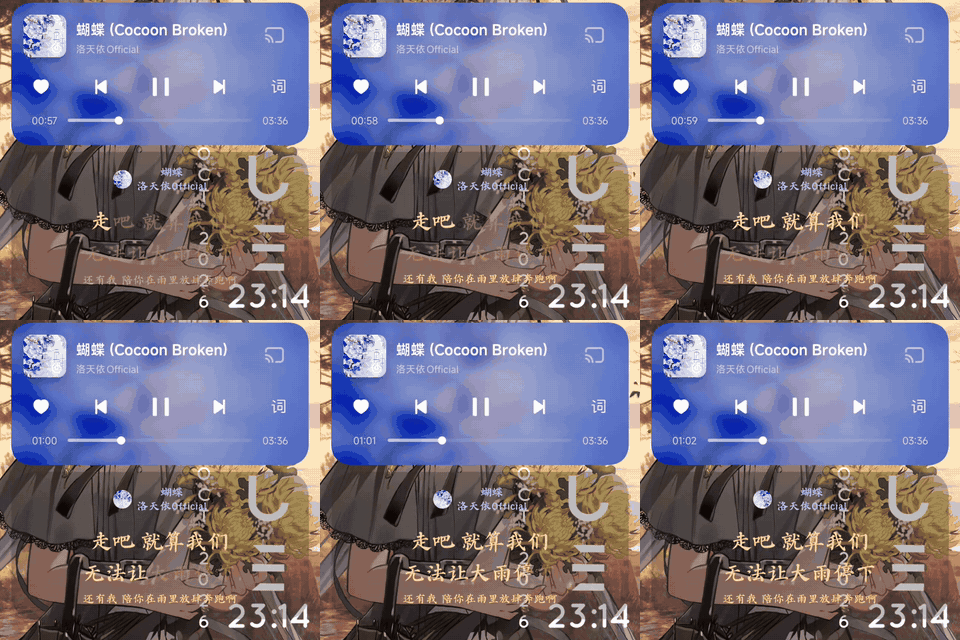
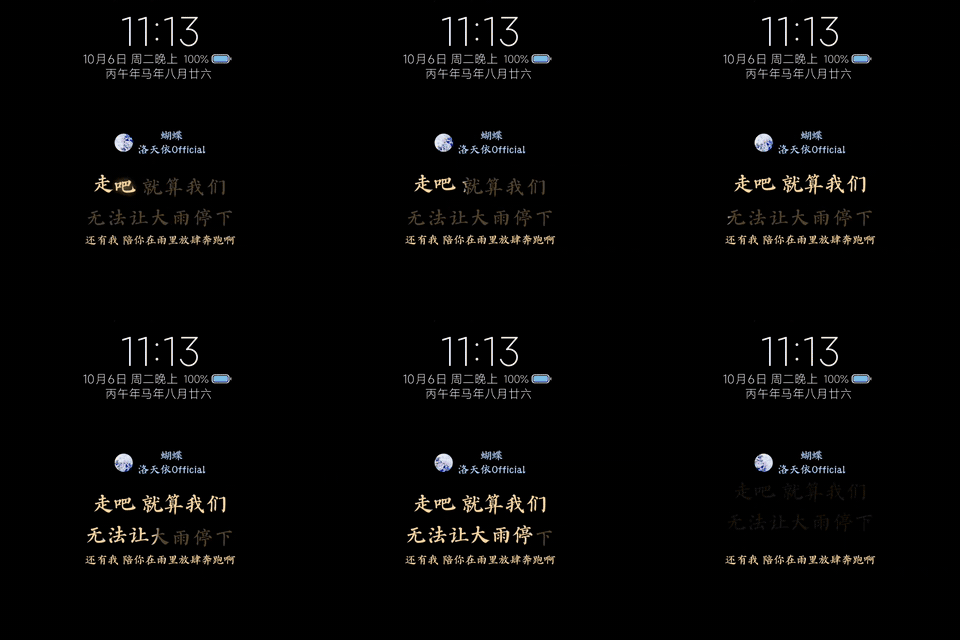
蝴蝶 · 洛天依 Official —— 锁屏 / 息屏 AOD / 横屏 AOD

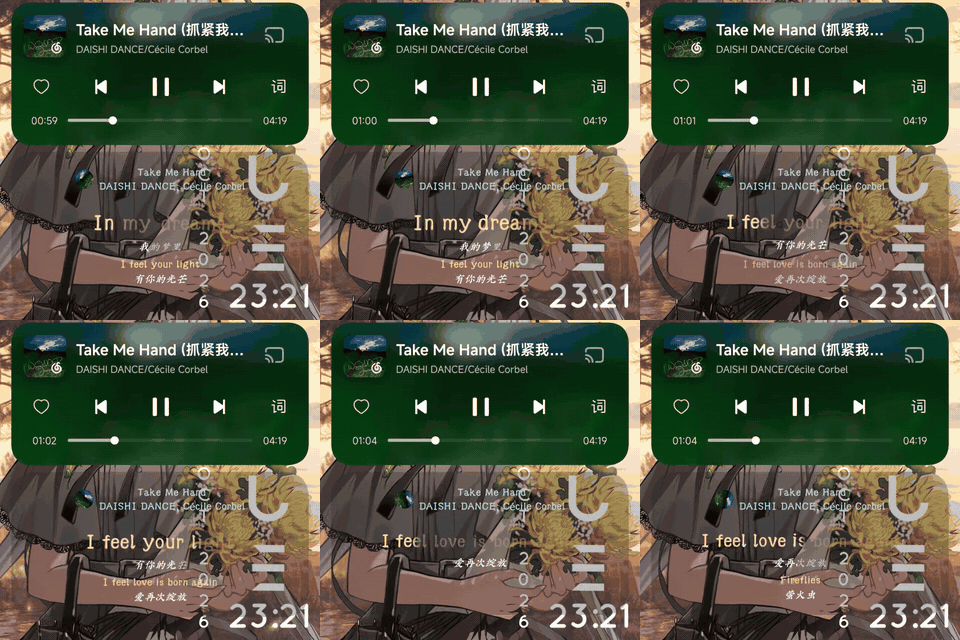
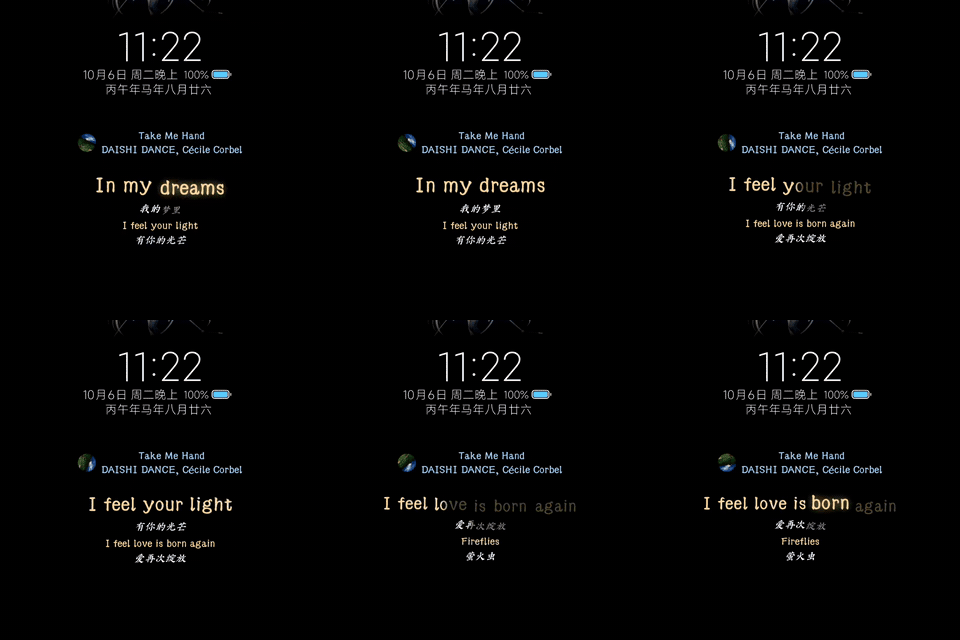
Take Me Hand · DAISHI DANCE —— 锁屏 / 息屏 AOD / 横屏 AOD
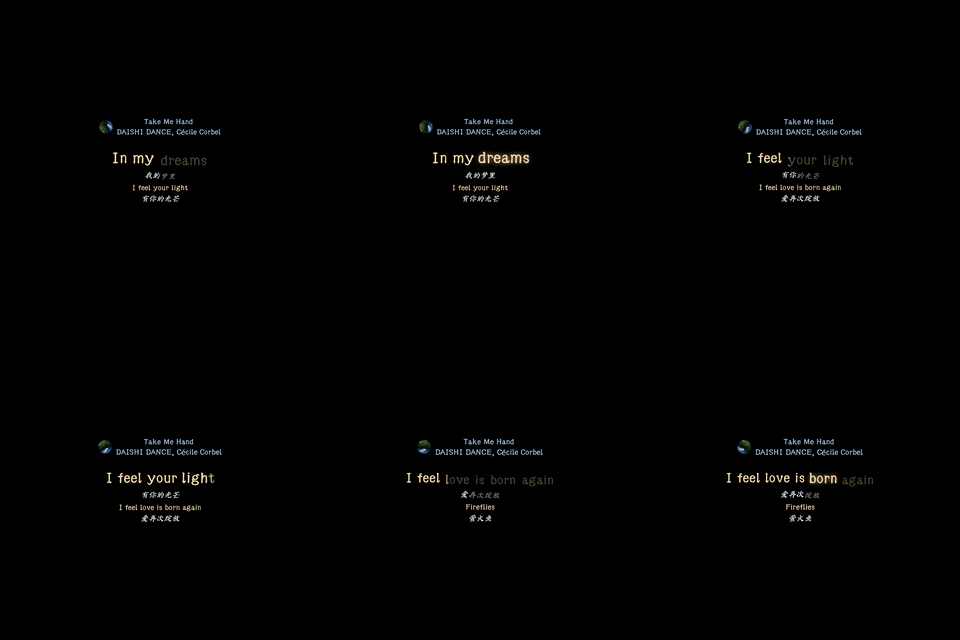
Requires root, LSPosed and a lyrics source (Spicy EX, Lyricon, SuperLyric or LyricInfo). 需要 root、LSPosed 以及一个歌词源(Spicy EX、Lyricon、SuperLyric 或 LyricInfo)。
-
Lyrics on the HyperOS lock screen and AOD from multiple sources:
- Spicy EX (Spotify, international).
- Lyricon (popular Chinese music apps — QQ Music, NetEase Cloud Music, Kugou, etc.).
- SuperLyric (active-line push via Binder, works with many music apps).
- LyricInfo (injects elrc/lrc lyrics into the media session metadata of supported apps).
-
Line-, word- and syllable-synchronized karaoke, including the BetterLyrics word animation preset (long syllables light up and scale up with a glow, unplayed syllables sink and rise as they are sung) and per-word karaoke for the auxiliary line.
-
Duet lyrics: when a second singing line overlaps the main one, both are drawn side by side, each with its own word-by-word sweep — with optional (男)/(女)/(合) side detection and section-marker stripping.
-
Auxiliary text: an optional second lyric line rendered as auxiliary text (a four-row layout), toggled independently for the lock screen and AOD.
-
Song info and artwork: choose and order title/artist/album, set a per-slot separator, and show the current track's album art (square, or circular with rotation).
-
Per-document lyric time offset (±5 s in 50 ms steps), applied to line selection and the word-by-word sweep alike.
-
Transliteration, translation and romaji where the source provides them (Spicy EX Full, Lyricon, LyricInfo translation/romaji lanes).
-
Configurable line-transition animations: 30 built-in exit/enter presets (fade, slide, zoom, flip, rotate, etc.) plus an Auto mode that follows the lyric source, with Slowest/Slow/Normal/Fast/Fastest speed tiers.
-
HyperLyric-compatible plugins, with an in-app lyric-enhancement section (plugin settings) and plugin cache management; the plugin chain covers every lyrics source, full-song and line-by-line alike. Four official plugins ship as separate ZIPs from the
pluginsrelease: lyricfetch (online lyrics: NetEase word-level, QQ, LRCLIB), scriptconvert (Simplified ⇄ Traditional), amll-ttml (AMLL TTML word-level lyrics with duet, harmony and translation) and ai-translation (any OpenAI-compatible endpoint). -
AOD clock placement, anchored clock positioning and burn-in movement.
-
AOD lyrics rotate with the device (landscape/reverse), optionally hiding the stock AOD content in landscape.
-
Landscape full-screen lyrics, centred on the display with a configurable safe-area inset.
-
Appearance settings: theme colour (default/dynamic/custom), background image with dimming and blur, glass (translucent) top bar, cards and navigation, text colour and font.
-
AOD brightness boost, a render frame-rate cap, and a power-saving frame-reduction toggle for hot or low-battery states.
-
Keep AOD active while lyrics are visible (configurable duration, up to indefinite).
-
Keep the lock screen awake while music is playing.
-
Raise to show AOD instead of the full lock screen.
-
Built-in diagnostics (guided capture, locally generated report ready for a GitHub issue) and settings backup/restore.
- Rooted HyperOS 3.
- LSPosed.
- At least one lyrics source:
- Spotify with Spicy EX Lite or Full (Publish lyrics to HyperGlow enabled).
- A Chinese music app with Lyricon active in SystemUI.
- SuperLyric active in the system service.
- LyricInfo active in the music app, plus notification access for HyperGlow.
APK from Releases.
Tip
Also available on the LSPosed Modules Repository under
HyperGlow CN+ (com.aodianjun.hyperglow.cnplus), which tracks each release automatically.
Tip
Optional plugins (online lyrics lookup, Simplified ⇄ Traditional conversion, AMLL TTML
word-level lyrics, AI translation) are distributed as separate ZIPs on the
plugins release;
install them in-app from the plugin management page (Install from local ZIP).
- Enable HyperGlow in LSPosed.
- Enable your lyrics source:
- Spotify: enable Spicy EX for Spotify in LSPosed, then enable Publish lyrics to HyperGlow in Spicy EX.
- Chinese music apps: enable Lyricon for SystemUI in LSPosed.
- SuperLyric: enable SuperLyric in LSPosed.
- LyricInfo: enable LyricInfo for the music app in LSPosed, and grant HyperGlow notification access.
- Set HyperGlow battery usage to No restrictions.
Note
Tested on Redmi K80 Pro.
Will eat battery.
Raise to show AOD requires the system Raise to wake option enabled.
Tip
If lyrics, the capability report or AOD behavior look wrong, check FAQ.md first.
JDK 21 and an Android SDK are required. No credentials or accounts are needed — every dependency resolves from Google's Maven repository and Maven Central.
JAVA_HOME=/path/to/jdk21 ./gradlew :app:testDebugUnitTest :app:assembleDebugThat produces an installable debug APK under app/build/outputs/apk/debug/. Released builds are
signed with a private key that is not in this repository, so a build from source will not share the
signing lineage of the published releases: installing your own build over a release requires
uninstalling first, and the LSPosed module has to be re-enabled afterwards.
Read the specs in docs/ before changing behavior — ARCHITECTURE.md for process
boundaries and trust, LOCKSCREEN_AOD_BEHAVIOR_SPEC.md for lockscreen/AOD visibility, lifetime, and
power rules, STYLE_GUIDE.md for conventions. They are the contract; code that contradicts them is
a bug even when it works.
This repository is generated from a private working repository, so a few things are worth knowing before opening a pull request:
- Changes are limited to what exists here. A pull request that adds files outside this tree cannot be integrated as written.
README.md,FAQ.md, and.gitignoreare generated. Edits to them are lost; raise the change in an issue instead.- Every accepted change is verified on the maintainer's device before release. Unit tests passing is necessary, not sufficient — anything touching SystemUI hooks, AOD power, or geometry needs hardware verification that cannot run in CI.
- Large or architectural changes are worth discussing in an issue first, so the design can be checked against the specs before you build it.
- amarinne/hyperglow — the upstream project this repackaged CN+ fork is based on.
- limczhh/HyperLyric — the referenced project HyperGlow adapts code from, which this fork inherits.
- Andrea-lyz/ColorOS-Live-Lyrics-Bridge — several hardening pieces in the lyric ingestion path (translation lane alignment, word-timing repair, text sanitization, opening-metadata cleanup) are adapted from its implementation.
- amll-dev/applemusic-like-lyrics — the lyric timeline-normalization pass (word-timing alignment, overlap arbitration) follows ideas and thresholds published by AMLL; ideas and thresholds only, no code from its AGPL codebase is used.
- jayfunc/BetterLyrics — the word-by-word playback
effects of the
BetterLyricsword-animation preset (long-syllable scale and glow, the sink and rise float rhythm of unplayed vs. sung syllables, per-word-block highlight timing) follow its LyricsAnimator / LyricsEffectSettings thresholds and feel; ideas and parameters only, no code from its GPL-3.0 C#/Win2D codebase is used. - LuckyPray/DexKit — runtime Dex symbol resolution behind the capability probes.
- miuix — the Compose UI library the entire settings interface is built with.
- The lyrics sources that make this possible: Spicy EX, Lyricon, SuperLyric, and LyricInfo.
- LSPosed and libxposed for the Xposed runtime.
-
通过多种来源在 HyperOS 锁屏与 AOD 上显示歌词:
- Spicy EX(国际版,Spotify)。
- Lyricon(热门国内音乐软件 —— QQ音乐、网易云音乐、酷狗音乐等)。
- SuperLyric(通过 Binder 实时推送当前歌词行,支持众多音乐软件)。
- LyricInfo(向受支持应用的媒体会话元数据注入 elrc/lrc 歌词)。
-
支持逐行、逐词、逐音节同步的卡拉OK,含 BetterLyrics 逐字动画档(长音节整块亮起并放大、带辉光;未唱字下沉、唱到后上浮)与辅助行的逐字效果。
-
对唱歌词:与主行重叠的第二条唱词行并排显示、各画各的逐字扫光,可选自动识别(男)/(女)/(合)并剥离段落标记。
-
辅助文字:可选的第二行歌词以辅助文字形态绘制(四行呈现),锁屏与息屏各自独立开关。
-
歌曲信息与歌曲图片:歌名/歌手/专辑可选可排序、分隔符逐槽设置,并可显示当前曲目的专辑图(方形,或可旋转的圆形)。
-
文档级歌词时间偏移(±5 秒、50ms 档),选行与逐字扫光一并生效。
-
音译、翻译与罗马音随歌词源提供(Spicy EX Full、Lyricon、LyricInfo 的翻译/罗马音 lane)。
-
可配置的换行动画:内置 30 种退场/进场预设(淡入淡出、滑动、缩放、翻转、旋转等),另有跟随歌词源的 Auto 档,速率支持 Slowest/Slow/Normal/Fast/Fastest 五档。
-
HyperLyric 兼容插件,应用内提供「歌词增强」(插件设置)板块与插件缓存管理;插件链覆盖全部歌词源(整首与逐行皆可)。四个官方插件以独立 ZIP 从
plugins发行 下载:lyricfetch(在线取词:网易云逐字 / QQ / LRCLIB)、scriptconvert(简 ⇄ 繁)、amll-ttml(AMLL TTML 逐字歌词,含对唱/和声/翻译)、ai-translation(任意 OpenAI 兼容接口)。 -
AOD 时钟位置、锚定式时钟定位与防烧屏位移。
-
AOD 歌词跟随设备横竖屏旋转(横屏/反向横屏),可选隐藏横屏下的系统息屏内容。
-
横屏全屏歌词:整块在屏幕上居中,并可设置安全区内边距。
-
外观设置:主题色(默认/动态取色/自定义)、背景图与压暗/模糊、玻璃化(半透明)顶栏/卡片/导航、文字颜色与字体。
-
AOD 亮度增强、渲染刷新率上限,以及发热/低电量时的省电降帧开关。
-
歌词显示时保持 AOD 常亮(时长可配置,最长不限)。
-
播放音乐时保持锁屏常亮。
-
拿起手机显示 AOD 而非完整锁屏。
-
内置诊断(引导采集、本地生成报告并可一键组装 GitHub issue)与设置备份/恢复。
- 已 root 的 HyperOS 3。
- LSPosed。
- 至少一个歌词源:
- Spotify + Spicy EX Lite 或 Full(需开启 将歌词发布到 HyperGlow)。
- 国内音乐软件 + Lyricon(在 SystemUI 作用域启用)。
- SuperLyric(在系统服务中启用)。
- LyricInfo(在音乐软件中启用,并为 HyperGlow 授予通知使用权)。
从 Releases 下载 APK。
Tip
也已在 LSPosed 模块仓库上架(HyperGlow CN+,包名
com.aodianjun.hyperglow.cnplus),会自动同步每个新版本。
Tip
可选插件(在线取词、简 ⇄ 繁转换、AMLL TTML 逐字歌词、AI 翻译)以独立 ZIP 发布在
plugins 发行,
在应用内「插件管理」页 从本地 ZIP 安装 即可。
- 在 LSPosed 中启用 HyperGlow。
- 启用你的歌词源:
- Spotify:在 LSPosed 中为 Spotify 启用 Spicy EX,然后在 Spicy EX 中开启 将歌词发布到 HyperGlow。
- 国内音乐软件:在 LSPosed 中为 SystemUI 启用 Lyricon。
- SuperLyric:在 LSPosed 中启用 SuperLyric。
- LyricInfo:在 LSPosed 中为音乐软件启用 LyricInfo,并为 HyperGlow 授予通知使用权。
- 将 HyperGlow 的电池使用设置为 无限制。
Note
已在 Redmi K80 Pro 上测试。
会比较耗电。
拿起显示 AOD 需要系统开启 抬起唤醒 选项。
Tip
如果歌词、能力报告或 AOD 行为异常,先查阅 FAQ.md。
需要 JDK 21 与 Android SDK。无需任何凭据或账号 —— 所有依赖均从 Google 的 Maven 仓库和 Maven Central 解析。
JAVA_HOME=/path/to/jdk21 ./gradlew :app:testDebugUnitTest :app:assembleDebug该命令会在 app/build/outputs/apk/debug/ 下生成可安装的调试 APK。正式发布版使用不在本仓库中的私钥签名,因此从源码构建不会与已发布版本共享签名链:用自己构建的版本覆盖安装正式版需要先卸载,之后还需要在 LSPosed 中重新启用模块。
在改动行为之前,请阅读 docs/ 中的规范 —— ARCHITECTURE.md 说明进程边界与信任、LOCKSCREEN_AOD_BEHAVIOR_SPEC.md 说明锁屏/AOD 的可见性、生命周期与电源规则、STYLE_GUIDE.md 说明代码约定。它们是约定;与它们相矛盾的代码即使能用也是 bug。
本仓库由私有工作仓库生成,提交 Pull Request 前有几件事值得了解:
- 改动仅限于本仓库已有的内容。新增超出本目录文件的 PR 无法按原样合并。
README.md、FAQ.md和.gitignore为自动生成,对它们的修改会被丢弃;请改为在 issue 中提出。- 每个被接受的改动在发布前都会在维护者的设备上验证。单元测试通过是必要条件而非充分条件 —— 任何涉及 SystemUI 挂钩、AOD 电源或几何布局的改动都需要无法在 CI 中运行的硬件验证。
- 大型或架构性改动值得先在 issue 中讨论,以便在动手前对照规范检查设计方案。
- amarinne/hyperglow —— 本 CN+ 重打包版所基于的上游项目。
- limczhh/HyperLyric —— HyperGlow 改编借鉴其代码的参考项目,本 fork 沿用了该代码。
- Andrea-lyz/ColorOS-Live-Lyrics-Bridge —— 歌词摄取路径的多项加固(翻译 lane 对齐、词级时间轴修复、文本清洗、开头元数据清理)改编自其实现。
- amll-dev/applemusic-like-lyrics —— 歌词时间轴规整(词级对齐、重叠仲裁)借鉴了 AMLL 公开的思路与阈值;仅借鉴思路与阈值,未使用其(AGPL)代码。
- jayfunc/BetterLyrics —— 「BetterLyrics」逐字动画档的播放效果(长音节放大与辉光、未唱音节下沉与唱到上浮的浮动节奏、词块级高亮节奏)参考了其 LyricsAnimator / LyricsEffectSettings 的阈值与观感;仅借鉴思路与参数,未使用其(GPL-3.0)代码。
- LuckyPray/DexKit —— 能力探测背后的运行期 Dex 符号解析。
- miuix —— 整个设置界面所基于的 Compose UI 组件库。
- 让这一切成为可能的歌词源:Spicy EX、 Lyricon、SuperLyric 与 LyricInfo。
- LSPosed 与 libxposed 提供的 Xposed 运行时。