PixelMask

Make Google Photos believe your phone is a Google Pixel — and unlock
Pixel-only perks like free unlimited Original-quality backup on any
rooted Android device.
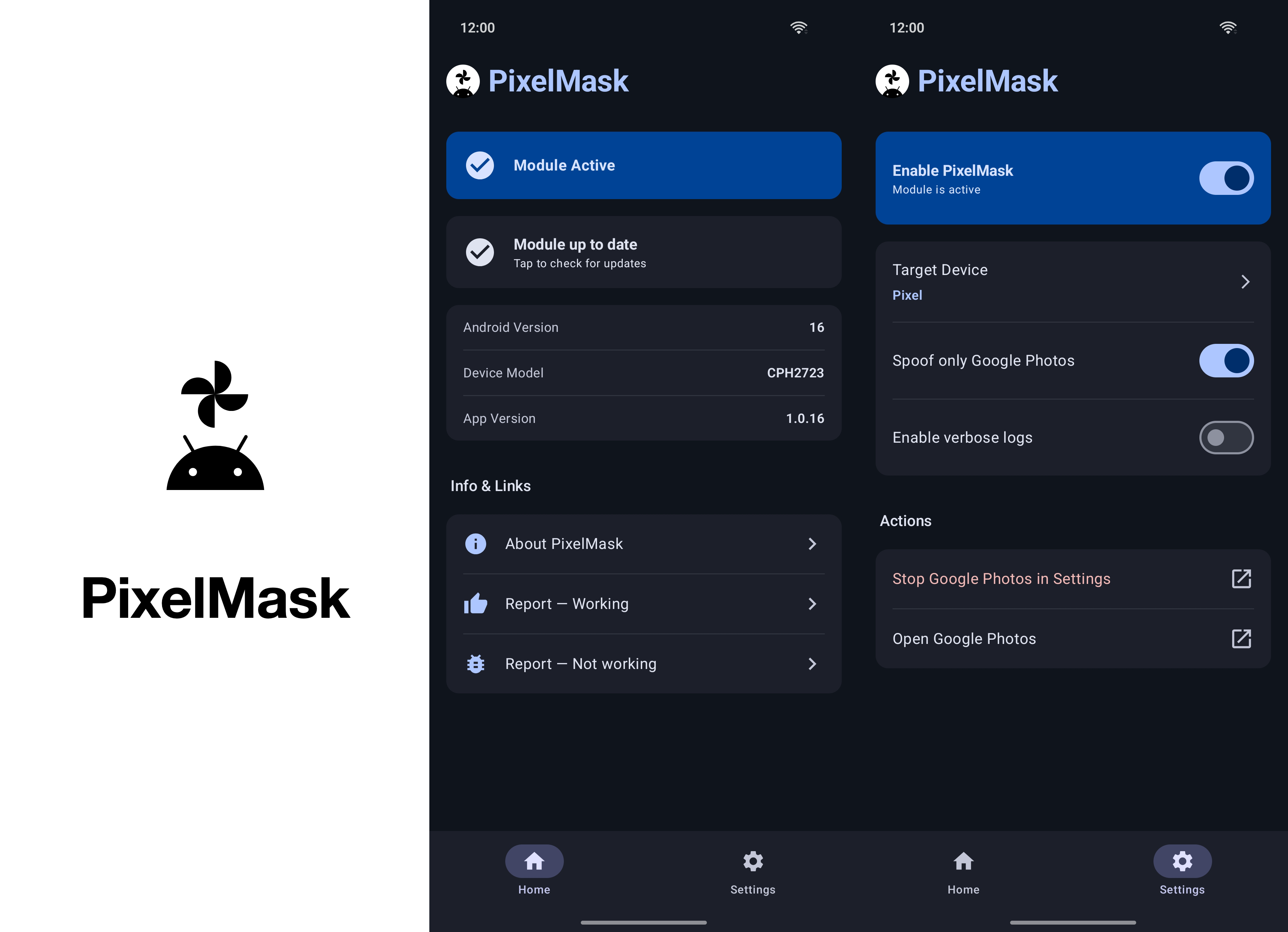
PixelMask app screens

Source code, full README, issue tracker, and release notes live at the
source repository: https://github.com/kinginu/PixelMask

This repository (Xposed-Modules-Repo/com.kinginu.pixelmask) only exists
so PixelMask shows up in LSPosed Manager's module catalog. Each release
here mirrors the corresponding release in the source repo.


What it does

Google Photos checks two things to decide whether you're on a Pixel:

  • the device fingerprint (Build.MANUFACTURER, MODEL, BRAND, FINGERPRINT)
  • a list of hasSystemFeature("PIXEL_<year>_EXPERIENCE") flags

PixelMask intercepts both — but only inside the Photos process, nothing else
on your phone is affected — and replies with the answers a Pixel of your
choosing would give. Photos then turns on the perks tied to that Pixel.

Install

  1. Find PixelMask in LSPosed Manager → Modules and tap install (or
    download the latest APK from the Releases page).
  2. Enable PixelMask in LSPosed Manager.
  3. Scope it to Google Photos and to PixelMask itself. Both. Without
    scoping the module to itself, the home screen sticks on Module Not
    Active
    even when the hook is working.
  4. Open PixelMask → switch to the Settings tab.
  5. Tap Target Device and pick the Pixel you want Photos to think you're
    on (see the table below).
  6. Tap Stop Google Photos in Settings and force-stop Photos.
  7. Open Google Photos and let it start fresh.

Did it actually work?

Photos doesn't pop up a "you're a Pixel now" banner. Open Photos → tap your
Google account icon (top-right) → Photos settingsBackup. If the
spoof is working, you'll see this line:

This Pixel can back up unlimited photos & videos at no charge.
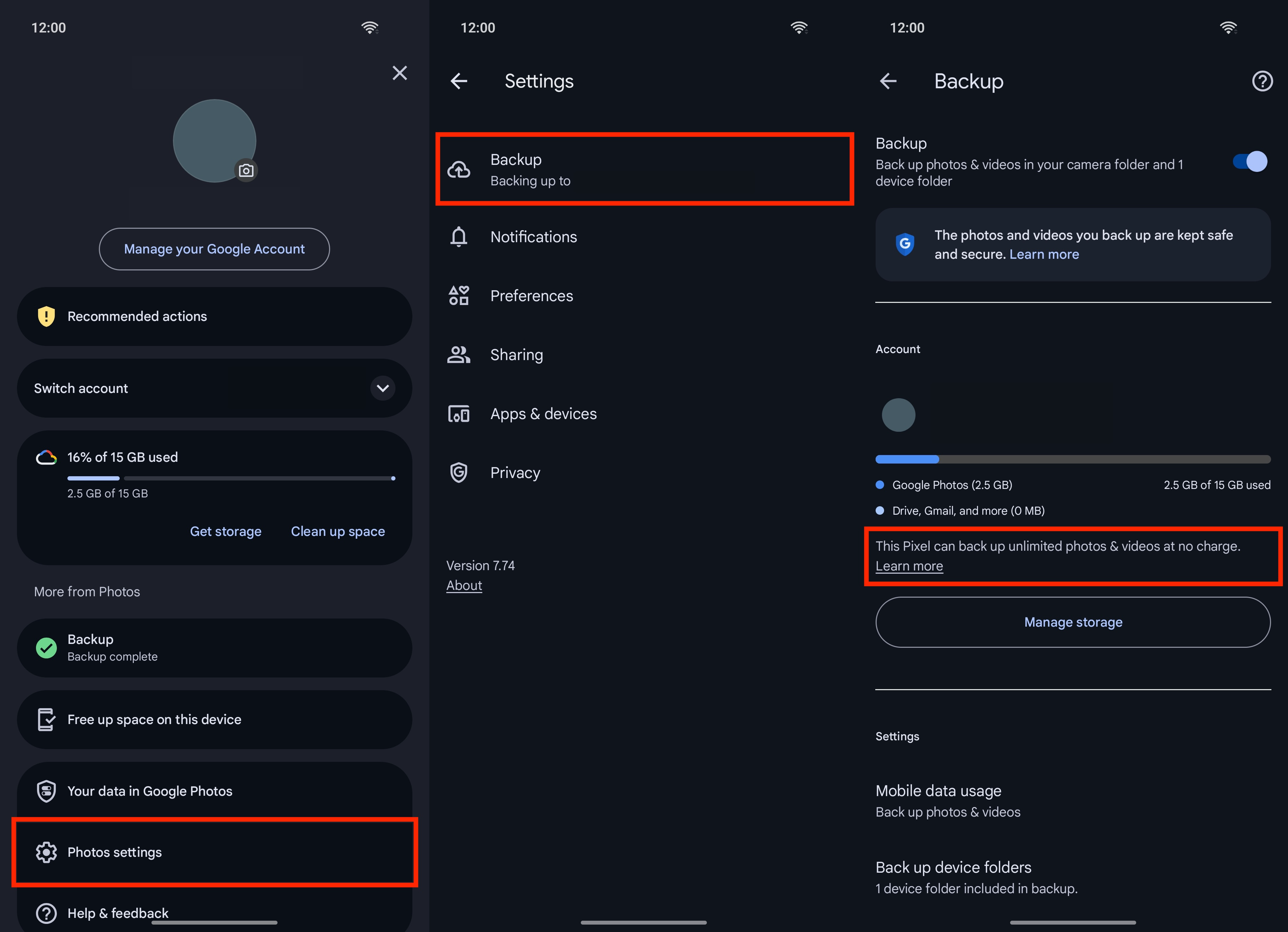
Photos backup proof flow

If that line isn't there, common causes are: forgot to force-stop Photos
after changing the target Pixel; forgot to scope the module to itself in
LSPosed; another module (tricky_store, shamiko, hidemyapplist, …) is
hiding LSPosed from Photos.

Which Pixel should I pick?

Target What you get
Pixel (default) Lifetime unlimited Original-quality backup. The original 2016 Pixel is the only model whose perk Google never rolled back.
Pixel 2 – Pixel 5 Unlimited Storage Saver (compressed) backup.
Pixel 6 / 7 (Pro) No notable Photos perk — Google ended the storage benefit for these generations.
Pixel 8 Pro Video Boost, Night Sight Video.
Pixel 9 Pro XL Add Me, Reimagine, unlimited Magic Editor.
Pixel 10 Pro XL Latest Pixel-first AI features.

If you came here for free unlimited storage, the original Pixel is what
you want. The defaults are already set to it.

Requirements

  • Rooted Android 8.0 or newer (arm64-v8a)
  • An Xposed framework: LSPosed on
    Magisk, or zygisk-vector +
    LSPosed on KernelSU / APatch
  • Google Photos installed

Issues, source, license

Everything else lives at the source repo:

Releases

v1.1.0

Stable

5/11/2026, 12:48:51 AM

First stable milestone. PixelMask is now listed in the LSPosed Manager module catalog (Xposed-Modules-Repo/com.kinginu.pixelmask), with multiple Telegram reports confirming unlimited-Original-quality Photos backup working across vendors / Android versions on every LSPosed flavor we've tested — Vector, Zygisk, classic.

Fixes since 1.0.16

  • LSPosed enable toggle now actually flips on a fresh install. A KSP/AGP task-ordering race was leaving assets/xposed_init out of the published APK — Vector-flavored LSPosed strictly requires that file, so the Manager would show PixelMask in the module list but the toggle silently no-op'd when tapped. Forced the asset-merge tasks to wait on KSP so the entry-class pointer is always packaged.
  • Home Module Active status no longer goes stale: toggling the master switch in Settings updates the Home card in real time instead of waiting for the next app launch.
  • openWebLink / openAppInfo / openApplication now show a Toast on failure instead of crashing when no browser / Photos / launcher is available.
  • XposedHelpers.findClass("android.os.Build") wrapped in runCatching — a missing class now only skips prop spoof instead of crashing the whole hook.

UX

  • Update card now distinguishes four states instead of two: Checking (spinner), Up to date (icon + "Checked just now / 5 minutes ago" timestamp), Check failed (warning icon, "Tap to retry," error-container colour), Update available (unchanged). Previously "up to date" and "couldn't check" rendered identically, so a flaky network looked the same as success.
  • Check spinner is held for a minimum 2 seconds even when the HTTP request finishes in 50 ms, so a tap always looks like it did something.
  • Removed the non-functional "Spoof only Google Photos" toggle from Settings — the strict-package check it gated was unreachable inside loadApp(name = PACKAGE_NAME_GOOGLE_PHOTOS), so the switch had been doing nothing.
  • Rapid setting toggles no longer queue a snackbar per change; only the most recent reminder shows.
  • 5-second connect / read timeouts on the update-check HTTP request so a slow CDN can't block the IO coroutine forever.
  • Empty-response handling on update check no longer silently buckets into "no update"; surfaces as Check failed so the UI shows the retry affordance.

Internal

  • FeatureLevel converted from a string-keyed data class to an enum class — typo'd device entries are now a compile error instead of a silent runtime no-spoof.
  • Deduped the hasSystemFeature(String) and hasSystemFeature(String, int) hooks via a vararg helper inside the loadApp scope.

Docs / distribution

  • README rewritten user-facing with screenshot banners — including a Google Photos navigation flow showing the unlimited-storage proof line. Developer / build / release internals moved to docs/INTERNALS.md.
  • Releases now auto-mirror to Xposed-Modules-Repo/com.kinginu.pixelmask so the LSPosed Manager catalog picks them up automatically.

Assets

1

v1.0.18

Stable

5/11/2026, 12:37:03 AM

UX

  • Update card now distinguishes "up to date" from "couldn't check" — the previous card said Module Up to Date / Tap to check for updates both before any check ran and after one finished, regardless of whether the HTTP request actually succeeded, so a flaky network looked identical to "you're on the latest." Four states now: Checking (spinner), Up to date (icon + "Checked just now / 5 minutes ago" timestamp), Check failed (warning icon, "Tap to retry," in the error-container color), Update available (unchanged).

Internal

  • Empty-response handling on update check was previously bucketed into "no update" — it now surfaces as Failed instead, so an unparseable body shows the retry affordance instead of a misleading "up to date."

Assets

1

v1.0.17

Stable

5/10/2026, 9:10:09 AM

Fixes

  • LSPosed enable toggle was silently no-op'ing on fresh installs because a KSP/AGP task-ordering race left assets/xposed_init out of the published APK. Force the asset-merge tasks to wait on KSP so the entry-class pointer LSPosed reads is always packaged. (Local builds were masked because previous builds left the file in the source tree, which is why this hit only some users.)

UX

  • Removed the non-functional "Spoof only Google Photos" toggle from Settings — its strict-package check was unreachable, so the switch had been doing nothing.
  • Home StatusCard now reflects the master-switch state in real time when you navigate back from Settings.
  • openWebLink / openAppInfo / openApplication now show a Toast instead of crashing if no browser / Photos / launcher is available.
  • 5-second connect/read timeouts on the update check so a slow CDN can't block the IO coroutine forever.

Internal

  • FeatureLevel converted from a string-keyed data class to an enum class — typo'd device entries are now a compile error instead of a silent runtime no-spoof.
  • Deduped the hasSystemFeature(String) and hasSystemFeature(String, int) hook bodies.

Docs

  • README rewritten user-facing with screenshot banners (including a Google Photos navigation flow showing the unlimited-storage proof line); developer docs split into docs/INTERNALS.md.

Assets

1