An Xposed module that prevents Google Play Store from automatically updating itself.
- Makes Google Play Store report that it is up to date
- Prevents only Play Store self-updates
- Does not affect normal app updates
- Open Google Play Store
- Tap the profile icon in the top-right corner
- Open Settings
- Scroll down to the About section
- Tap Update Play Store
If it reports that Google Play Store is up to date, the module is working correctly.
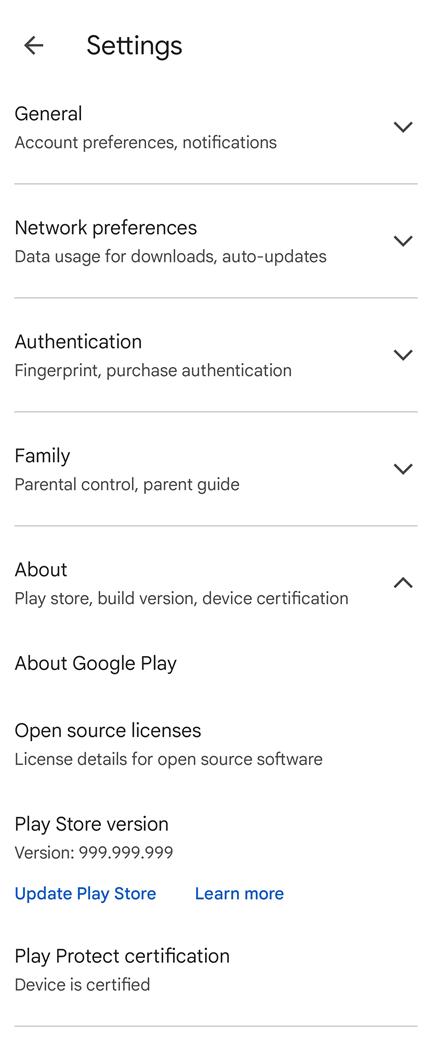
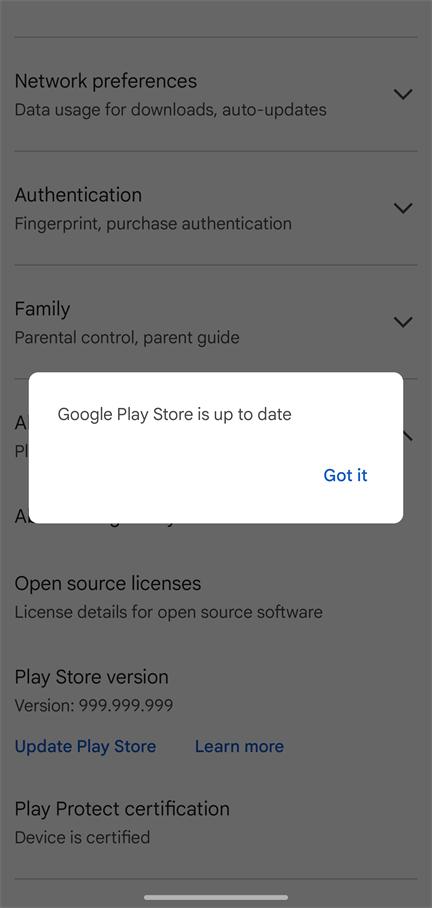
📝 Note: Seeing the real installed Play Store version is expected. If the default mode does not work with your Play Store version, enable Legacy PackageInfo fallback in the module app, then force stop and reopen Google Play Store. Use the fallback only when necessary.
- Rooted Android device
- Xposed Framework (LSPosed recommended)
- Android 9.0 or newer
- Download and install the APK from Releases
- Enable the module in LSPosed
- Select Google Play Store as the module scope
- Force stop and reopen Google Play Store
- Open the PlaySpoofer app to check the module status
This project is intended for educational and personal use. Use it at your own risk.
If you find this module useful, please Star the project. Contributions and suggestions are welcome.
一个阻止 Google Play 商店进行自我更新的 Xposed 模块。
- 让 Google Play 商店提示当前已是最新版本
- 仅阻止 Play 商店自我更新
- 不影响普通应用更新
- 打开 Google Play 商店
- 点击右上角的个人资料图标
- 打开“设置”
- 向下滚动到“关于”
- 点击“更新 Play 商店”
如果提示 Google Play 商店已是最新版本,说明模块工作正常。
📝 注意:显示 Play 商店的真实安装版本属于正常行为。如果默认模式不支持当前 Play 商店版本,可在模块应用中启用 旧版 PackageInfo fallback,然后强行停止并重新打开 Play 商店。仅建议在确有需要时启用 fallback。
- 已 Root 的 Android 设备
- Xposed 框架(推荐使用 LSPosed)
- Android 9.0 或更高版本
- 从 Releases 下载并安装 APK
- 在 LSPosed 中启用模块
- 选择 Google Play Store 作为模块作用域
- 强行停止并重新打开 Google Play 商店
- 打开 PlaySpoofer 应用检查模块状态
本项目仅用于个人学习和研究,使用风险自负。
如果觉得这个模块有用,请为项目点一个 Star。欢迎提交贡献和建议。