🇨🇴 🙏 Colombia needs us / Colombia nos necesita ❤️
[EN] Pixel Taskbar Enabler is free. However, Colombia, my country, recently suffered a devastating earthquake. The most vulnerable communities in the Pacific (including Chocó, Buenaventura, and others) and parts of the Andean region need us. If you value this module, please consider supporting through any official organization or verified donation site. Feel free to research this crisis independently. Thank you for your attention.
[ES] Pixel Taskbar Enabler es gratuito. Sin embargo, Colombia, mi país, acaba de sufrir un devastador terremoto. Las comunidades más vulnerables del Pacífico (incluyendo Chocó, Buenaventura y otras) y parte de la región Andina nos necesitan. Si valoras este módulo, considera apoyar a través de cualquier entidad oficial o sitio de donación verificado. Te invito a investigar sobre esta emergencia por tu cuenta. Gracias por tu atención.

| An Xposed module designed to enable the taskbar on Pixel devices. | Un módulo Xposed diseñado para habilitar la barra de tareas en dispositivos Pixel |
|---|
 |
 |
|---|
| GitHub Repo |  |
 |
|---|---|---|
| Xposed Repo |  |
 |
🇪🇸 - 🇨🇴 Versión en Español
Pixel Taskbar Enabler es un módulo exclusivo de Xposed / LSPosed / Vector diseñado para forzar la aparición y personalizar la barra de tareas (Taskbar) en el Pixel Launcher nativo de los dispositivos Google Pixel. Trae la experiencia de tabletas a tu dispositivo sin necesidad de modificar el DPI del sistema.
Gracias a que utiliza Xposed, los cambios se aplican en la memoria, haciéndolos no destructivos y fácilmente reversibles con solo deshabilitar el módulo y reiniciar el dispositivo.
Espero que en algún momento Google decida incorporar oficialmente estas opciones de personalización en el Pixel Launcher nativo. Mientras tanto, este proyecto seguirá vivo en la medida de lo posible, siempre y cuando a Google no le dé por convertir a Android en un sistema completamente cerrado.
- Activación de la Taskbar: Fuerza la aparición de la barra de tareas del Pixel Launcher en tu dispositivo móvil.
- Escala de Iconos y Carpetas: Ajusta el tamaño de los iconos en la barra de tareas y el grid de aplicaciones.
- Cantidad de Iconos: Controla cuántas aplicaciones quieres que se muestren simultáneamente en el dock inferior.
- Recientes tipo Móvil: Obliga al sistema a mostrar la vista de "Aplicaciones Recientes" con el estilo clásico de teléfono, incluso cuando la interfaz simula estar en una tablet.
Este módulo está diseñado y probado exclusivamente para el Pixel Launcher en firmware oficial de Google Pixel.
Compatible con Android 17.
[!WARNING] No se garantiza su funcionamiento en ROMs personalizadas (LineageOS, Pixel Experience, etc.) ni en launchers de terceros (Nova, Lawnchair, etc.).
[!TIP] Este módulo requiere una instalación de Magisk o KernelSU y un entorno de Xposed, LSPosed o Vector con Zygisk activado.
Dado que esta aplicación solicita permisos especiales para modificar funciones internas del sistema a través de Xposed, es muy común que Google Play Protect la marque como "App desconocida" o la bloquee al intentar instalarla. Esto es un falso positivo estándar para módulos root fuera de la Play Store.
✅ Esta aplicación es 100% segura y de código abierto.
- No recopila datos, no se conecta a internet y todo el código está disponible públicamente aquí para su revisión.
- Puedes verificar el análisis del APK en VirusTotal (0 Detecciones).
Si Play Protect bloquea la instalación, pulsa en "Más detalles" (Learn more) y luego en "Instalar de todas formas" (Install anyway).
- Descarga el último APK desde la página de Releases (Lanzamientos).
- Instala el módulo en tu dispositivo.
- Abre tu Xposed Manager.
- Ve a la pestaña de "Módulos" y activa Pixel Taskbar Enabler.
- Asegúrate de que Pixel Launcher esté marcado en la lista de aplicaciones objetivo.
- Ve a tu gestor de root (como KernelSU, Magisk o APatch) y concédele permisos de superusuario a Pixel Taskbar Enabler. Esto permite que la app reinicie el Pixel Launcher automáticamente cada vez que apliques cambios (de lo contrario, tendrás que forzar la detención de la aplicación Pixel Launcher manualmente desde los Ajustes del sistema).
- Abre Pixel Taskbar Enabler, ajusta las opciones a tu gusto y presiona Aplicar Cambios.
| Canal | Fuente |
|---|---|
| Versiones Estables | GitHub Releases |
Si experimentas algún problema, encuentras un error o tienes sugerencias para nuevas funciones, por favor repórtalos en el repositorio original:
| Acción | Enlace |
|---|---|
| Reportar un Error o Sugerir Función | Sección de Issues en GitHub |
Este proyecto es posible gracias a las siguientes contribuciones de código abierto y equipos:
- PixelXpert / AOSPMods: Equipo original (@siavash79 & @ElTifo) de donde se tomó inspiración y código base.
- XposedBridge: La creación original de Xposed por @rovo89.
- LSPosed: El equipo LSPosed por mantener el entorno vivo.
- Vector: El equipo Vector por mantener el entorno vivo.
- Google & Android: El sistema operativo Android y el equipo de Google.
Pixel Taskbar Enabler está licenciado bajo la GNU General Public License v3.
🇬🇧 - 🇺🇸 English Version
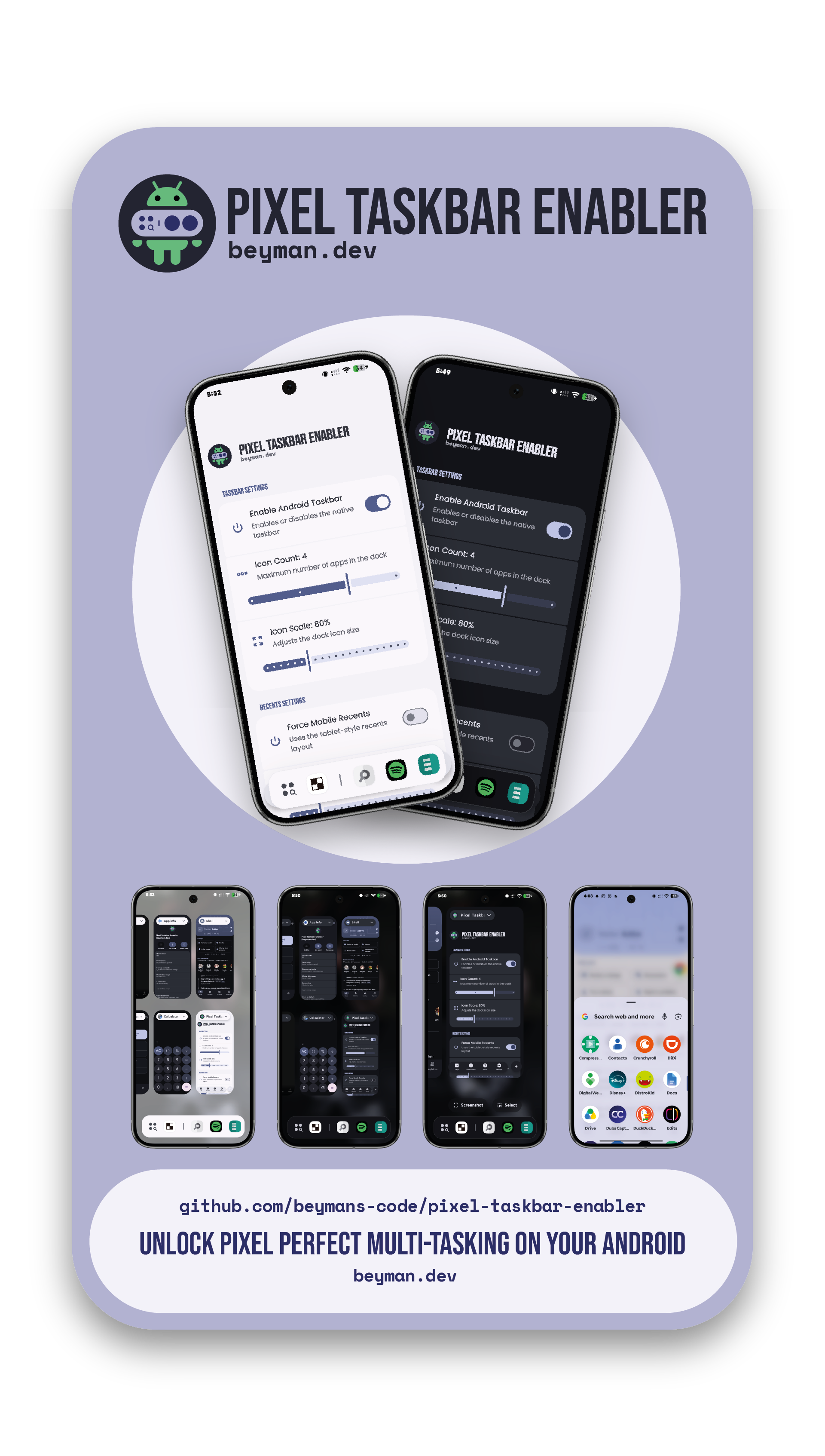
Pixel Taskbar Enabler is an exclusive Xposed / LSPosed / Vector module designed to force the appearance and customize the taskbar in the native Pixel Launcher of Google Pixel devices. It brings the tablet experience to your device without needing to modify the system DPI.
Because it uses Xposed, changes are applied in memory, making them non-destructive and easily reversible just by disabling the module and restarting the device.
I hope that at some point Google decides to officially incorporate these customization options into the native Pixel Launcher. In the meantime, this project will remain alive as long as possible—provided Google doesn't decide to turn Android into a completely closed system.
- Taskbar Activation: Forces the appearance of the Pixel Launcher taskbar on your mobile device.
- Icon and Folder Scaling: Adjust the size of the icons in the taskbar and the app grid.
- Icon Count: Control how many apps you want to display simultaneously on the bottom dock.
- Mobile-style Recents: Forces the system to show the "Recent Apps" view with the classic phone style, even when the interface is simulating a tablet.
This module is designed and tested exclusively for the Pixel Launcher on official Google Pixel firmware.
Compatible with Android 17.
[!WARNING] Its functionality is not guaranteed on custom ROMs (LineageOS, Pixel Experience, etc.) or third-party launchers (Nova, Lawnchair, etc.).
[!TIP] This module requires an installation of Magisk or KernelSU and an Xposed, LSPosed or Vector environment with Zygisk enabled.
Since this application requests special permissions to modify internal system functions via Xposed, it is very common for Google Play Protect to flag it as an "Unknown app" or block it when trying to install. This is a standard false positive for root modules outside the Play Store.
✅ This application is 100% safe and open source.
- It does not collect data, does not connect to the internet, and all the code is publicly available here for review.
- You can verify the APK analysis on VirusTotal (0 Detections).
If Play Protect blocks the installation, click on "Learn more" and then "Install anyway".
- Download the latest APK from the Releases page.
- Install the module on your device.
- Open your Xposed Manager.
- Go to the "Modules" tab and enable Pixel Taskbar Enabler.
- Ensure that Pixel Launcher is checked in the target applications list.
- Open your root manager (such as KernelSU, Magisk, or APatch) and grant superuser permissions to Pixel Taskbar Enabler. This allows the app to restart the Pixel Launcher automatically whenever you apply changes (otherwise, you will have to manually force stop the Pixel Launcher app via System Settings).
- Open Pixel Taskbar Enabler, adjust the options to your liking, and tap Apply Changes.
| Channel | Source |
|---|---|
| Stable Versions | GitHub Releases |
If you experience any issues, find a bug, or have suggestions for new features, please report them in the original repository:
| Action | Link |
|---|---|
| Report a Bug or Request a Feature | GitHub Issues Section |
This project is possible thanks to the following open-source contributions and teams:
- PixelXpert / AOSPMods: Original team (@siavash79 & @ElTifo) from where inspiration and base code were taken.
- XposedBridge: The original creation of Xposed by @rovo89.
- LSPosed: The LSPosed team for keeping the environment alive.
- Vector: The Vector team for keeping the environment alive.
- Google & Android: The Android operating system and the Google team.
Pixel Taskbar Enabler is licensed under the GNU General Public License v3.