This repository only hosts releases for the LSPosed / Xposed module repository. Source, build script and CI live at https://github.com/U-rTrDD-fyi/recents-clear-all — file issues and pull requests there.
An Xposed module that puts an always-visible Clear all button in the Pixel Launcher's Overview screen.
The launcher already has one — RecentsView adds ClearAllButton as the last page of
the recents pager, so reaching it means scrolling past every task. This module adds a
second one that is on screen the moment Overview opens.
It does that one thing and nothing else, so it will not collide with launcher or system-UI tweaks your ROM already applies.
| Unfolded — floating beside the carousel | Folded — in the Screenshot / Select row |
|---|---|
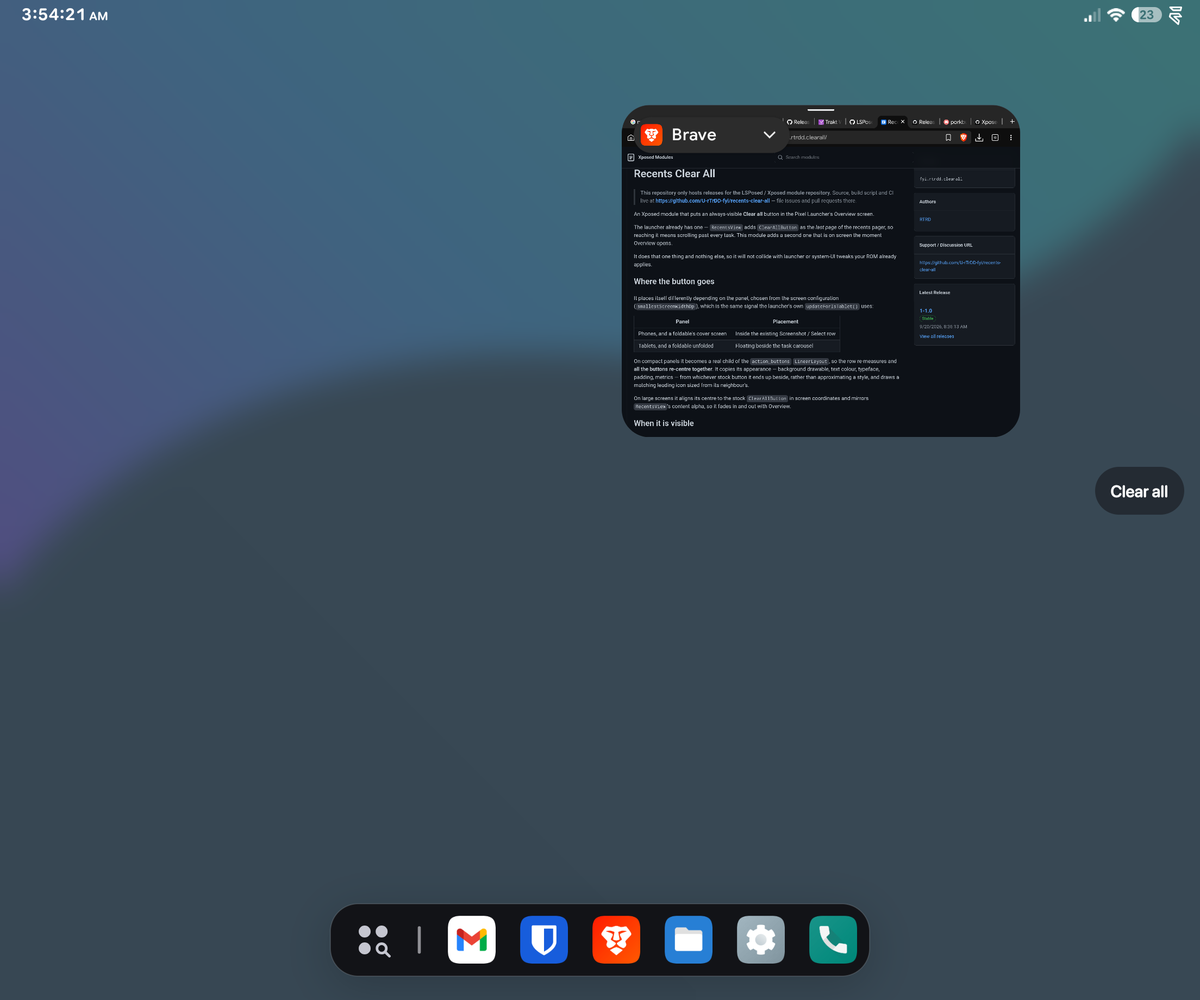 |
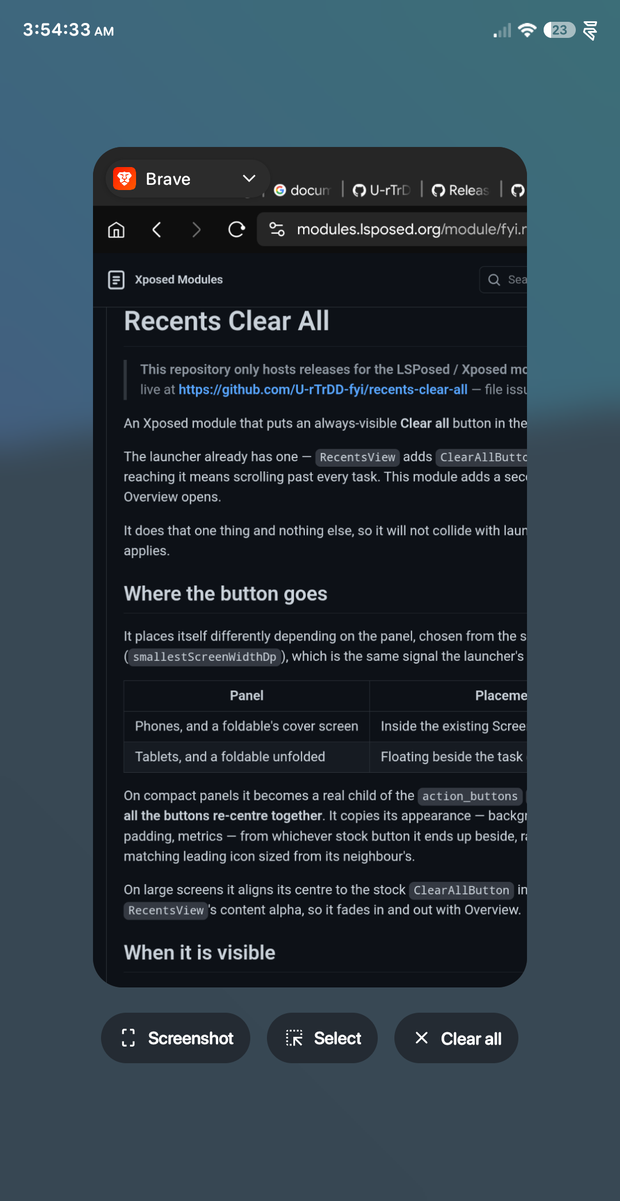 |
It places itself differently depending on the panel, chosen from the screen configuration
(smallestScreenWidthDp), which is the same signal the launcher's own updateForIsTablet()
uses:
| Panel | Placement |
|---|---|
| Phones, and a foldable's cover screen | Inside the existing Screenshot / Select row |
| Tablets, and a foldable unfolded | Floating beside the task carousel |
On compact panels it becomes a real child of the action_buttons LinearLayout, so the
row re-measures and all the buttons re-centre together. It copies its appearance —
background drawable, text colour, typeface, padding, metrics — from whichever stock button
it ends up beside, rather than approximating a style, and draws a matching leading icon
sized from its neighbour's.
On large screens it aligns its centre to the stock ClearAllButton in screen coordinates
and mirrors RecentsView's content alpha, so it fades in and out with Overview.
Only when Overview is genuinely open and has tasks:
- hidden while a swipe gesture is in progress (
onGestureAnimationStart/End) - hidden unless
RecentsViewis at scale ~1.0, which it only is once Overview has settled - hidden when
getTaskViewCount() == 0, so it never sits over "No recent items" - on large screens, revealed only after the state has held briefly (see below)
That last one exists because Overview is entered and abandoned for a few frames during some gestures, and in those frames every readable value — scale, content alpha, view visibility, the whole alpha chain, even the stock button's own alpha and position — is identical to a real Overview session. Nothing distinguishes them at an instant, so the module waits instead.
Both are plain Settings.System keys, read live — no reinstall, no launcher restart.
# how long the state must hold before the button appears, large screens only.
# Default 200. Lower feels snappier; too low and it flickers during gestures.
settings put system clear_all_reveal_delay_ms 200

# horizontal placement of the floating variant, large screens only.
# 0 = end (default), 1 = start, 2 = centre
settings put system clear_all_button_gravity 0- Pixel Launcher (
com.google.android.apps.nexuslauncher) - Developed and tested on Android 16 on a Pixel Fold, on both panels
- Requires an Xposed framework — LSPosed, or a maintained fork such as Vector
It resolves the launcher's classes, methods and resources by name at runtime and copies
its styling from live views, so it carries no hardcoded ids, colours or dimensions and
should survive launcher updates that do not rename
com.android.quickstep.views.RecentsView / OverviewActionsView.
build.sh takes its toolchain from the environment:
AJ=/path/to/android.jar \
XP=/path/to/xposed-api-82.jar \
BT=/path/to/build-tools \
KS=/path/to/keystore.jks KS_PASS=... \
./build.sh
The Xposed API jar is de.robv.android.xposed:api:82, available from
https://api.xposed.info/. Note that classes.dex is added stored, not deflated —
Android mmaps the dex straight out of the APK.
GPL-3.0, matching PixelXpert, whose
ClearAllButtonMod this follows.
The approach follows PixelXpert's
ClearAllButtonMod, which worked out the two load-bearing details: OverviewActionsView
is WRAP_CONTENT, so a child added to it falls outside the touchable area unless the
parent is resized; and the MultiValueAlpha that fades the actions bar is attached to the
inner row rather than the root, so a child of the root never gets hidden.