An LSPosed module that makes your themed (monochrome) icons apply to badged shortcut icons too — without removing the badge.




-purple)
On modern Android (12+, reworked on 16), the launcher skips icon-theming for badged shortcut icons — contact shortcuts, cloned / work-profile icons, and app-shortcut icons. The result: those icons stay full-color while everything else on your home screen is nicely themed, and only the badge picks up the theme.
ThemeBadgedIcons fixes that. It removes the launcher's "don't theme this, it's a raw file drawable" signal, so badged icons get run through the normal themed path just like every other icon.
Important
This module does NOT remove the badge. The badge stays exactly where it is — the underlying icon simply becomes themed to match the rest of your set.
| Before | After |
|---|---|
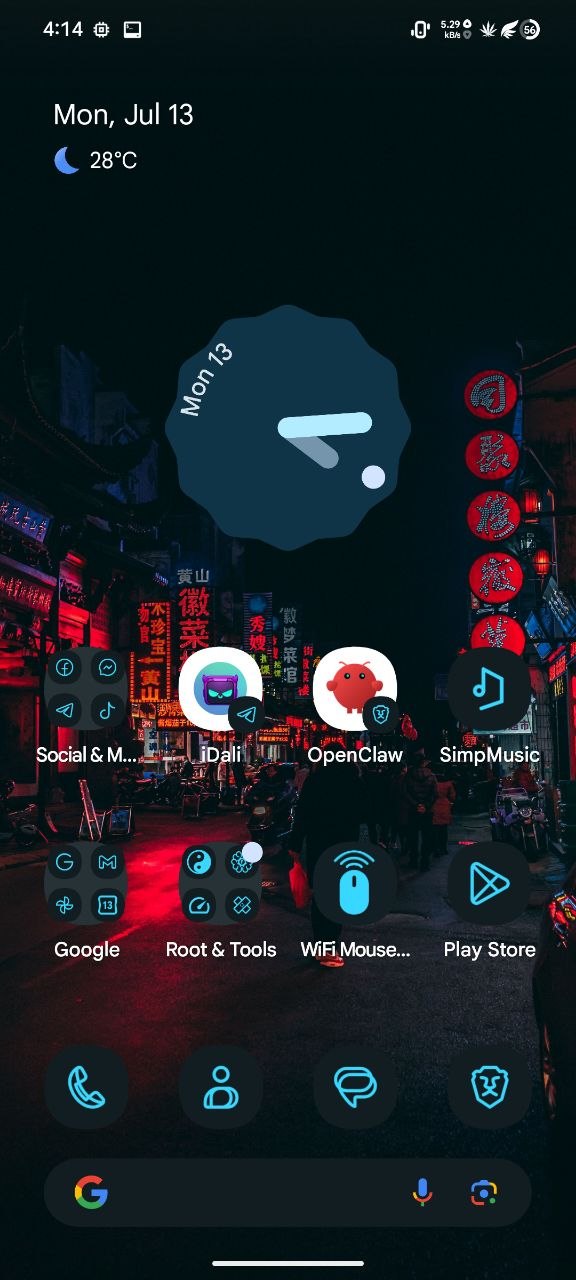 |
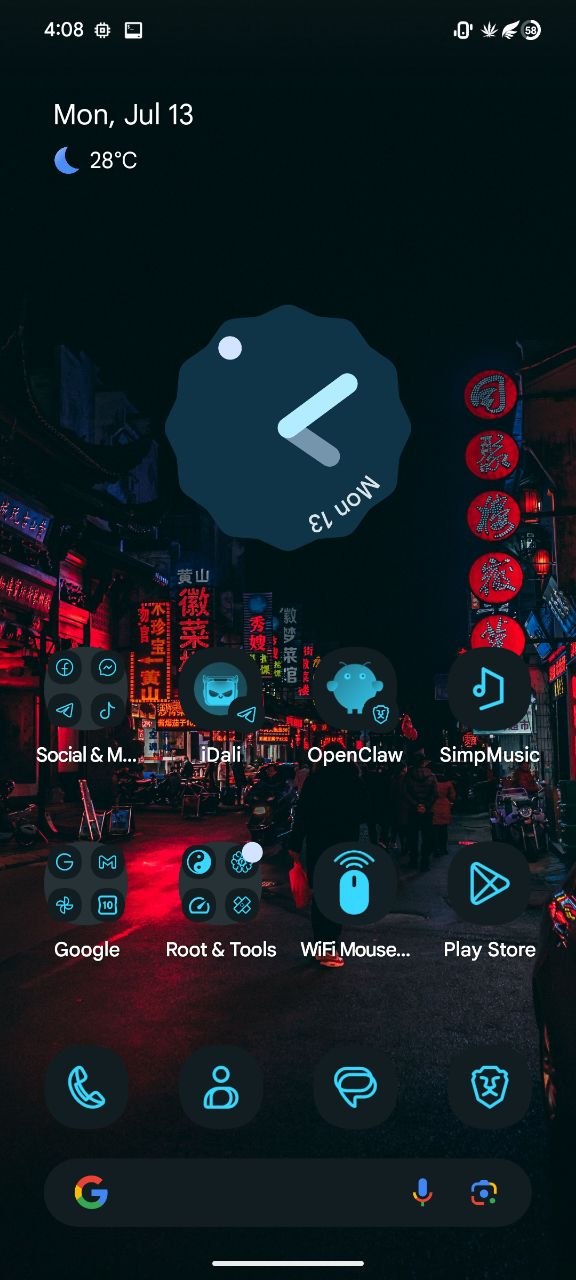 |
| Badged icons stay full color, unthemed | Badged icons are themed (badge kept) |
Disassembled from the device's real launcher (Launcher3QuickStep.apk, Android 16 / SDK 36):
-
When building a shortcut icon, the launcher calls:
IconOptions.setSourceHint(SourceHint)
SourceHintcarries the original app'sComponentKeyand anisFileDrawableflag. -
MonoIconThemeController.createThemedBitmap(..., SourceHint)reads that flag:if-eqz p4, :cond_2c # if SourceHint == null -> skip invoke-virtual {p4}, SourceHint;->isFileDrawable()Z move-result v3 # v3 = isFileDrawable :cond_2c move v9, v3 # getMonochromeDrawable(..., isFileDrawable) isFileDrawable == true => SKIP theming
-
Badged icons are raw file / bitmap drawables →
isFileDrawable == true→ the theme controller bails out of the monochrome/themed path.
Null the argument to IconOptions.setSourceHint(...):
findAndHookMethod IconOptions.setSourceHint(SourceHint) {
    before { param.args[0] = null; }   // no SourceHint => isFileDrawable defaults to false
}
With no SourceHint, isFileDrawable defaults to false, so the launcher themes
the icon normally. The badge is drawn separately, afterwards, so it's untouched.
All hooks are scoped to the launcher process only and are pure runtime method hooks — no overlays, no resource edits — so this coexists cleanly with a custom ROM's built-in Iconify/overlay theming (different layer entirely).
- Install
ThemeBadgedIcons-release.apk. - Open LSPosed → Modules → ThemeBadgedIcons → enable.
- Scope it to your launcher (e.g.
com.android.launcher3). - Reboot your device.
Warning
Icons the launcher already cached won't change automatically — you need to rebuild them once.
Go to Settings → Wallpaper & style → Themed icons and toggle it off, then on. This rebuilds every icon through the hooked path at once — no need to touch your layout.
For a specific badged shortcut (contacts, app shortcuts, cloned/work icons), remove it from your home screen, then add it again — the freshly-created shortcut is built through the hooked path and comes out themed.
(Clearing the launcher's storage/cache + rebooting also works, but that wipes your layout — use the toggle instead.)
- Verify it engaged:
adb logcat -d | grep ThemeBadgedIcons
# [ThemeBadgedIcons] Hooked com.android.launcher3.icons.BaseIconFactory$IconOptions.setSourceHint (force-theme badged icons)
Requirements: Android SDK (compileSdk 34), JDK 17, and the Xposed API jar at
app/libs/api-82.jar.
./gradlew assembleRelease
# APK -> app/build/outputs/apk/release/
SDK-tools build path (used to produce the shipped APK, no Gradle)
javac  -> compile ThemeHook.java + BadgeThemer.java (cp android.jar:api-82.jar)
d8     -> classes.dex
aapt2  -> compile res + link (manifest + assets + resources.arsc)
zip    -> add classes.dex
zipalign -p 4
apksigner sign (debug keystore)- Built and confirmed on Android 16 / SDK 36, AOSP/LineageOS
com.android.launcher3. - The scope list in
app/src/main/res/values/xposed_scope.xmlcovers common launchers; add your launcher's package if it's missing. - If
logcatshowssetSourceHint NOT FOUND, your launcher uses a differently-namedIconOptionsclass — open an issue with the log and it can be added.
ThemeBadgedIcons/
├── build.gradle · settings.gradle · gradle.properties
└── app/
    ├── build.gradle
    ├── libs/api-82.jar
    └── src/main/
        ├── AndroidManifest.xml            # xposedmodule meta + scope (inside <application>)
        ├── assets/xposed_init             # idali.themebadgedicons.ThemeHook
        ├── res/values/xposed_scope.xml    # launcher packages
        └── java/idali/themebadgedicons/
            ├── ThemeHook.java             # scope gate + entry point
            └── BadgeThemer.java           # the setSourceHint hook
Originally prototyped as NoShortcutBadge with the intent to remove the
source-app badge. It turned out that nulling SourceHint doesn't remove the badge
at all — it makes badged icons get themed, which was the real goal. So it was
renamed to match what it actually does.
MIT © daliboss