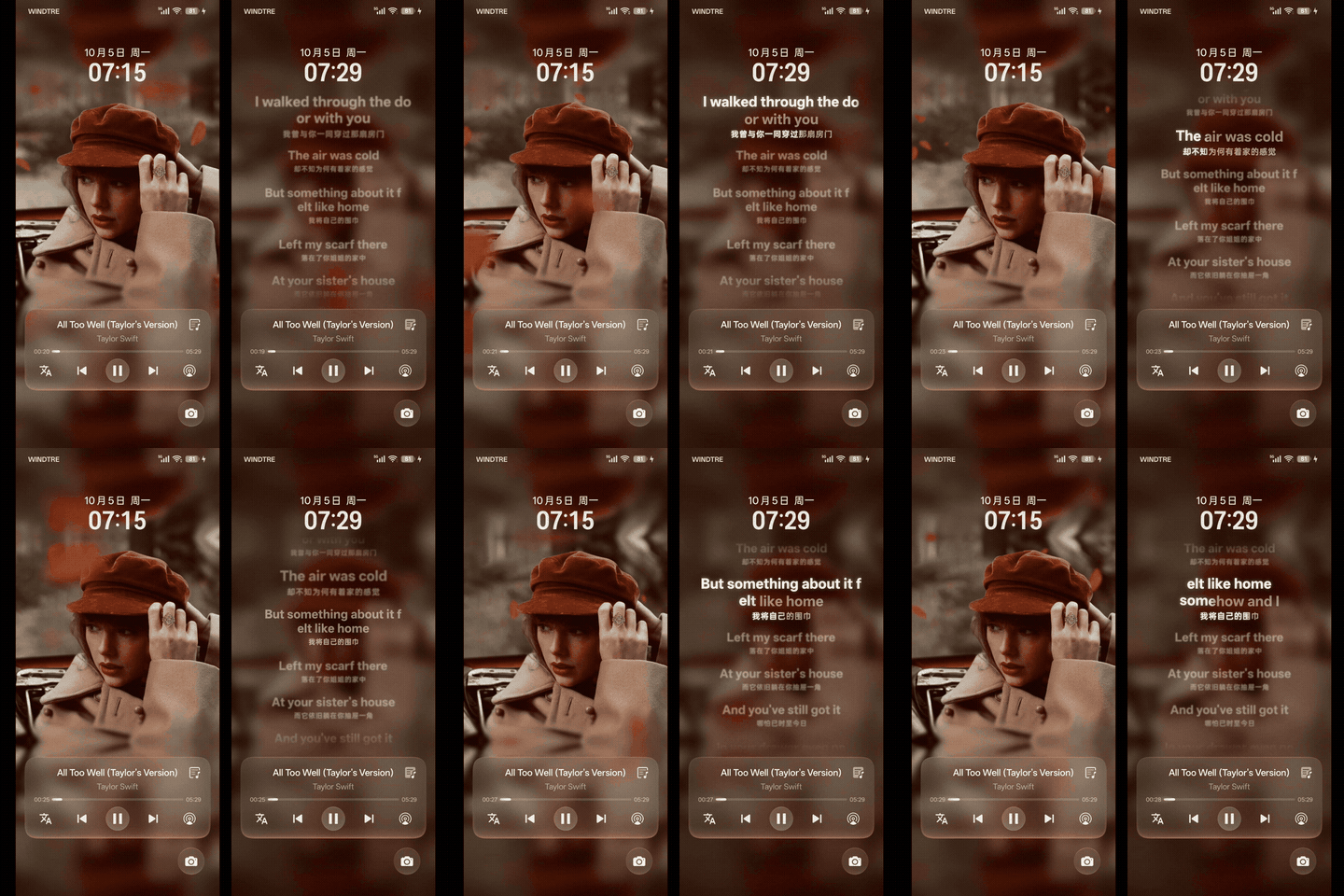
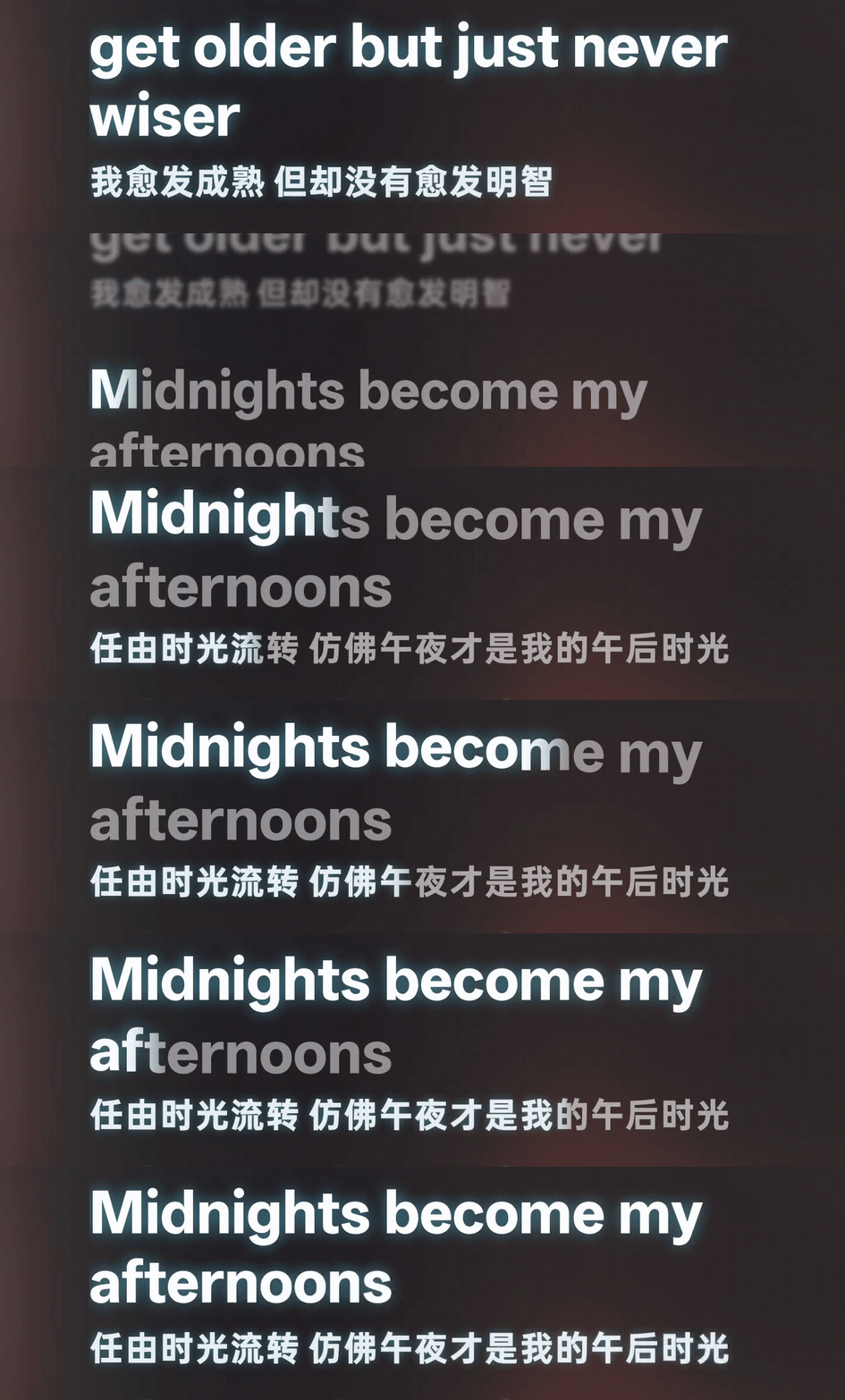
为 ColorOS / OPlus 原生锁屏与 AOD 歌词页面提供完整时间轴、逐字高亮、翻译、样式与兼容 增强。它不是悬浮窗;歌词界面仍由 SystemUI 绘制。
整合 v4.4.0 之后的 C17 Preview、C16 Artwork 与 C17 Artwork Preview / Preview1 / Preview2,可从 v4.4.0 或任一预览版直接覆盖升级。
- ColorOS 17 适配:插件 ClassLoader 工厂入口、沉浸式歌词行号/缩放中心/行模糊(PR #48)、官方字体 变化后重新测量、酷我 C17 歌词保留(#46)、翻译按钮刷新、酷狗概念版歌词门禁、动作规则恢复。
- 动态封面(可选):安装同一 Release 中的动态封面 Provider 1.0.5 并在 Bridge 中授权后,锁屏小封面、 大封面与 C17 全屏镜像背景播放方形动态封面;Apple Music 与可选网易云来源并发查找、AM 优先;静态与 动态封面柔和淡入淡出;新增 10–30 fps 帧率设置,调低更省电;可选播放时保持亮屏;手动绑定、缓存 上限、脱敏诊断与商店连通性测试。
- 外观:C17 光晕跟随封面取色;修复英文单词从中间换行;普通逐行进度快速切句更稳。
- 锁屏流畅度:去掉逐帧锁屏状态跨进程查询与翻译按钮扫描卡顿,字符上浮绘制开销下降约 20%。
- Provider:全部版本号加一;13 个专属 Provider 不再显示桌面图标(更新后重启桌面旧图标才会消失);
通用播放器 Provider 1.1.2 修复 C17 加载失败,并放开除酷我外的官方播放器——同一播放器只开一个
Provider,专属与通用二选一,同时开启会互相覆盖
lyricInfo。
- Provider 只追加
lyricInfo:LX、Poweramp、Apple Music、Metrolist、酷狗、网易云、QQ 音乐不再 重建 metadata、不再重绘封面,锁屏与 AOD 封面与关闭模块时一致;KuWo 改用同一共享实现。 - 酷狗:切歌不再先闪官方渲染;歌词文件名与播放信息不一致的歌曲不再整首回落官方渲染; 多歌手署名中的连字符名字不再被拆错;歌词开头不再出现空白占位行。
- 通用播放器 Provider 1.1.0:识别换曲时的撕裂 metadata;新增「进度粒度粗时自动逐行」; 近期歌词补全 App 未运行期间的曲目。
- Bridge 行号时钟对齐:官方当前行与逐字填充共用同一平滑时钟,行边界不再回跳。
- 彻底根治状态栏与控制中心媒体卡片按钮错位:Bridge 永不修改 QS 规则表(args[1]),无论 QQ 音乐还是通用 Provider(SaltPlayer、LX 等)接入的播放器,控制中心按钮 100% 保持系统和播放器原生排版,绝不错位、不丢失关闭按钮。
- 翻译按钮锁屏态门禁与即时刷新:仅在锁屏状态下激活注入,解锁进入桌面瞬间自动平滑撤出;修复内部重绑机制复合 Key 传递,灭屏与解锁瞬间即时刷新,无需切歌或暂停。
- 收紧翻译按钮门禁:仅在播放器确实由 Provider 服务且当前曲目包含翻译时才允许展示翻译按钮,未适配播放器或无翻译歌曲严格保持 100% 原生。
- 修复 QQ 音乐媒体卡控制按钮错位:不再为该播放器强制 OPlus Rule0 或重新下发规则表,保留 系统原生按钮行;翻译按钮继续通过收藏槽原地替换呈现。
- 翻译按钮接入增强:既无
PlaybackState.CustomAction也无 OPlus heart 的播放器,由 Bridge 合成 framework 同类型动作兜底,点击仍在 Bridge 内处理。 - 歌词时钟平滑:播放中小于 600 ms 的位置偏差按本地时钟修正处理,不再误判为跳变或回退。
- KuWo Provider 1.2.0 (3):只往宿主 metadata 追加
lyricInfo,不再重建 metadata、不再改写 封面通道(删除联网补封面与 240px 重绘),锁屏封面与歌词同时正确。 - 仍包含 v4.3.0 的字符上浮动画(默认关闭,幅度 0–200% 可调);Bridge 继续只作用于
system和com.android.systemui,不进入播放器进程、不创建额外 MediaSession。
- 已 Root,并安装支持 libxposed API 102 的 LSPosed / LSP 管理器;建议 LSPosed 2.2.0+。
- 系统本身包含 ColorOS / OPlus 原生锁屏歌词页面。
- 当前主要围绕 ColorOS 16 验证;系统和播放器大版本更新可能需要重新适配。
| 播放器 | 额外模块 | 能力 |
|---|---|---|
| Salt Player | Provider-Salt |
逐字、翻译 |
| ConePlayer / GP | Provider-Cone |
完整时间轴、翻译 |
| 酷我 | Provider-KuWo |
官方 payload 追加逐字/翻译 |
| LX / Walnut | Provider-LX |
逐字、翻译、蓝牙身份与封面兼容 |
| Poweramp | Provider-Poweramp |
sidecar / 内嵌歌词、翻译 |
| Metrolist | Provider-Metrolist |
多歌词源,不支持翻译 |
| 酷狗 / 概念版 | Provider-KuGou |
官方 payload 追加逐字/翻译 |
| QQ 音乐官方版 | Provider-QQ |
QRC 逐字、翻译 |
| 网易云 / 荣耀 / 9.0.40 | Provider-NetEase |
官方追加或构造逐字/翻译 |
| Apple Music | Provider-Apple |
TTML 逐字、翻译 |
| Spotify | Provider-Spotify |
逐行/逐字,不支持翻译 |
| 汽水音乐 | Provider-QiShui |
TrackLyric / 缓存逐字、翻译 |
| 通用播放器 | Provider-Universal |
在设置 App 中选择目标播放器;system_server MediaSession 补全 |
| Readify AI | Provider-Readify |
Readify 3.1.0 的事件驱动 TTS 句子窗口 |
Provider-Universal 1.1.2 (4) 为没有专属适配、但能创建 Android MediaSession 的播放器提供
受控的歌词补全。它只在 system_server 运行;用户必须在设置 App 中主动选择目标包,未选择的音乐、
视频和其他媒体 App 不会被观察或写入歌词。
安装后打开 Universal Player Provider,选择播放器并配置歌词来源、逐字、翻译、原始歌词和诊断。
它保留宿主 metadata,只向选中且活跃的会话附加标准 MediaMetadata["lyricInfo"];Bridge 继续只在
system 与 com.android.systemui 中提供 SystemUI 外观、AOD 和翻译按钮增强。不要对同一播放器同时
使用专属 Provider 与通用 Provider。
使用通用 Provider 时关闭蓝牙歌词、车载歌词或其他会用当前歌词覆写媒体标题的功能,否则首曲匹配、 缓存与切歌识别可能不可靠。反馈时仅提供脱敏日志、目标包名和复现步骤,不要上传完整歌词、cookie、 token 或私人媒体路径。
- 安装自己使用的
ColorOS-Live-Lyrics-Provider-<Name>-v4.3.0.apk;通用 Provider 在其设置 App 中选择目标播放器,专属 Provider 在 LSPosed 中只勾选对应播放器。 - 安装
ColorOS-Live-Lyrics-Bridge-v4.3.0.apk,Bridge 作用域只保留system与com.android.systemui。 - 不要让旧 Provider 与 4.3.0 专属 Provider 同时 hook 一个播放器;通用 Provider 使用时关闭 蓝牙歌词、车载歌词或其他会覆盖媒体标题的功能。
- 重启播放器和 SystemUI;首次安装或改变 scope 后建议重启设备。
本项目不分发词幕 Provider。需要词幕时请从 LyricProvider 原项目 获取,并向原项目反馈 词幕显示/产品问题。
出现问题时提供机型、ROM/SystemUI 版本、播放器版本、Bridge/Provider 版本、LSPosed scope、复现步骤和脱敏日志。不要上传 token、cookie、完整私人歌词或个人媒体路径。
Enhances the native ColorOS / OPlus lock-screen and AOD lyric page with complete timelines, word-by-word highlighting, translations, appearance controls, and compatibility handling. It is not a floating overlay; SystemUI still owns the lyric surface.
Folds the C17 Preview, C16 Artwork, and C17 Artwork Preview / Preview1 / Preview2 released after v4.4.0 into a stable release; update in place from v4.4.0 or any preview.
- ColorOS 17 support: plugin ClassLoader factory entry, immersive row index / scale pivot / row blur (PR #48), re-measuring on official typeface changes, KuWo C17 lyric retention (#46), translation-button refresh, the KuGou Lite lyric gate, and action-rule restoration.
- Dynamic artwork (optional): install Dynamic Artwork Provider 1.0.5 from the same Release and authorize it in Bridge to play square motion covers on the small and large lock-screen covers and the C17 mirrored full-screen background; concurrent Apple Music and optional NetEase lookup with AM priority; soft static/motion cross-fades; a new 10–30 fps frame-rate setting (lower saves battery); optional keep-awake; manual binding, cache limit, redacted diagnostics, and a storefront reachability test.
- Appearance: C17 glow can follow the artwork color; English words no longer break mid-word; smoother fast line changes with line-timed progress.
- Lock-screen smoothness: no per-frame cross-process keyguard query, no translation-scan stalls, and about 20% cheaper character float-up drawing.
- Providers: every version moves up by one; the 13 dedicated Providers no longer show a home-screen
icon (the old icon disappears after a launcher restart); Universal Player Provider 1.1.2 fixes the C17
load failure and opens the official players except KuWo — enable only one Provider per player,
dedicated or Universal, as both write
lyricInfoand overwrite each other.
- Append-only
lyricInfo: the LX, Poweramp, Apple Music, Metrolist, KuGou, NetEase, and QQ Music Providers no longer rebuild metadata or redraw artwork, so lock-screen and AOD artwork matches the module-disabled state; KuWo moves onto the same shared implementation. - KuGou: no official-renderer flash on track switch, no whole-song fallback when the lyric file name disagrees with the playing metadata, correct titles for hyphenated names in multi-artist credits, and no empty row at the start of the lyrics.
- Universal Player Provider 1.1.0: torn-metadata detection on track switch, the new Line lyrics for coarse clocks setting, and recent-lyrics backfill for tracks played while the app was not running.
- Bridge line clock alignment: the official current row and the word fill share one smooth clock, so line boundaries no longer jump back.
- The 12 dedicated Providers, Universal Player Provider, and Readify TTS Provider continue to use
libxposed API 102 and static scope. Universal Provider enriches standard
lyricInfofromsystem_serverfor user-selected apps. - An optional Salt Player-style character float-up effect moves unsung graphemes below the baseline and returns them along a cosine step as the reveal front passes; it stays synchronized with the existing word reveal, feather, and glow.
- Character float amount supports 0–200%. Ordinary LRC-style lyrics receive the same whole-line front when Line-timed lyric progress is enabled.
- Wrapped multi-segment rows now sum revealed advances for one continuous front. A lift draw failure
safely falls back and emits a
CHAR_LIFT_UNAVAILABLEdiagnostic. - Bridge remains limited to
systemandcom.android.systemui; no player-process Bridge hook, additional MediaSession, or legacy private lyric transport is restored.
- Root and an LSPosed/LSP manager with libxposed API 102 support; LSPosed 2.2.0+ is recommended.
- A ColorOS/OPlus ROM that already includes the native lock-screen lyric page.
- Current validation focuses on ColorOS 16; major system/player updates can require renewed support.
Salt, Cone/GP, KuWo, LX/Walnut, Poweramp, Metrolist, KuGou/Concept, QQ Music, NetEase/Honor/
modified 9.0.40, Apple Music, Spotify, QiShui, Universal Player, and Readify AI are shipped as separate Provider
APKs. Universal Player selects its target apps in its settings UI and runs from system_server.
Provider-Universal 1.1.2 (4) supplies controlled lyric enrichment for players without a dedicated
adapter that still create an Android MediaSession. It runs only in system_server; users explicitly
select target packages in its settings UI, while unselected music, video, and other media apps are
not observed or written with lyrics.
Open Universal Player Provider after installation to select players and configure lyric sources,
word timing, translations, raw lyrics, and diagnostics. It preserves host metadata and appends only
standard MediaMetadata["lyricInfo"] to a selected active session. Bridge remains limited to system
and com.android.systemui for SystemUI styling, AOD, and translation controls. Do not enable a
dedicated Provider and Universal Provider for the same player.
Disable Bluetooth, car-lyrics, or similar features that overwrite media titles with current lyric lines while using Universal Provider; otherwise first-track matching, caching, and track-change recognition can be unreliable. Reports should contain sanitized logs, the selected package, and reproduction steps, never complete lyrics, cookies, tokens, or personal media paths.
- Install the required
ColorOS-Live-Lyrics-Provider-<Name>-v4.3.0.apk. Select target apps in the Universal Provider UI, or select only the dedicated Provider's player package in LSPosed. - Install
ColorOS-Live-Lyrics-Bridge-v4.3.0.apk; keep onlysystemandcom.android.systemuiin Bridge scope. - Do not let an old Provider and a 4.3.0 dedicated Provider hook the same player. Disable Bluetooth, car-lyrics, or similar media-title-overwrite features while using Universal Provider.
- Restart the player and SystemUI; reboot after the first install or a scope change.
Lyricon Providers are distributed by the original LyricProvider project. Report Lyricon display/product issues there.
For a useful issue, include device/ROM/SystemUI/player versions, Bridge/Provider versions and scopes, reproduction steps, and sanitized logs. Never upload tokens, cookies, complete private lyrics, or personal media paths.
Source and documentation · Report an issue

感谢 Lyrico 与 Lyrico-Plugins 在本地音乐元数据、歌词管理和 插件化歌词源方面提供的开源工作与启发。 Thanks to Lyrico and Lyrico-Plugins for their open-source work and inspiration around local music metadata, lyric management, and plugin-based lyric sources.