See your Xiaomi phone's notifications on your Xiaomi tablet, from every app, and reply to them with Xiaomi's own reply box. An LSPosed module for the HyperOS 4 China ROM.
XNotify has moved to XApps (io.github.leekin2.xapps): XGoogle, XSecurity and XNotify in one module. XNotify gets no more updates. Flash the XApps zip from the latest release in KernelSU / Magisk and restart fully: it installs XApps, sets up LSPosed, moves your XNotify settings and removes XNotify by itself. Do not install the XApps APK next to XNotify.
XNotify artık XApps içinde ve güncellenmeyecek. XApps zip'ini root yöneticisinde kurup telefonu tamamen yeniden başlatın: ayarlarınızı taşır ve XNotify'i kendisi kaldırır.
XReply is now part of XNotify. Since 4.0, XNotify also gives Telegram, WhatsApp and every other notification Xiaomi's reply box and buttons. If you use XReply, uninstall it and use XNotify instead.
HyperOS can show phone notifications on a tablet, but it has three limits:
- Only a few Chinese apps are supported (WeChat, QQ, DingTalk…).
- The China tablet ROM hides the Receive tab, where you choose which phone and which apps to receive notifications from.
- It only works with Xiaomi accounts registered in China.
XNotify removes all three.
- ✅ Every app: Telegram, WhatsApp, Instagram, SMS, calls and anything else installed on the phone.
- ✅ Receive tab unlocked: Settings → Interconnectivity → Notifications now shows the Receive tab on the tablet.
- ✅ App picker with icons: The phone sends its app list and icons to the tablet. After installing new apps, tap the refresh icon at the top right.
- ✅ Search and turn all off: Find an app by typing its name, or turn every app off with one tap.
- ✅ Clear notifications: Big app icon; the title shows the source device and the app name.
- ✅ Pop-ups: Notifications pop up on the tablet screen, even while you watch a video.
- ✅ Works while you use the phone, not only when it is locked.
- ✅ Any Xiaomi account region: EU, US, UA and other non-China accounts work on China ROMs.
- ✅ No duplicates: Apps that are also installed on the tablet are skipped.
- ✅ Xiaomi reply box (formerly XReply): Telegram, WhatsApp, Instagram and other apps get HyperOS's own reply box and buttons instead of Android's. The sent reply shows in the notification, even when the app does not update it.
- ✅ Settings screen: Turn tablet forwarding and the reply box on or off separately, from LSPosed.
- Languages: English, Türkçe, Русский, Español, 简体中文
| Receive tab on the tablet | Every phone app, with icons |
|---|---|
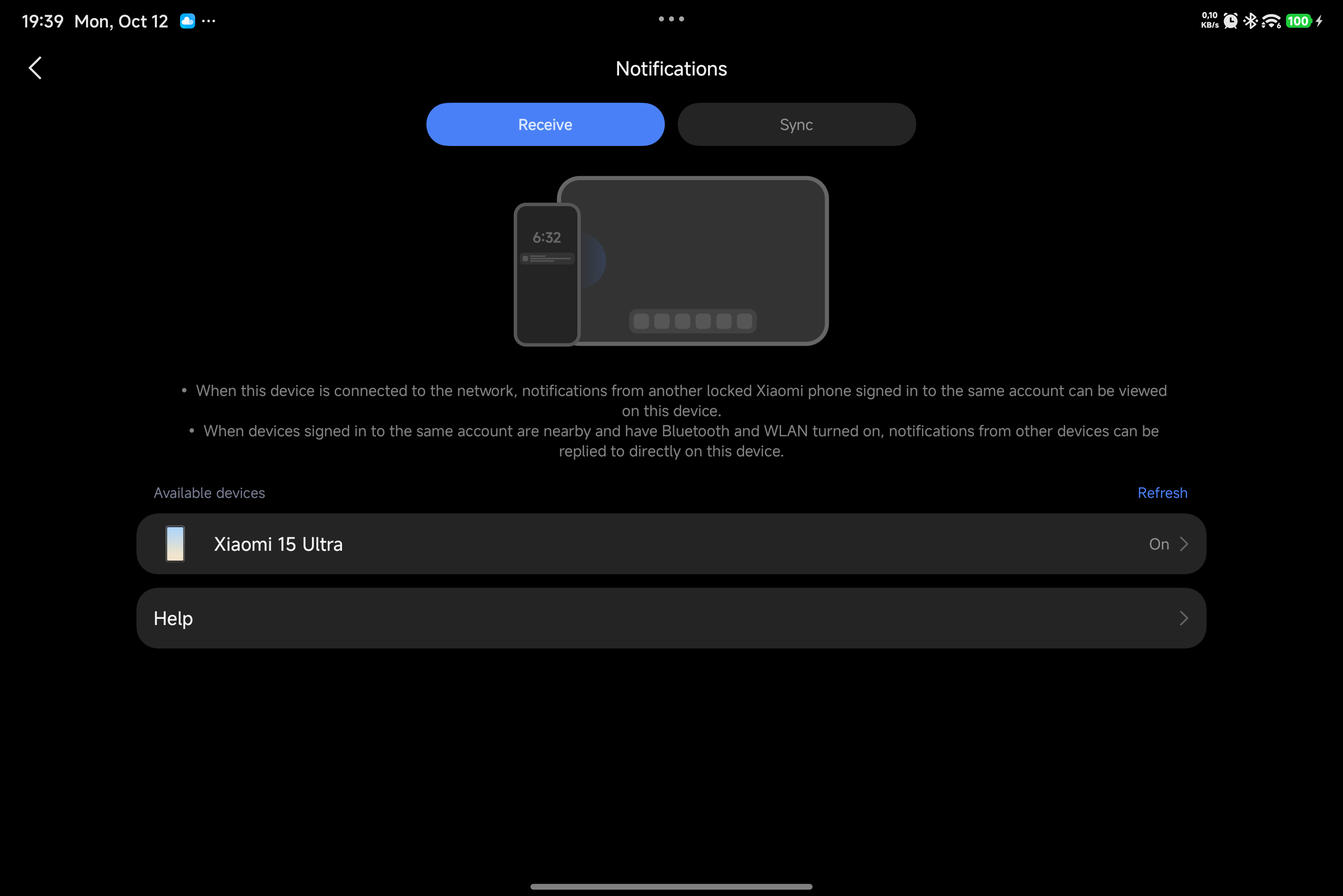 |
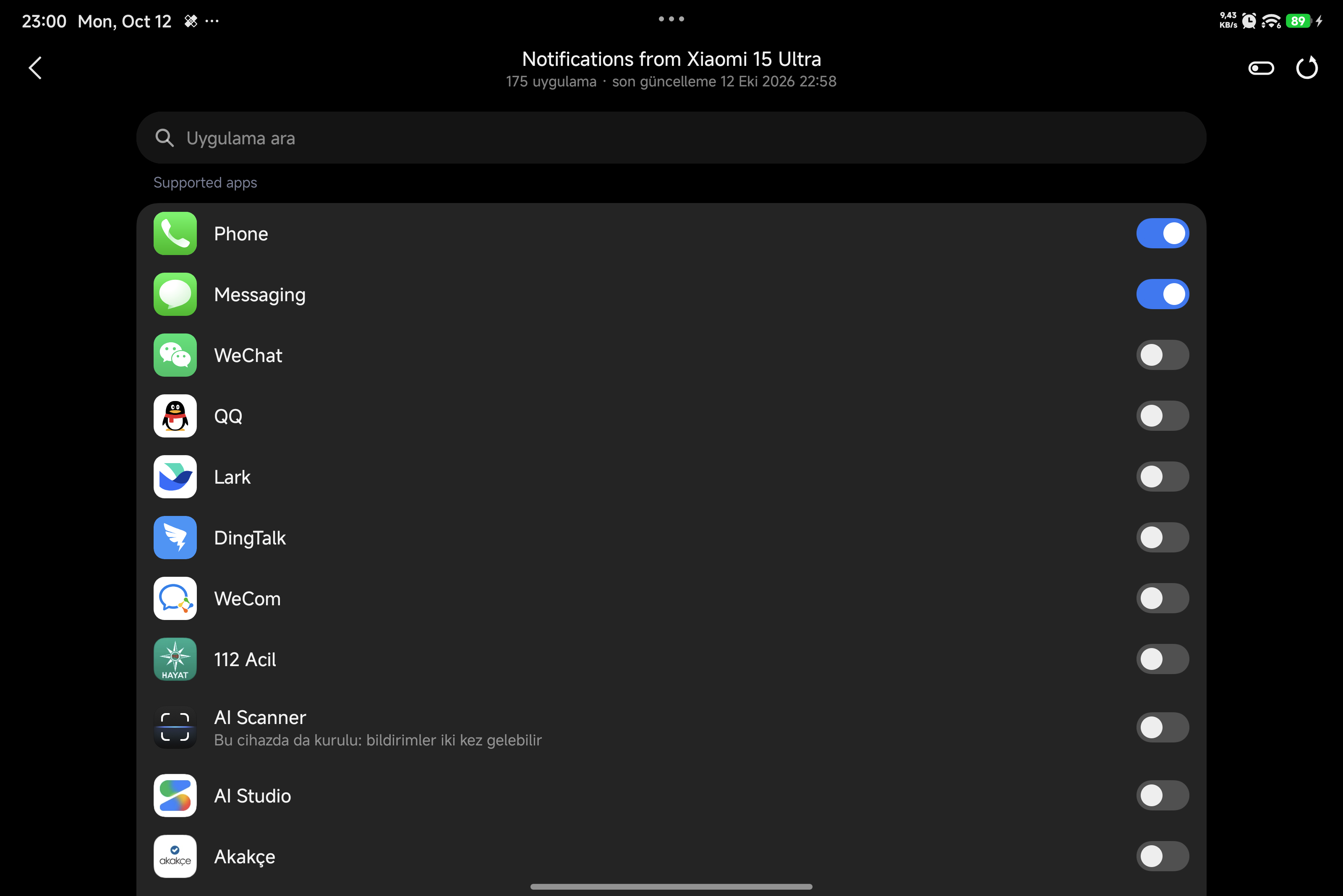 |
| Xiaomi buttons | Xiaomi reply box | Settings |
|---|---|---|
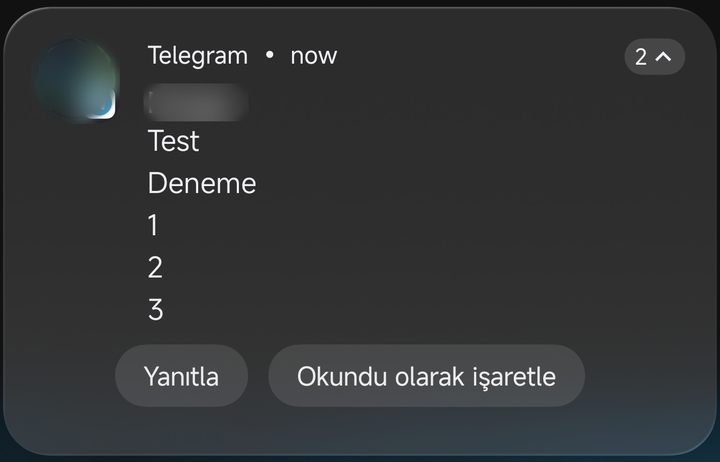 |
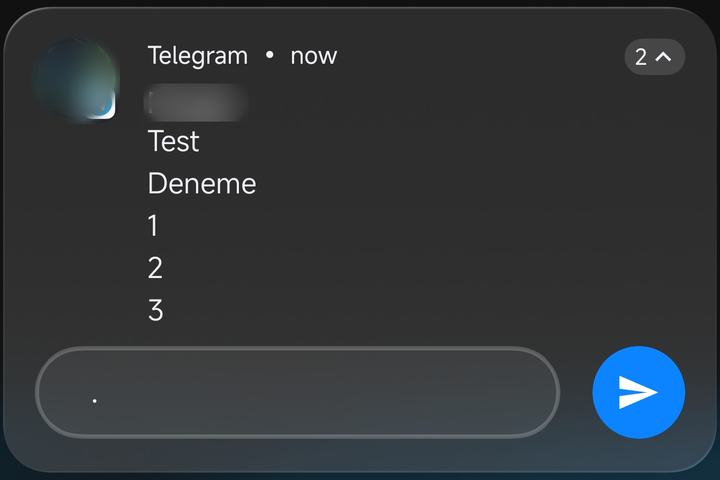 |
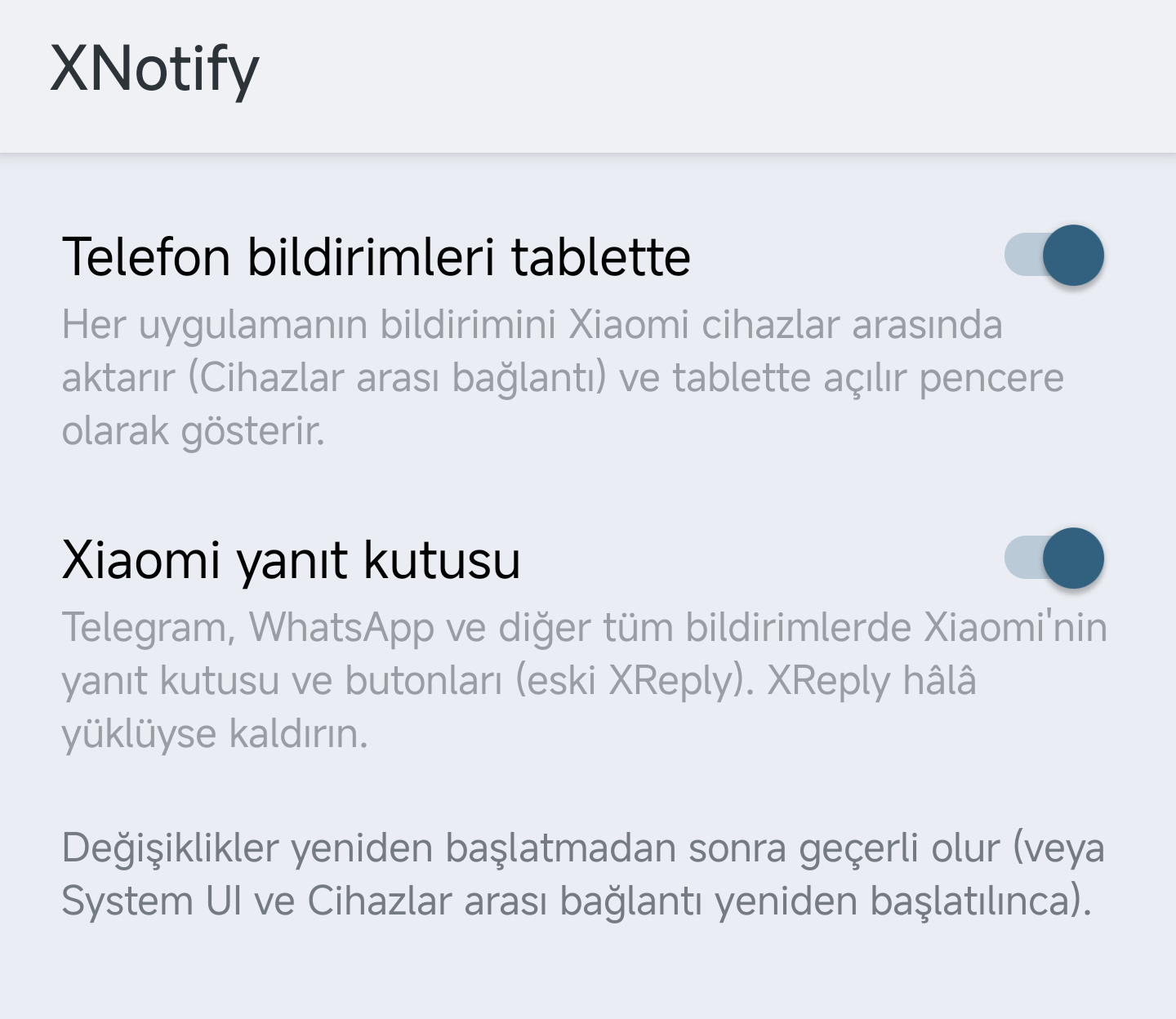 |
The tablet's system language is Turkish, so the lines XNotify adds are in Turkish; Xiaomi's own screen has no Turkish translation and stays in English.
- A Xiaomi phone and a Xiaomi tablet on the HyperOS 4 China ROM (Android 17); the reply box needs only the phone
- Both signed in to the same Xiaomi account, with Wi-Fi and Bluetooth on
- Root (KernelSU, SukiSU or Magisk) and LSPosed (API 102) on both devices
Tested on Xiaomi 15 Ultra + Xiaomi Pad 8 Pro, and REDMI K90 Pro Max + Xiaomi Pad.
- Install XNotify on both the phone and the tablet.
- Enable it in LSPosed. The scope is
com.milink.service(Interconnectivity) and System UI. - If XReply is installed, uninstall it.
- Reboot both devices.
- On the tablet, open Settings → Interconnectivity → Notifications → Receive, tap your phone and turn on the apps you want.
XNotify has no app icon. Its settings screen opens from the settings button next to XNotify in LSPosed; the apps to receive are chosen in the tablet's notification settings.
- Source: https://github.com/Leekin2/XNotify (GPL-3.0)
- Telegram channel: https://t.me/xioamifetiscisi
- Feedback and suggestions: @emcleek
Xiaomi telefonunuzdaki tüm uygulamaların bildirimlerini Xiaomi tabletinizde görün, Xiaomi'nin kendi yanıt kutusuyla yanıtlayın. HyperOS 4 Çin ROM'u için bir LSPosed modülü.
XReply artık XNotify'ın içinde. 4.0'dan itibaren XNotify, Telegram, WhatsApp ve diğer tüm bildirimlere Xiaomi'nin yanıt kutusunu ve butonlarını da getirir. XReply kullanıyorsanız onu kaldırıp XNotify'ı kullanın.
HyperOS telefon bildirimlerini tablette gösterebiliyor, ama üç sınırı var:
- Yalnızca birkaç Çin uygulaması destekleniyor (WeChat, QQ, DingTalk…).
- Çin tablet ROM'u Al (Receive) sekmesini gizliyor. Hangi telefondan ve hangi uygulamalardan bildirim alacağınızı bu sekmede seçiyorsunuz.
- Sadece Çin'de kayıtlı Xiaomi hesaplarıyla çalışıyor.
XNotify bu üç sınırı da kaldırır.
- ✅ Tüm uygulamalar: Telegram, WhatsApp, Instagram, SMS, aramalar ve telefonda kurulu diğer her şey.
- ✅ Al sekmesi açılır: Tablette Ayarlar → Bağlantı → Bildirimler bölümünde artık Al sekmesi görünür.
- ✅ İkonlu uygulama seçici: Telefon, uygulama listesini ve ikonlarını tablete gönderir. Telefona yeni uygulama kurduktan sonra sağ üstteki yenile simgesine dokunun.
- ✅ Arama ve hepsini kapat: Uygulamayı adını yazarak bulun ya da tek dokunuşla hepsini kapatın.
- ✅ Anlaşılır bildirimler: Büyük uygulama ikonu; başlıkta bildirimin geldiği cihaz ve uygulama adı yazar.
- ✅ Ekranda açılır: Bildirimler tablette ekranın üstünde açılır, video izlerken bile.
- ✅ Telefonu kullanırken de çalışır, sadece kilitliyken değil.
- ✅ Her bölgedeki Xiaomi hesabı: AB, ABD, Ukrayna gibi Çin dışı hesaplar da Çin ROM'unda çalışır.
- ✅ Çift bildirim yok: Tablette de kurulu olan uygulamaların bildirimleri tekrar gösterilmez.
- ✅ Xiaomi yanıt kutusu (eski XReply): Telegram, WhatsApp, Instagram ve diğer uygulamalarda Android'in kutusu yerine HyperOS'un kendi yanıt kutusu ve butonları. Gönderilen yanıt, uygulama bildirimi güncellemese bile bildirimde görünür.
- ✅ Ayar ekranı: Tablete aktarmayı ve yanıt kutusunu LSPosed'dan ayrı ayrı açıp kapatın.
- Diller: English, Türkçe, Русский, Español, 简体中文
| Tablette Al sekmesi | Telefondaki tüm uygulamalar, ikonlarıyla |
|---|---|
|
|
| Xiaomi butonları | Xiaomi yanıt kutusu | Ayarlar |
|---|---|---|
|
|
|
- HyperOS 4 Çin ROM'lu (Android 17) bir Xiaomi telefon ve bir Xiaomi tablet; yanıt kutusu için sadece telefon yeterli
- İkisi de aynı Xiaomi hesabına giriş yapmış, Wi-Fi ve Bluetooth açık
- İki cihazda da root (KernelSU, SukiSU veya Magisk) ve LSPosed (API 102)
Xiaomi 15 Ultra + Xiaomi Pad 8 Pro ve REDMI K90 Pro Max + Xiaomi Pad üzerinde test edildi.
- XNotify'ı telefona ve tablete kurun.
- LSPosed'da etkinleştirin. Kapsam:
com.milink.service(Bağlantı / Interconnectivity) ve System UI. - XReply yüklüyse kaldırın.
- İki cihazı da yeniden başlatın.
- Tablette Ayarlar → Bağlantı → Bildirimler → Al bölümünü açın, telefonunuza dokunun ve istediğiniz uygulamaları açın.
XNotify'ın uygulama ikonu yoktur. Ayar ekranı LSPosed'da XNotify'ın yanındaki ayar düğmesinden açılır; alınacak uygulamalar tabletin bildirim ayarlarından seçilir.
- Kaynak kod: https://github.com/Leekin2/XNotify (GPL-3.0)
- Telegram kanalı: https://t.me/xioamifetiscisi
- Öneri ve geri bildirim: @emcleek