Real HyperOS 4 notification replies instead of the AOSP ones. An LSPosed module for the HyperOS 4 China ROM.
HyperOS has its own reply box and action buttons for notifications, but it only uses them for notifications it draws itself. Telegram, WhatsApp, SMS and every other messaging app use Android's message layout, so they get the plain AOSP reply bar and pill buttons instead. On the China ROM replying from these notifications is also broken: after you send, the button keeps spinning and your reply never shows up in the notification.
XReply gives every app the HyperOS look and fixes the reply.
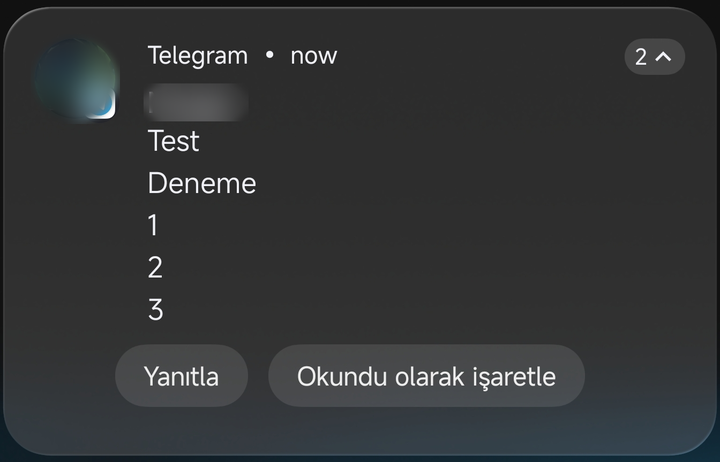
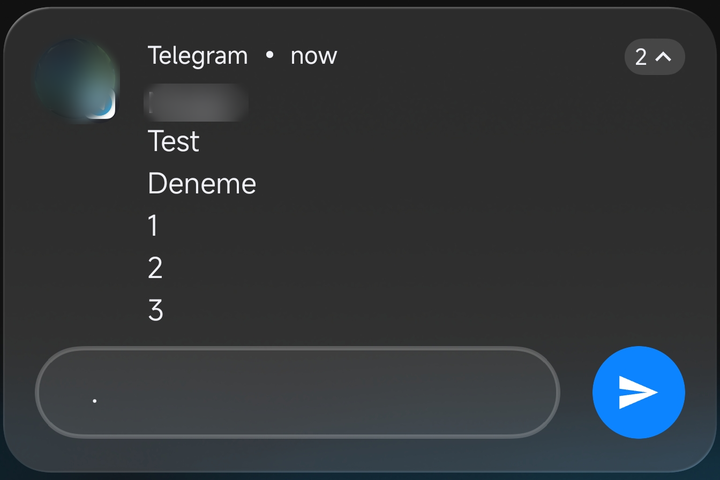
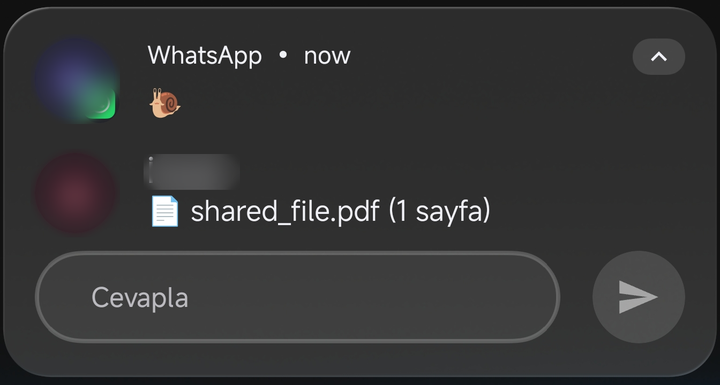
- ✅ HyperOS reply box for every app: Telegram, WhatsApp, Instagram, SMS and the rest get Xiaomi's own reply box, never the AOSP one.
- ✅ Clean send button: a frosted grey circle while the box is empty, blue with a paper plane once you type. Same height and line as the box.
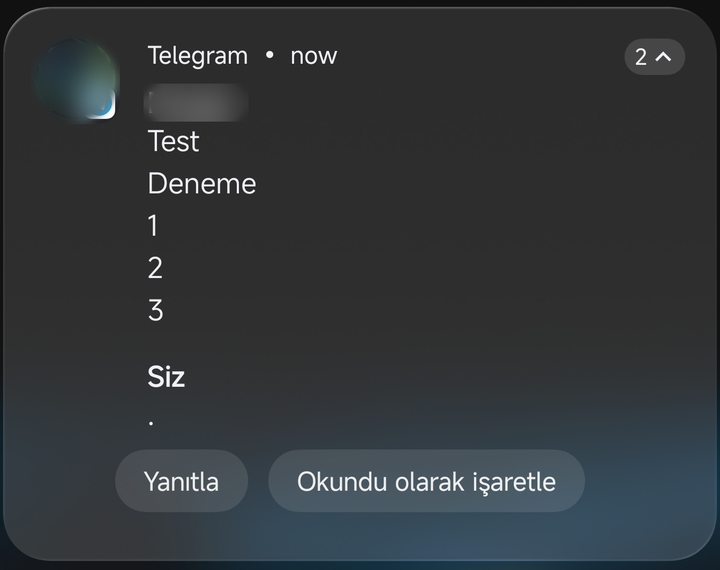
- ✅ Your reply shows up: after sending, the reply appears in the notification as "You: …" and the spinner stops, even for apps that do not update their notification (Telegram).
- ✅ HyperOS action buttons: "Reply", "Mark as read" and the others use Xiaomi's grey buttons, lined up with the text, also when there are three of them.
- ✅ Tidy pop-ups: the floating-window handle no longer touches the buttons or the reply box.
- ✅ Quieter details: the message count badge stays grey instead of the app colour, and the bubble button is hidden.
- Readable in the light and dark theme, also on the lock screen: colours follow the notification's own text colour.
| Xiaomi buttons | Typing a reply |
|---|---|
 |
 |
| Reply shown after sending | |
 |
 |
The phone's language is Turkish, so the buttons read "Yanıtla" (Reply) and "Okundu olarak işaretle" (Mark as read).
- A Xiaomi phone on the HyperOS 4 China ROM (Android 17)
- Root (KernelSU, SukiSU or Magisk) and LSPosed (API 102)
Tested on the Xiaomi 15 Ultra.
- Install XReply.
- Enable it in LSPosed. The scope is System UI only.
- Reboot.
XReply has no settings screen: once it is enabled, every notification uses the HyperOS look.
- Source: https://github.com/Leekin2/XReply (GPL-3.0)
- Feedback and complaints on Telegram: @emcleek
- Support group: Xgoogle for HyperOS
HyperOS'ta AOSP yanıt kutusu yerine gerçek HyperOS 4 bildirim yanıtı. HyperOS 4 Çin ROM'u için bir LSPosed modülü.
HyperOS'un bildirimler için kendi yanıt kutusu ve butonları var, ama bunları yalnızca kendi çizdiği bildirimlerde kullanıyor. Telegram, WhatsApp, SMS ve diğer mesajlaşma uygulamaları Android'in mesaj şablonunu kullandığı için bunlarda sade AOSP yanıt çubuğu ve hap butonlar çıkıyor. Çin ROM'unda bu bildirimlerden yanıt vermek de bozuk: gönderince buton dönmeye devam ediyor ve yazdığınız yanıt bildirimde hiç görünmüyor.
XReply her uygulamaya HyperOS görünümünü verir ve yanıtı düzeltir.
- ✅ Her uygulamada HyperOS yanıt kutusu: Telegram, WhatsApp, Instagram, SMS ve diğerlerinde Xiaomi'nin kendi kutusu açılır, AOSP kutusu hiç çıkmaz.
- ✅ Sade gönder butonu: kutu boşken buzlu gri daire, yazınca kâğıt uçaklı mavi. Kutuyla aynı boyda ve hizada.
- ✅ Yanıtınız görünür: gönderdikten sonra yanıt bildirimde "Siz: …" olarak çıkar, dönen simge durur; bildirimini güncellemeyen uygulamalarda bile (Telegram).
- ✅ HyperOS butonları: "Yanıtla", "Okundu olarak işaretle" ve diğerleri Xiaomi'nin gri butonlarıyla, metinle aynı hizada; üç buton olduğunda da.
- ✅ Düzgün açılır bildirimler: kayan pencere çizgisi artık butonlara ve yanıt kutusuna değmez.
- ✅ Daha sade ayrıntılar: mesaj sayısı rozeti uygulama rengine boyanmaz, gri kalır; baloncuk butonu gizlenir.
- Açık ve koyu temada, kilit ekranında da okunur: renkler bildirimin kendi yazı rengine göre seçilir.
- HyperOS 4 Çin ROM'lu (Android 17) bir Xiaomi telefon
- Root (KernelSU, SukiSU veya Magisk) ve LSPosed (API 102)
Xiaomi 15 Ultra'da test edildi.
- XReply'ı kurun.
- LSPosed'da etkinleştirin. Kapsam yalnızca Sistem arayüzü (System UI).
- Telefonu yeniden başlatın.
XReply'ın ayar ekranı yoktur: etkinleştirdiğiniz anda tüm bildirimler HyperOS görünümünü kullanır.
- Kaynak: https://github.com/Leekin2/XReply (GPL-3.0)
- Geri bildirim ve şikayet için Telegram: @emcleek
- Destek grubu: Xgoogle for HyperOS