






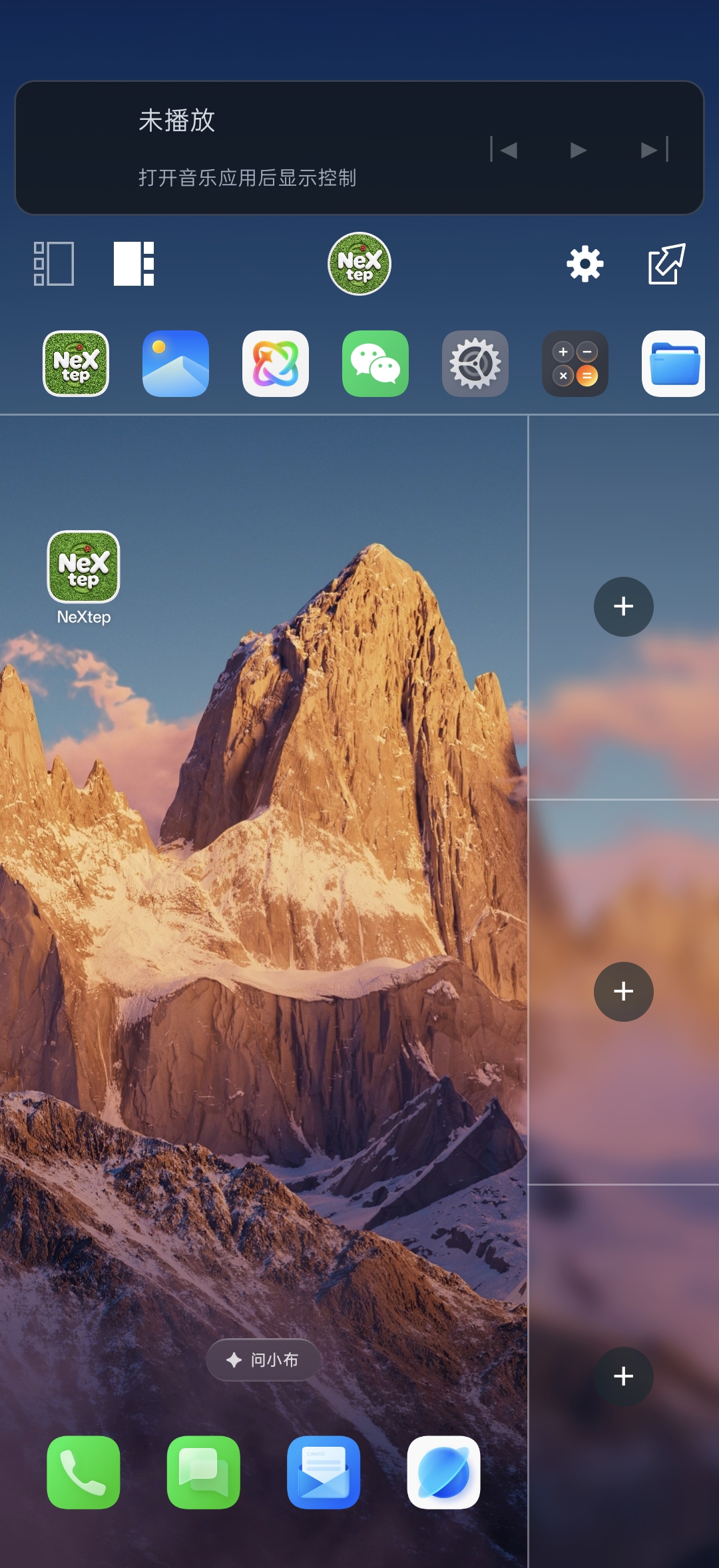
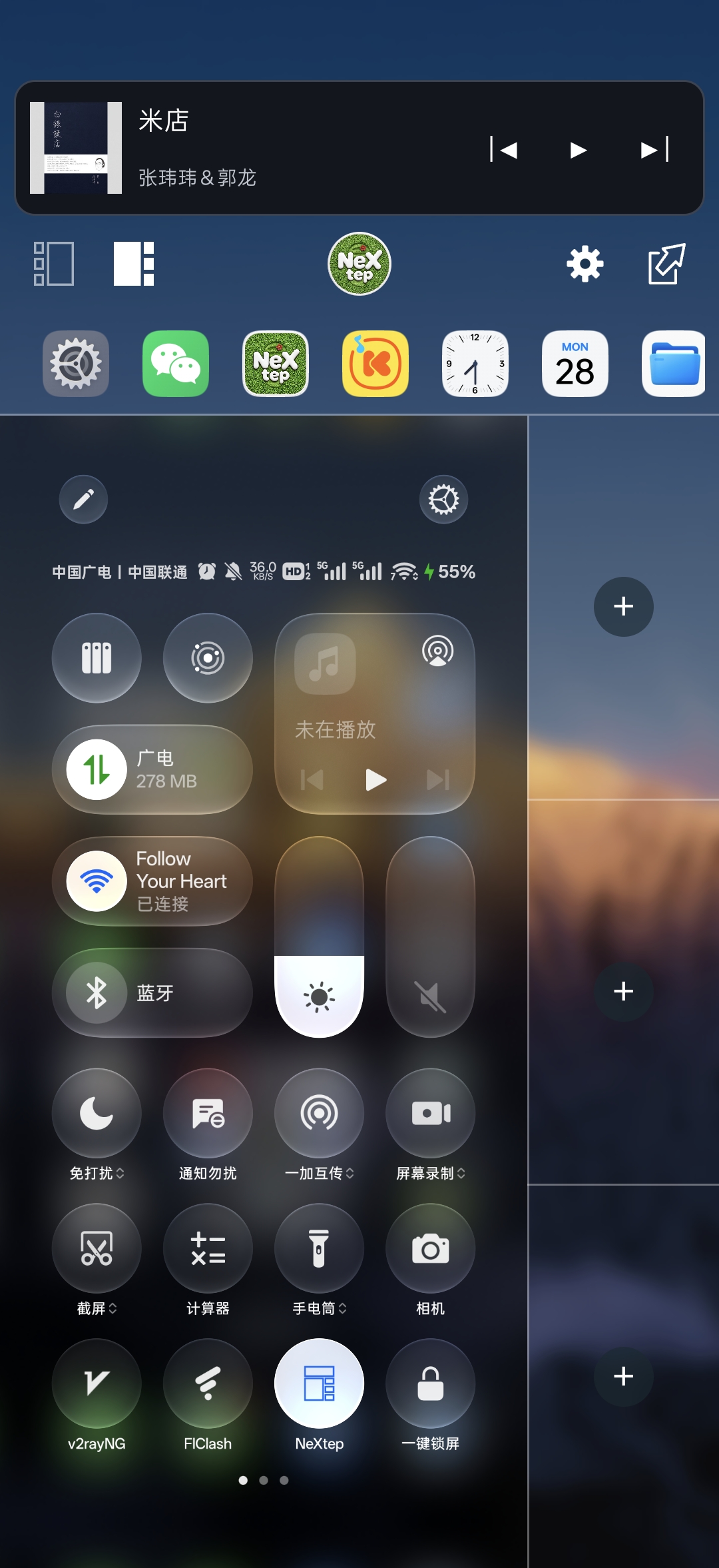
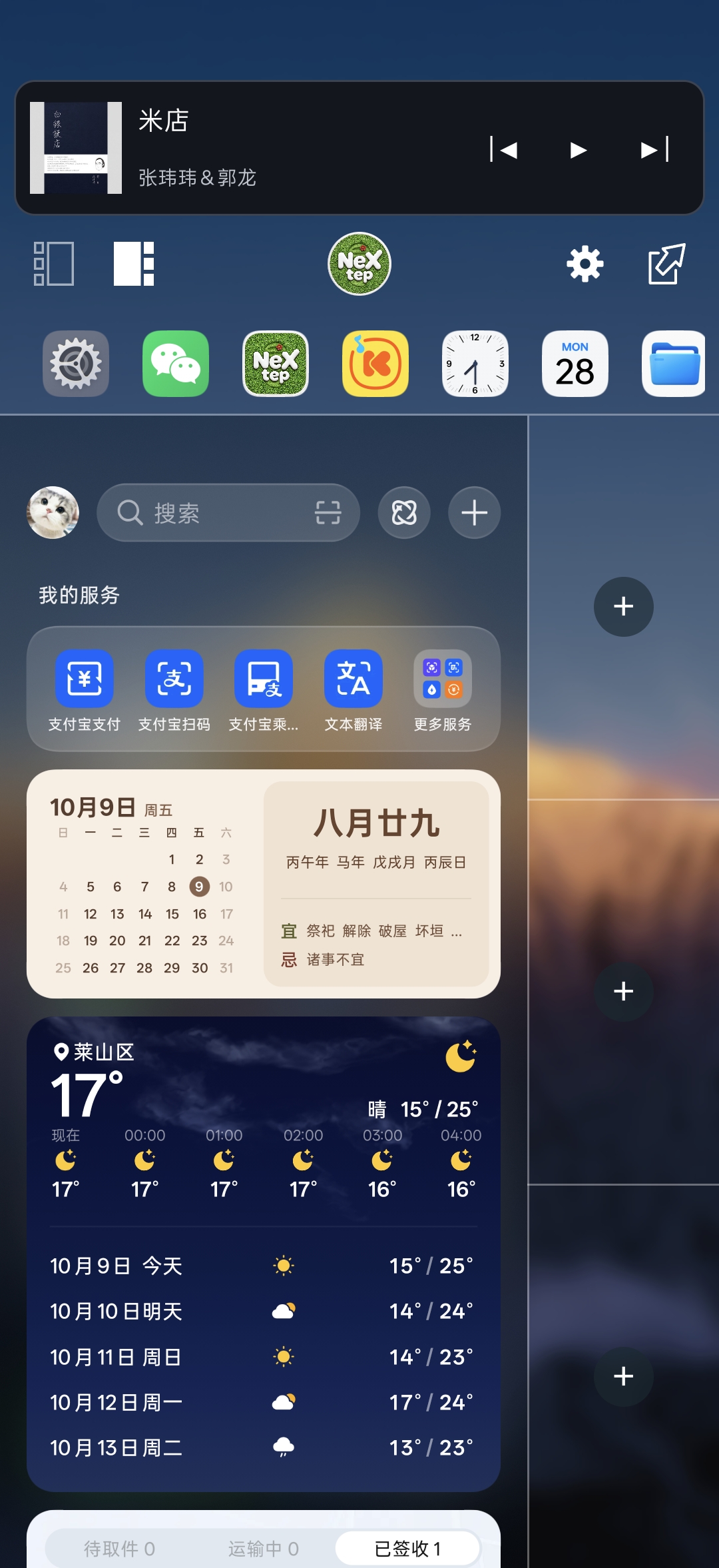
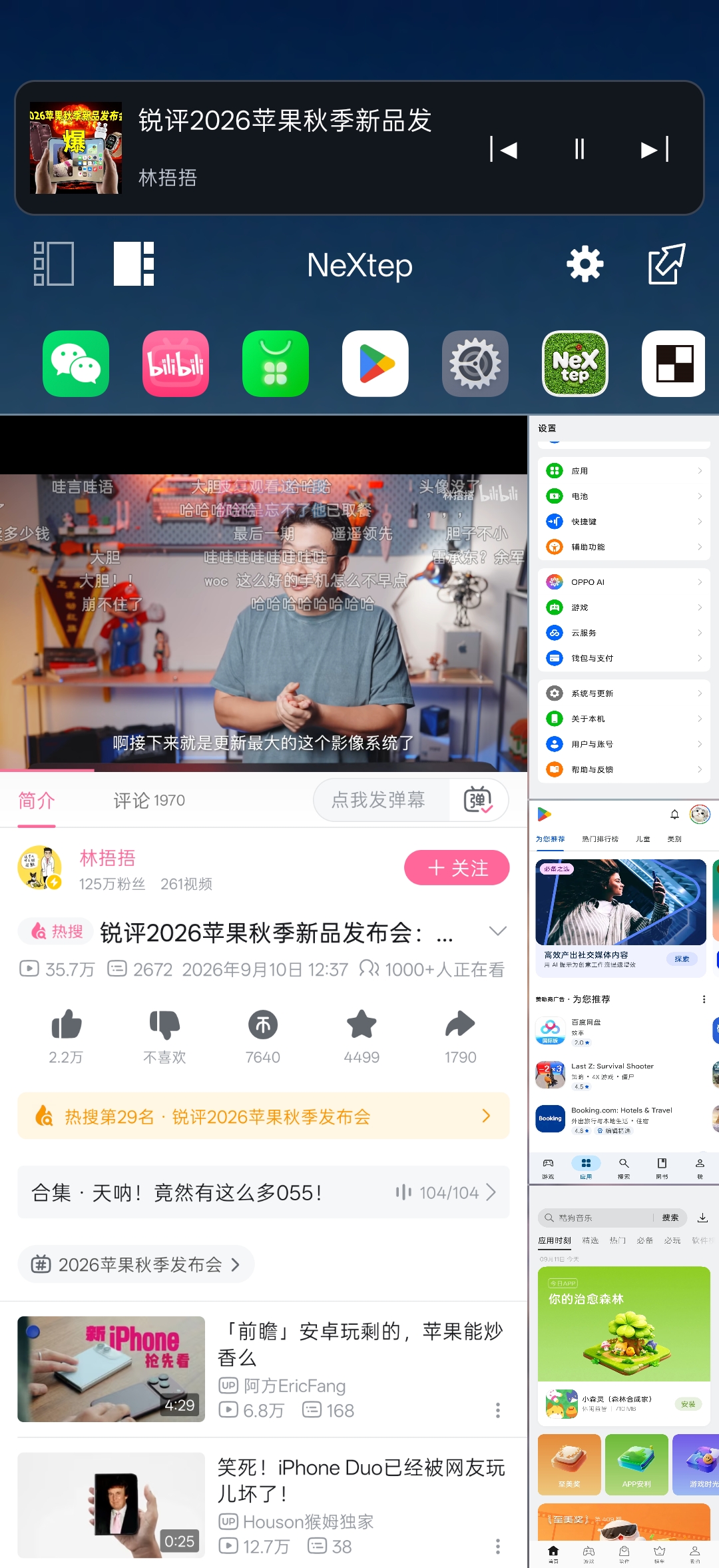
NeXtep is an LSPosed module that adds a native side workspace to ColorOS 16 / 17 while keeping the stock launcher. It provides one main window and three live task slots, with task switching, drag-and-drop, media controls, and customizable app shortcuts integrated into SystemUI.
The project primarily targets OnePlus PLK110, previously verified on Android 16 / ColorOS 16. Recent feature and compatibility testing is based on Android 17 / ColorOS 17. It relies on private Android and ColorOS behavior, so other devices, ROM versions, and vendor launchers require adaptation.
Download and release notes · Demo video on Bilibili
Features · Requirements · Installation · Workspace controls · External commands · Behavior switches
- Stock launcher: keeps the ColorOS launcher without registering a replacement HOME app, with adaptations for launcher shortcut menus, desktop search, and the assistant panel.
- One main window and three live slots: keep several app tasks visible together and move whole tasks between the main window and slots.
- Left and right layouts: switch the slot sidebar using the layout buttons in the control area.
- Portrait and both landscape orientations: keep the controls at the phone's physical top while the main app follows the landscape direction. The controls and three slots remain available during landscape video playback.
- Navigation-button adaptation: optionally fit the main window and slots around the system navigation bar. Enable it for three-button navigation and disable it for gesture navigation; after changing the system navigation mode, toggle the option again.
- Task retention: restore eligible slot tasks that remain in the system when closing and reopening the workspace. Locking pauses slot output; unlocking restores the workspace with its tasks.
- System integration: coexists with native floating windows above the workspace panels, and includes adaptations for keyboard focus, notification shade and Control Center interaction, brightness controls, and video-window sizing.
| Action | How to use it |
|---|---|
| Put the main app in a slot | With a regular app in the main window, tap the + in an empty slot. |
| Add from Recents | Center the desired task card in system Recents, then tap an empty slot's +. Recents stays open so you can add more apps. Exit split screen before adding a grouped split-screen card. |
| Exchange a slot with the main window | Tap an occupied slot, or long-press it and drag it onto the main window. |
| Move or exchange slots | Long-press an occupied slot and drag it onto an empty slot to move, or another occupied slot to exchange. Drop targets are highlighted during dragging. |
| Open an app in the main window | Tap its icon in the app strip. |
| Add from the app strip | Long-press an app icon and drag it onto the target slot. |
| Move a slot app to the background | Swipe outward: left for left-side slots, right for right-side slots. No long press is needed. This gesture can be disabled in Settings. |
| Move to the background by dragging | Long-press a slot and drag it onto the control area; release when Release to move to background appears. This remains available when swipe dismissal is disabled. |
Moving a slot app to the background frees the slot while retaining its task and leaving the main window unchanged. Opening an app from the launcher when it already occupies a slot exchanges it with the main window.
The optional Park the previous main app when switching setting moves the previous main app into an empty slot when switching from the app strip. If no empty slot is available, the app switch proceeds normally. It is disabled by default.
- Automatic ordering: arrange app shortcuts by recent usage; this is the default mode.
- Manual ordering: choose up to 36 apps, remove shortcuts, and long-press selected entries to reorder them.
- System app clones: show cloned apps in the app strip and manual selection list, with clone labels to distinguish them from the original apps.
- Display track artwork, title, and artist information from the active system media session, with previous, play/pause, and next controls as supported by the playback app.
- Tap the artwork, title, or another area outside the playback buttons to open the playback app in the main window. If it occupies a slot, it exchanges with the main window.
- Use a soft gradient drawn from the track artwork, retaining the colors while paused. With no media session or usable artwork, the card falls back to frosted wallpaper.
NeXtep 2.0.0 adds a video page alongside the control area's Controls page. Supported floating video windows are detected and displayed automatically. System picture-in-picture (PiP) and app-provided floating video windows are supported; compatibility with OEM freeform windows and protected video depends on the app and system.
- Start playback in the source app and enable system PiP or the app's own floating video window.
- Open the workspace. A supported floating window automatically moves into the Video page.
- Swipe left or right across the control area to switch between Controls and Video. If the window remains outside, use the video shortcut on Controls or tap Show video here on Video.
Video keeps its original aspect ratio, stays horizontally centered, and reaches the top edge of the screen using the status-bar area. The source app continues to handle playback. Tap the video to temporarily show Return to floating window, or use the return shortcut on Controls, to restore the original window. The button hides automatically to keep the picture clear. Locking the device or closing the workspace also restores the native window; a manually returned window stays outside after unlocking until it is captured again.
The control area and slot backgrounds use the wallpaper, including adaptations for ColorOS live wallpaper. Frosting leaves app content sharp.
| Setting | Options and behavior |
|---|---|
| Top content | NeXtep icon, time, date and weekday, blank, or custom text. The default is the icon; mode changes take effect immediately. |
| Clock seconds | Optional, disabled by default; the switch appears beside the time option. |
| Custom text | The editor appears in custom-text mode. Drafts are remembered when switching modes; tap Save text to apply edits. |
| Looping text | Disabled by default. Enable continuous scrolling for both short and long text; otherwise text is centered and overflow is ellipsized. Scrolling pauses while the workspace is hidden. |
| Font | Search, preview, and select fonts installed on the device, or choose a generic font family. System default follows the device's font setting. |
| Text size and weight | 10–28 sp, default 16 sp, with optional bold styling and an input preview. |
| Frost strength | 0–100, default 50. Release the slider to save and apply the value to the control area and slot backgrounds. |
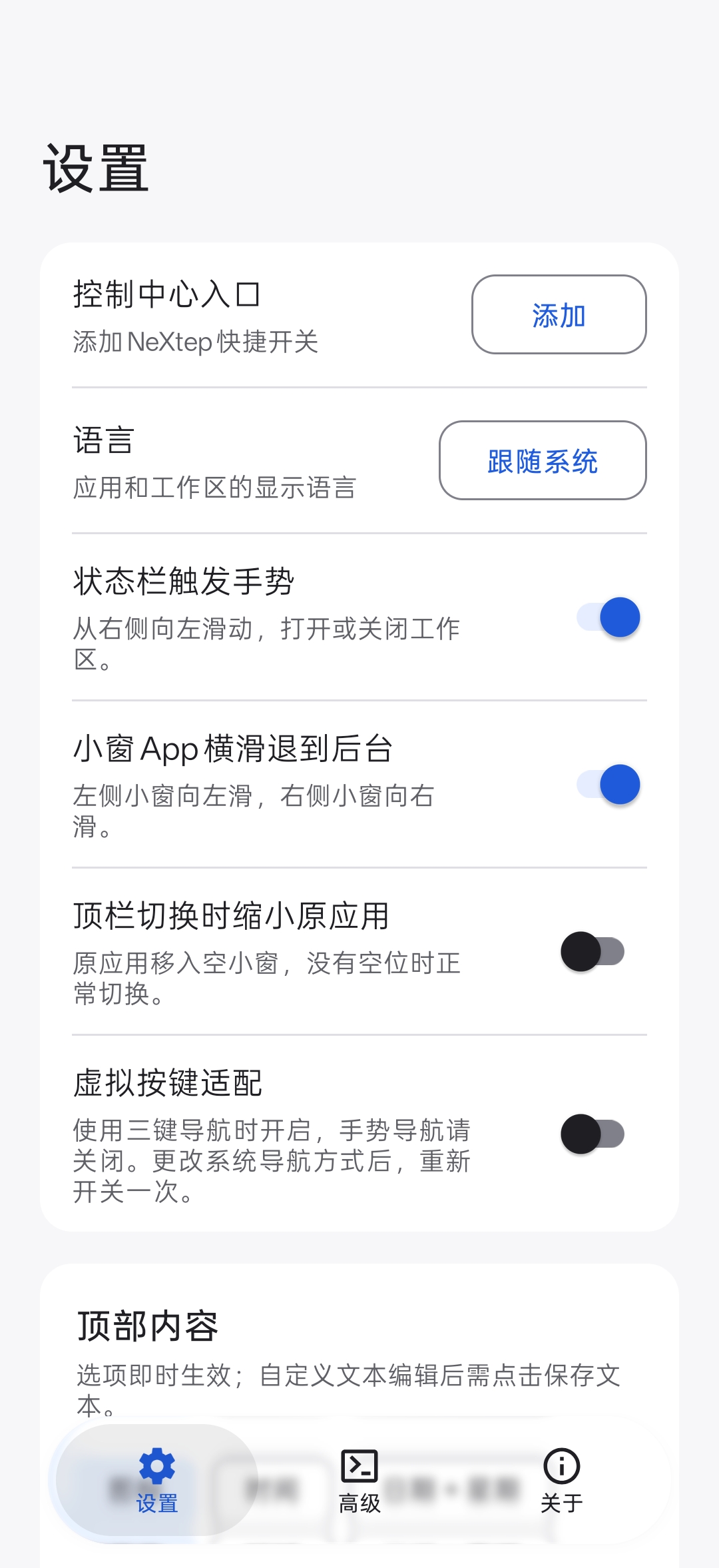
- Settings / Advanced / About: use bottom navigation to switch between workspace settings, external-control commands, and project information. The settings interface follows the system's light or dark theme and uses a liquid-glass bottom navigation bar.
- Languages: follow the system or select Simplified Chinese, Traditional Chinese, English, Japanese, or Korean for the app and workspace.
- Settings shortcut: tap the control area's gear button to open NeXtep settings while keeping workspace mode active.
- About: view the installed version, check for updates, open release and source pages, and read license information and acknowledgements.
- Update download: view available release notes and open the APK download in a browser. Downloaded updates are installed manually.
- OnePlus PLK110: previously verified on Android 16 / API 36, ColorOS 16; recent partial device testing uses Android 17 / API 37, ColorOS 17. The APK minimum is API 35, which does not imply compatibility with every device on that API level.
- A matching ColorOS 16 / 17 build on an adapted device.
- KernelSU or another compatible root solution.
- Zygisk and LSPosed with modern libxposed API support.
- Enable the module for all applicable packages in the bundled scope list, including SystemUI, system framework, launcher, app-clone service, and assistant panel.
This module modifies SystemUI, Launcher, and system-server behavior. Keep a working recovery path, and disable the module if the device enters a boot loop or core UI becomes unstable.
Testing has not covered every app or edge case. Other devices and ROMs require separate adaptation; untested configurations have no compatibility guarantee.
- Download the APK from GitHub Releases, or build it using docs/BUILDING.md.
- Install it on the target device.
- Enable NeXtep in LSPosed for all applicable packages in the bundled scope list.
- Reboot the device.
- Open NeXtep's Settings page to configure the workspace and add its Control Center tile.
After enabling the module and rebooting, unlock the device. Use any of these entry points:
- Status-bar gesture: swipe horizontally to the left from the top-right status-bar area. Swiping down still opens the system notification shade or Control Center. The gesture is enabled by default and can be disabled independently.
- Control Center tile: in NeXtep's Settings, tap Add in the Control Center entry row and confirm. Pull down Control Center and tap NeXtep to toggle the workspace. If adding it from the app fails, use Control Center's edit screen.
- External commands: copy commands from the Advanced page into a gesture, shortcut, automation, or terminal tool; see below.
- Exit button: tap the exit button in the workspace control area to return to fullscreen.
The Advanced page provides copy buttons for entering, exiting, and querying workspace mode. The module must be enabled and the device rebooted; run entry and exit commands with Root privileges while the phone is unlocked.
Enter the workspace:
am broadcast -n io.github.lujinxin.nextep/.trigger.WorkspaceControlBrokerReceiver -a io.github.lujinxin.nextep.action.HOST_SET_REQUEST --ez io.github.lujinxin.nextep.extra.REQUESTED_ACTIVE trueExit the workspace:
am broadcast -n io.github.lujinxin.nextep/.trigger.WorkspaceControlBrokerReceiver -a io.github.lujinxin.nextep.action.HOST_SET_REQUEST --ez io.github.lujinxin.nextep.extra.REQUESTED_ACTIVE falseQuery the current state:
settings get global nextep_workspace_active_v1The state is 1 while the workspace layout is active and 0 when inactive. Lock-screen suspension also publishes an inactive state; query after unlocking when using it in an automation.
These switches are on the Settings page; appearance and app ordering are described in the feature sections above.
| Setting | Default | Behavior |
|---|---|---|
| Status-bar gesture | On | Enable or disable the top-right horizontal gesture. The Control Center tile remains available. |
| Swipe slot apps to the background | On | Enable or disable outward swipe dismissal. Dragging a slot to the control area remains available. |
| Park the previous main app when switching | Off | Move the previous main app into an empty slot when switching from the app strip; switch normally if none is available. |
| Navigation-button adaptation | Off | Enable for three-button navigation and disable for gesture navigation. Toggle again after changing the system navigation mode. |
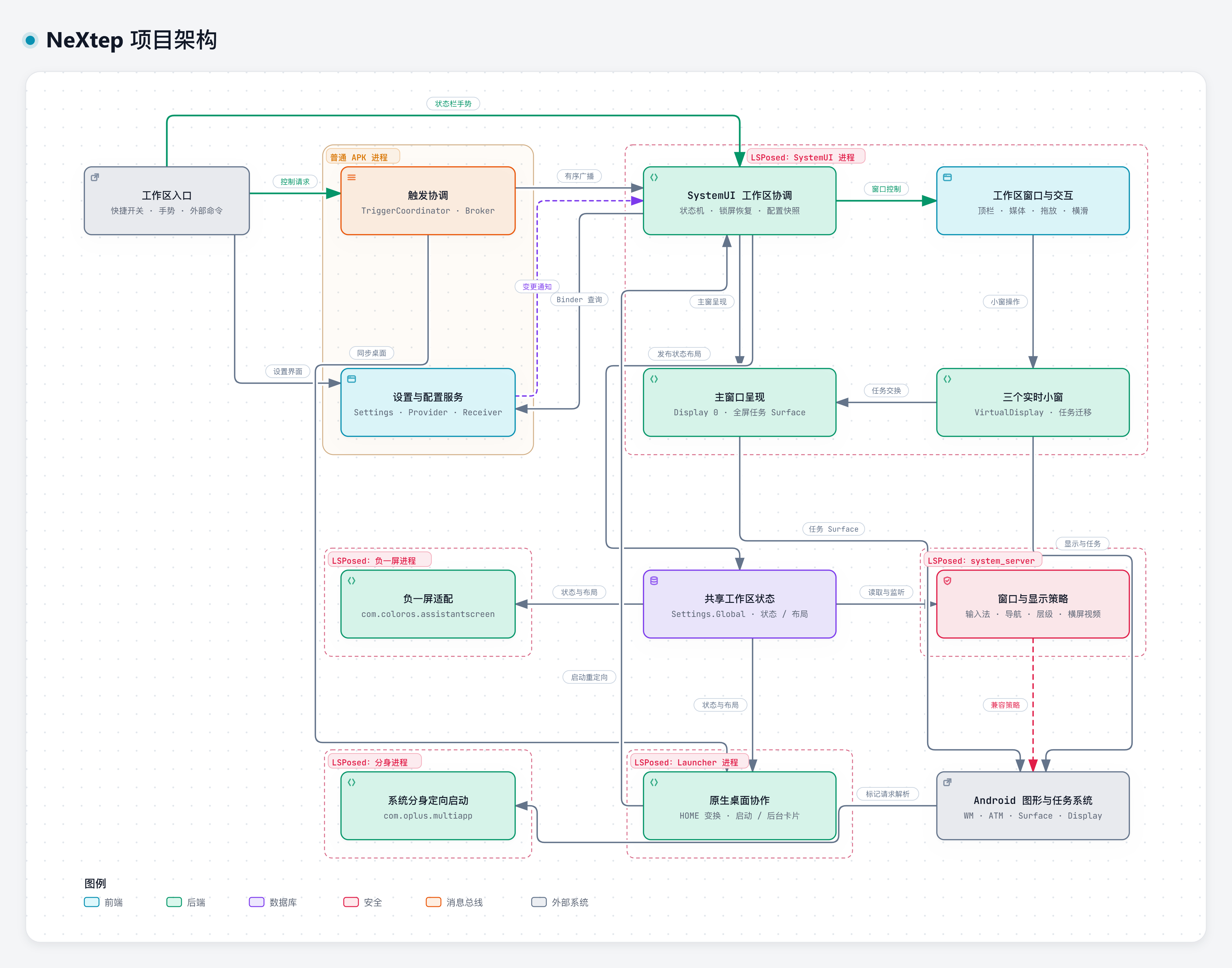
The diagram shows how the regular APK coordinates with the LSPosed-injected SystemUI, stock launcher, assistant panel, app-clone service, and system_server. It separates main-window presentation from the three live slots and shows configuration reads, change notifications, and shared runtime state. Compatibility hooks are guarded individually and skip unavailable targets.
Architecture details · Interactive diagram (download HTML to view) · Diagram source
QQ group: 1128561895
Special thanks to Smartisan OS OneStep for the product concept and interaction inspiration behind this project.
NeXtep is licensed under the Apache License 2.0. See THIRD_PARTY_NOTICES.md for third-party attribution and design provenance.
Copyright 2026 lujinxin.
NeXtep 是一个 LSPosed 模块。它在保留 ColorOS 16 / 17 原生桌面的同时,为系统加入原生侧边工作区,提供一个主窗口和三个实时小窗,并将任务切换、拖动操作、媒体控制和自定义应用快捷方式集成到 SystemUI 中。
本项目主要适配一加 PLK110,此前已在 Android 16 / ColorOS 16 上验证,近期功能与兼容性验证基于 Android 17 / ColorOS 17。项目依赖 Android 和 ColorOS 的私有行为,因此其他设备、系统版本和厂商桌面需要经过适配。
功能 · 使用要求 · 安装 · 工作区入口 · 外部命令 · 行为开关
- 保留原生桌面:不将 NeXtep 注册为替代的主屏幕应用,并对桌面快捷菜单、桌面搜索和负一屏进行适配。
- 一个主窗口、三个实时小窗:同时展示多个应用任务,可在主窗口与小窗之间移动整个任务。
- 左右侧布局:通过控制区的布局按钮,将小窗侧栏切换到屏幕左侧或右侧。
- 竖屏与双向横屏:控制区保持在手机物理顶部,主窗口应用随横屏方向旋转;横屏视频播放时仍保留控制区和三个小窗。
- 虚拟按键适配:可根据系统导航栏边界调整主窗与小窗布局。三键导航时开启,手势导航时关闭;更改系统导航方式后,重新开关一次此选项。
- 任务保留与恢复:关闭并重新打开工作区时,可恢复仍保留在系统中的符合条件的小窗任务;锁屏时暂停小窗输出,解锁后恢复工作区及原有任务。
- 系统交互适配:支持与系统原生悬浮窗共存,原生悬浮窗位于工作区面板上方;同时适配输入法焦点、通知栏、控制中心、亮度控件和视频窗口尺寸。
| 操作 | 使用方法 |
|---|---|
| 将主窗口应用加入小窗 | 主窗口为普通应用时,点击空小窗的 +。 |
| 从多任务页添加 | 将目标后台卡片移到屏幕中间,点击空小窗的 +。添加后保持多任务页打开,可连续添加;分屏组合卡片需先退出分屏。 |
| 主窗口与小窗交换 | 点击已有应用的小窗,或长按小窗后拖到主窗口。 |
| 小窗之间移动或交换 | 长按已有应用的小窗,拖到空小窗时移动,拖到已占用小窗时交换;拖动时高亮目标区域。 |
| 在主窗口打开应用 | 点击顶部 App 栏中的应用图标。 |
| 从 App 栏加入小窗 | 长按应用图标,拖到目标小窗后松手。 |
| 横滑移到后台 | 在小窗上直接向屏幕外侧滑动:左侧小窗向左滑,右侧小窗向右滑,无需长按;可在设置中关闭。 |
| 拖动移到后台 | 长按小窗并拖到控制区,看到**“松手移到后台”**后释放;关闭横滑退后台后仍可使用。 |
移到后台会释放小窗位置,同时保留应用任务,当前主窗口保持原样。从桌面再次打开已在小窗中的应用时,会与主窗口交换。
可选的**“顶栏切换时缩小原应用”**功能,会在点击顶部 App 栏切换应用时,将原主窗口应用放入空小窗;没有空位时正常切换。此功能默认关闭。
- 自动排序:按最近使用情况排列应用快捷方式,默认使用此模式。
- 手动排序:最多选择 36 个应用,支持移除快捷方式,并长按已选项目拖动调整顺序。
- 系统分身应用:分身应用可出现在 App 栏和手动选择列表中,通过分身标记与原应用区分。
- 从系统媒体会话中显示歌曲封面、标题和歌手信息,提供上一首、播放/暂停、下一首按钮,具体可用操作取决于播放应用。
- 点击封面、标题等非播放按钮区域,在主窗口打开播放应用;如果播放应用已在小窗中,则与主窗口交换。
- 有可用封面时,自动生成柔和的封面取色渐变,暂停时保留配色;没有媒体会话或可用封面时,回退到壁纸磨砂背景。
NeXtep 2.0.0 在控制区的**“功能”页之外加入“视频”**页,可自动识别并接入支持的悬浮视频小窗。支持系统画中画(PiP)和应用自行提供的视频悬浮窗;厂商自由小窗和受保护视频的兼容性取决于应用与系统。
- 先在来源应用中播放视频,并开启系统画中画或应用自己的悬浮小窗。
- 打开工作区,支持的悬浮小窗会自动接入**“视频”**页。
- 在控制区左右滑动,切换**“功能”页与“视频”页。如果小窗仍在外部,可点击功能页的视频快捷按钮,或在视频页点击“在此显示视频”**。
视频保持原始比例、水平居中显示,利用状态栏空间贴合屏幕顶部,避免拉伸。播放仍由来源应用负责。轻点视频可临时显示**“返回原小窗”**按钮,也可通过功能页的返回快捷按钮恢复原小窗;返回按钮会自动隐藏,减少画面遮挡。锁屏或退出工作区时,也会归还原悬浮窗;手动返回的小窗在解锁后保持在外部,直到再次接入。
控制区和小窗背景使用壁纸,并对 ColorOS 动态壁纸进行适配。磨砂效果不影响应用内容的清晰度。
| 设置项 | 选项与行为 |
|---|---|
| 顶部内容 | NeXtep 图标、时间、日期+星期、留空、自定义文本;默认显示图标,切换选项即时生效。 |
| 显示秒 | 默认关闭,开关位于时间选项右侧。 |
| 自定义文本 | 选择自定义文本时显示编辑框;切换模式会保留草稿,编辑后点击**“保存文本”**生效。 |
| 循环滚动文字 | 默认关闭;开启后短文本与长文本均循环滚动,关闭时居中显示,超长部分省略;工作区隐藏时暂停滚动。 |
| 字体 | 搜索、预览并选择本机已安装字体,也可使用通用字体;系统默认跟随手机的字体设置。 |
| 字号与粗体 | 字号范围 10–28 sp,默认 16 sp,支持粗体和输入预览。 |
| 磨砂强度 | 范围 0–100,默认 50;松开滑块后保存并应用到控制区和小窗背景。 |
- 设置/高级/关于:通过底部导航切换工作区设置、外部调用命令和项目信息;设置界面跟随系统浅色/深色主题,底部导航提供液态玻璃效果。
- 语言选择:应用与工作区可跟随系统,或手动选择简体中文、繁体中文、英语、日语、韩语。
- 设置快捷入口:点击工作区控制区的齿轮按钮打开 NeXtep 设置,并保持小窗模式。
- 关于页面:查看已安装版本、检查更新、打开发布页面和源码,以及查看开源协议与致谢名单。
- 更新下载:查看可用版本的更新说明,通过浏览器下载 APK,下载后手动安装。
- 一加 PLK110:此前已在 Android 16 / API 36、ColorOS 16 上验证,近期部分真机验证使用 Android 17 / API 37、ColorOS 17。APK 最低安装版本为 API 35,不代表适配所有达到此 API 等级的设备。
- 与已适配设备相匹配的 ColorOS 16 / 17 系统版本。
- KernelSU 或其他兼容的 Root 方案。
- Zygisk 和 LSPosed,并支持新版 libxposed API。
- 在 LSPosed 中勾选内置作用域列表中适用于当前设备的全部项目,包括 SystemUI、系统框架、桌面、应用分身服务和负一屏。
本模块会修改 SystemUI、桌面和 system server 的行为。请确保设备具备可用的恢复手段;如果设备出现无法开机或核心界面不稳定等问题,请停用本模块。
真机验证尚未覆盖所有应用和边界场景,其他设备和 ROM 仍需单独适配,未经测试的环境不作兼容性保证。
- 从 GitHub Releases 下载 APK,或按照 docs/BUILDING.md 自行构建。
- 将 APK 安装到目标设备。
- 在 LSPosed 中为内置作用域列表中适用于当前设备的全部项目启用 NeXtep。
- 重启设备。
- 打开 NeXtep 的**“设置”**页,配置工作区并添加控制中心入口。
启用模块并重启设备后,在解锁状态下,可通过以下入口操作:
- 状态栏手势:从屏幕右上角的状态栏区域水平向左滑动;向下滑动仍按系统原有方式打开通知栏或控制中心。此手势默认开启,可独立关闭。
- 控制中心开关:在 NeXtep 设置页的**“控制中心入口”一行点击“添加”**并确认,随后下拉控制中心,点击 NeXtep 开关切换工作区状态。应用内添加失败时,可在控制中心编辑页面手动添加。
- 外部命令:在**“高级”**页复制命令,配置到手势、快捷操作、自动化或终端工具中,具体见下文。
- 退出按钮:点击工作区控制区的退出按钮,返回全屏模式。
“高级”页提供进入、退出小窗模式及查询状态的命令和复制按钮。请先启用模块并重启设备;进入和退出命令需在手机解锁后,以 Root 权限执行。
进入小窗模式:
am broadcast -n io.github.lujinxin.nextep/.trigger.WorkspaceControlBrokerReceiver -a io.github.lujinxin.nextep.action.HOST_SET_REQUEST --ez io.github.lujinxin.nextep.extra.REQUESTED_ACTIVE true退出小窗模式:
am broadcast -n io.github.lujinxin.nextep/.trigger.WorkspaceControlBrokerReceiver -a io.github.lujinxin.nextep.action.HOST_SET_REQUEST --ez io.github.lujinxin.nextep.extra.REQUESTED_ACTIVE false查询当前状态:
settings get global nextep_workspace_active_v1工作区布局处于开启状态时返回 1,未开启时返回 0。锁屏挂起期间也会记录为未开启,自动化场景请在解锁后查询。
以下开关均位于**“设置”**页,外观和 App 排列选项见上方功能说明。
| 设置项 | 默认值 | 行为 |
|---|---|---|
| 状态栏触发手势 | 开启 | 控制右上角水平滑动手势;关闭后仍可使用控制中心开关。 |
| 小窗 App 横滑退到后台 | 开启 | 控制向外侧滑动移入后台;关闭后仍可拖到控制区移入后台。 |
| 顶栏切换时缩小原应用 | 关闭 | 从顶栏切换应用时,将原主窗口应用移入空小窗;没有空位时正常切换。 |
| 虚拟按键适配 | 关闭 | 三键导航时开启,手势导航时关闭;更改系统导航方式后,重新开关一次。 |
下图展示普通 APK 与经 LSPosed 接入的 SystemUI、原生桌面、负一屏、应用分身和 system_server 之间的协作。图中区分主窗口呈现与三个实时小窗,并标注配置读取、变更通知及共享状态链路。兼容性 Hook 分别进行保护,在目标不可用时跳过对应处理。
架构说明 · 交互式架构图(下载 HTML 后打开) · 图源 JSON
QQ 群:1128561895
特别感谢锤子科技 Smartisan OS OneStep,为本项目提供了产品理念与交互设计灵感。
NeXtep 使用 Apache License 2.0 授权。第三方署名和设计来源请参阅 THIRD_PARTY_NOTICES.md。
Copyright 2026 lujinxin.