Fake GPS: Fake GPS Navigation & Joystick

Ultra-realistic GPS spoofing for rooted Android — powered by LSPosed / libxposed. Giả lập GPS siêu thực cho Android đã root — chạy trên LSPosed / libxposed.

libxposed API 102 Android 7.0+ (API 24)


/ Module Info · Thông tin module

Key / Mục Value / Giá trị
Name / Tên Fake GPS: Fake GPS Navigation & Joystick
Package io.github.mwarevn.fakegps
Module API libxposed API 102 (min / target)
Min Android 7.0 (API 24)
Source https://github.com/mwarevn/fake-gps

/ Table of Contents · Mục lục


🇬🇧 English

Overview

Fake GPS hooks deep into Android's location stack so every app on the device sees the fake fix instead of the real one. It intercepts the platform location framework (system_server, the Google Play Services fused provider, and the two raw message channels — NMEA and GnssStatus), and additionally denies the side-channels (sensors, network, cell, Wi-Fi / Bluetooth scans, reverse geocoding) that a determined app would otherwise use to re-derive your real position.

Beyond a simple static point, it ships a full location toolkit: route navigation simulation, an analog joystick, GPS track recording / replay, and unattended scheduling that keeps working even while the app is killed.

Features

Spoofing

  • Static spoof — teleport the fix to any point on the map.
  • Unstable indoor GPS (jitter) — optional small autocorrelated wander within the reported accuracy radius, so a "held" fix wobbles like a real stationary receiver instead of sitting dead-still.

Navigation

  • Route navigation simulator — route planning via Mapbox Directions; the engine drives the fake fix along the polyline in a background foreground service.
    • Simulated red lights (configurable density + wait range)
    • Auto-decelerate into curves
    • Ping-pong loop mode (A → B → A …)
    • Off-road connectors, smooth interpolation
  • Analog joystick — live-drive the fake position in real time at up to 150 km/h with fine control near the centre.

Recording & Replay

  • Record the real device GPS track (+ pause / resume).
  • Replay a track at its real recorded timing, or at a custom speed.

Automation

  • Scheduled actions (one-shot / daily / weekly): fire a static spoof, navigate, replay, or stop — executed by a native AlarmManager, so they run even when the app process is killed. State reconciles live when the app reopens.

Stealth / Anti-detection

  • Per-app or system-wide spoofing (system mode via the system_server hook).
  • Independent toggles to deny the real signals that leak position:
    • Accuracy, motion sensors
    • Network location, cell (cell-ID) resolution
    • Wi-Fi scan, Bluetooth scan
    • Reverse geocoding
  • Fake satellite sky view (GnssStatus) and NMEA streams.

Quality of life

  • Share-link in / out: Google Maps, Apple Maps, Waze, Grab, OSM, geo: URIs.
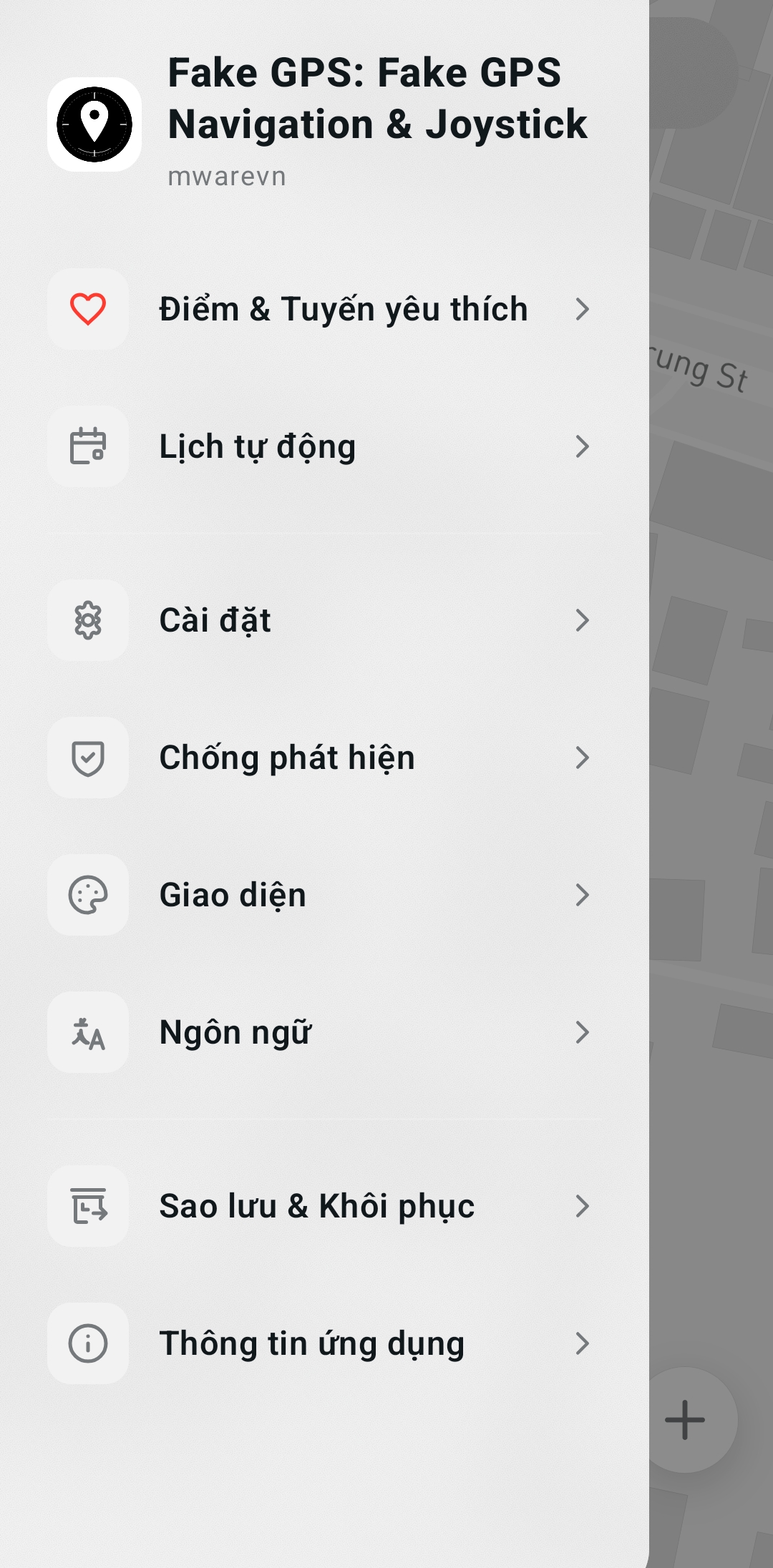
  • Favorites for points and routes.
  • Backup & restore (settings, favorites, schedules, recorded tracks).
  • In-app updater — self-sideload of GitHub release APKs, with release metadata verified by ECDSA P-256 (anti-MITM) and an APK-signature anti-tamper vault.
  • Multi-language UI: English, Tiếng Việt, 简体中文, 繁體中文.

Requirements

  • A rooted device.
  • LSPosed (the modern Vector build for libxposed API 102).
  • Zygisk (e.g. ReZygisk).
  • Android 7.0+ (API 24).

⚠️ Use the latest LSPosed (Vector) and Zygisk (ReZygisk). Remove any older module build before installing this one.

Installation

🎬 Video guide: https://youtu.be/26nd7CD_Erc

1. Prepare the device

  • Make sure the device is rooted (Magisk / KernelSU / APatch).
  • Install Zygisk (e.g. ReZygisk) and LSPosed (the Vector build for libxposed API 102).
  • If you previously installed an older build of this module, uninstall it first.

2. Install the APK

  • Download the latest APK from the Releases page.
  • Install it on the device (you may need to allow "Install unknown apps").

3. Enable the module in LSPosed

  1. Open the LSPosed manager.
  2. Go to Modules and enable Fake GPS.
  3. Select the scope:
    • system + android + com.google.android.gms → system-wide spoofing (affects every app).
    • Or pick individual apps for per-app spoofing.

4. Reboot

  • Reboot the device. LSPosed hooks are applied at process fork time, so the module only becomes active after a fresh boot.

5. Grant permissions

  • Open the app and grant the requested location permissions.
  • (Optional) Grant POST_NOTIFICATIONS for the status notification.
  • (Optional) Disable battery optimization for reliable scheduled actions.

Usage

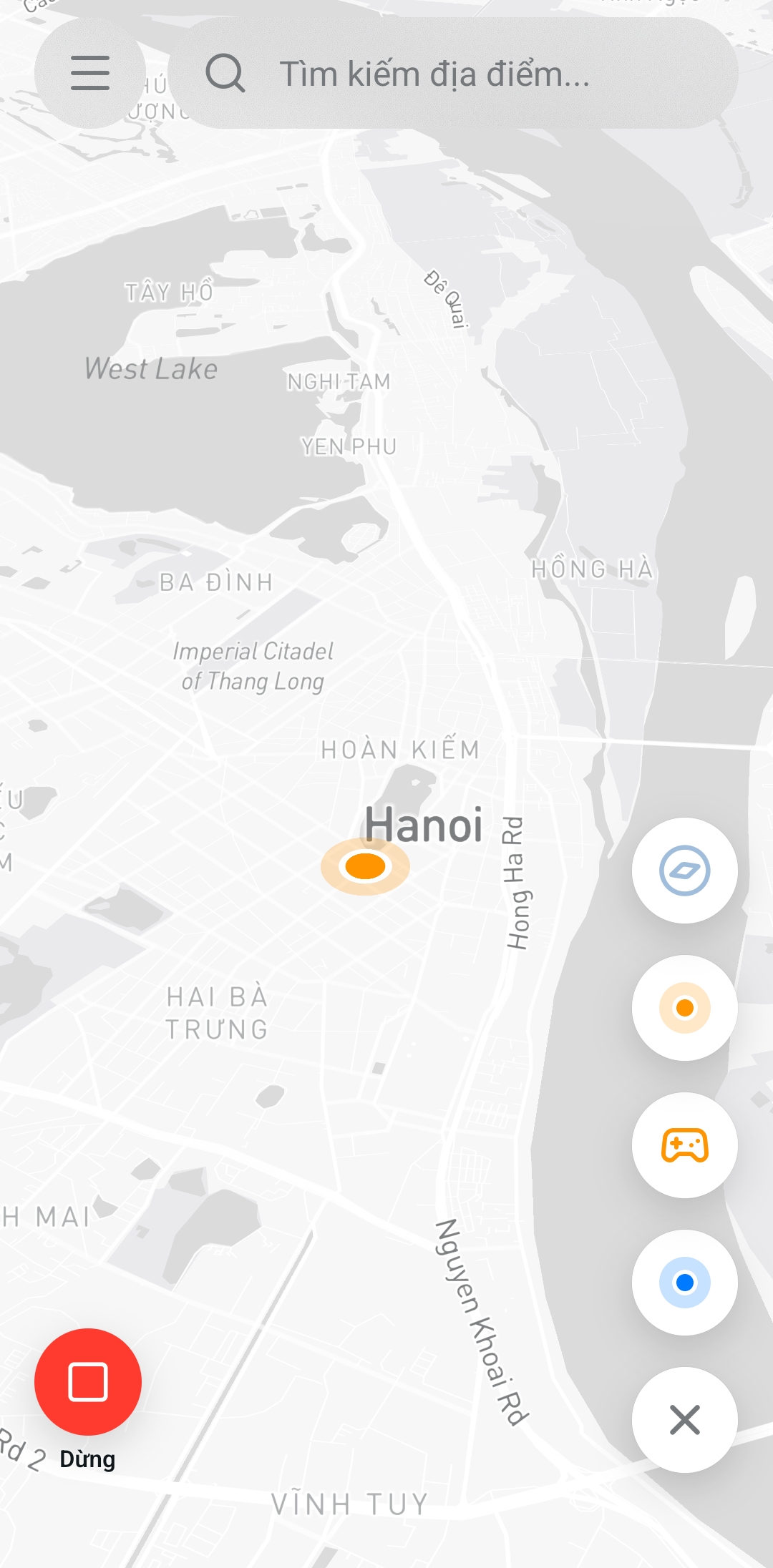
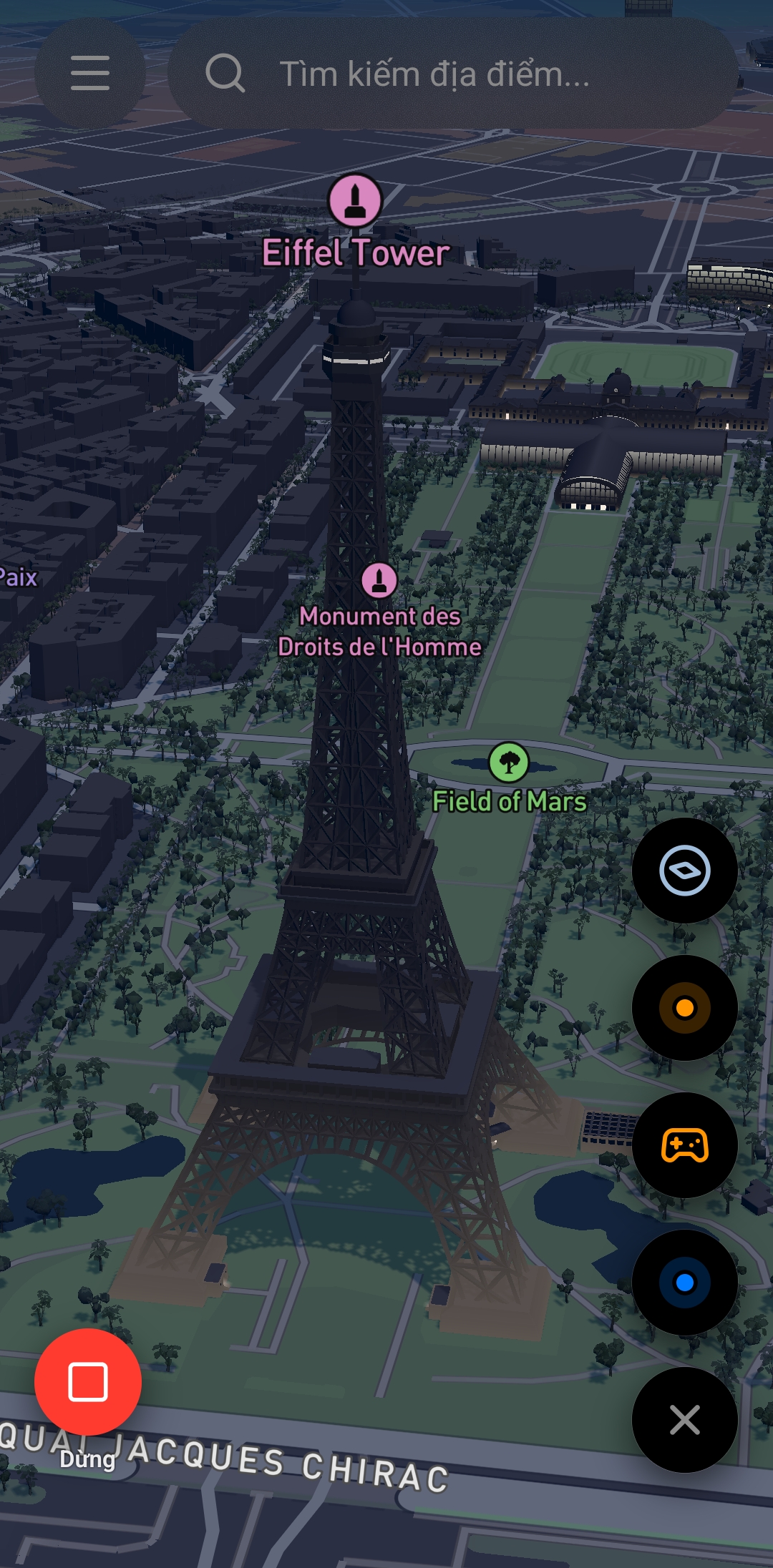
  1. Open Fake GPS — the full-screen map is the home screen.
  2. Search or tap a point on the map, then tap Set to start spoofing there. Open any other app to confirm it sees the fake location.
    • Tap the fake marker again and use Replace to move it, or Unset to stop.
  3. Route navigation: mark a destination → Directions → adjust the draft → press Start. Use the HUD to change speed, toggle red lights / auto-decelerate / loop, pause, or skip a red light.
  4. Joystick: open the joystick control and drag to live-drive the fake fix.
  5. Record / Replay: record your real track, then replay it at real timing or a custom speed.
  6. Schedules: create one-shot / daily / weekly actions (spoof, navigate, replay, stop) that fire even while the app is closed.
  7. Settings → Anti-detection: fine-tune the stealth toggles per your needs.

System-wide mode (hooking system_server) takes effect on the next process load — a device reboot is required after switching it on.

Troubleshooting

Symptom Fix
Module not listed in LSPosed Reinstall the APK; confirm it is a libxposed API 102 build and that Zygisk is enabled.
Apps still show the real location Ensure the scope includes system + com.google.android.gms, then reboot. Verify the module is active inside the app.
Scheduled action did not fire Disable battery optimization for the app; allow exact alarms; check the schedule is enabled.
Map is blank / crashes on launch Provide a valid Mapbox public token (pk.) in the app settings.
Spoof stops after a while Some apps re-check; make sure your anti-detection toggles match the target app.

Disclaimer

This module is intended for testing, development, and privacy. Spoofing your location may violate the terms of service of some apps and may be illegal in certain contexts. You are responsible for how you use it. Use it only where you are permitted to.


🇻🇳 Tiếng Việt

Tổng quan

Fake GPS can thiệp sâu vào tầng location của Android để mọi ứng dụng trên máy đều nhận vị trí giả thay vì vị trí thật. Module hook vào framework location của hệ thống (system_server, provider fused của Google Play Services, và cả hai kênh thô NMEA / GnssStatus), đồng thời chặn các kênh phụ (sensor, network, cell, quét Wi-Fi / Bluetooth, reverse geocoding) mà app tinh vi có thể dùng để suy ngược ra vị trí thật của bạn.

Ngoài việc giả lập một điểm tĩnh đơn giản, module còn là một bộ công cụ vị trí đầy đủ: mô phỏng dẫn đường theo lộ trình, joystick analog, ghi / phát lại track GPS, và lên lịch chạy tự động ngay cả khi app đã bị tắt.

Tính năng

Giả lập

  • Giả lập tĩnh — dịch chuyển vị trí giả tới bất kỳ điểm nào trên bản đồ.
  • GPS trong nhà không ổn định (jitter) — tùy chọn cho vị trí "đang giữ" dao động nhẹ có tương quan trong bán kính accuracy, giống một máy thu đứng yên thật thay vì đứng im tuyệt đối.

Dẫn đường

  • Mô phỏng dẫn đường theo lộ trình — lập lộ trình qua Mapbox Directions; engine chạy vị trí giả dọc theo polyline trong một foreground service nền.
    • Đèn đỏ mô phỏng (tùy chỉnh mật độ + khoảng thời gian chờ)
    • Tự giảm tốc khi vào cua
    • Chế độ lặp lại (ping-pong A → B → A …)
    • Nối đoạn off-road, nội suy mượt
  • Joystick analog — điều khiển vị trí giả theo thời gian thực, tối đa 150 km/h, cảm giác chính xác cao quanh tâm.

Ghi & phát lại

  • Ghi track GPS thật của thiết bị (+ tạm dừng / tiếp tục).
  • Phát lại track theo đúng thời gian thật đã ghi, hoặc theo tốc độ tùy chọn.

Tự động hóa

  • Hành động theo lịch (một lần / hằng ngày / hằng tuần): chạy giả lập tĩnh, dẫn đường, phát lại, hoặc dừng — thực thi bằng AlarmManager native nên chạy được kể cả khi app đã bị kill. Khi mở lại app, trạng thái được đồng bộ ngay.

Tàng hình / Chống phát hiện

  • Theo từng app hoặc toàn hệ thống (chế độ system qua hook system_server).
  • Các công tắc độc lập để chặn tín hiệu thật làm lộ vị trí:
    • Accuracy, sensor chuyển động
    • Network location, cell (định vị theo cell-ID)
    • Quét Wi-Fi, quét Bluetooth
    • Reverse geocoding
  • Giả sky view vệ tinh (GnssStatus) và luồng NMEA.

Tiện ích

  • Chia sẻ link vào / ra: Google Maps, Apple Maps, Waze, Grab, OSM, URI geo:.
  • Yêu thích cho điểm và lộ trình.
  • Sao lưu & phục hồi (cài đặt, yêu thích, lịch, track đã ghi).
  • Cập nhật trong app — tự cài APK từ GitHub Releases, metadata release được xác minh bằng ECDSA P-256 (chống MITM) và két chống can thiệp chữ ký APK.
  • Giao diện 4 ngôn ngữ: English, Tiếng Việt, 简体中文, 繁體中文.

Yêu cầu

  • Thiết bị đã root.
  • LSPosed (bản Vector hiện đại cho libxposed API 102).
  • Zygisk (ví dụ ReZygisk).
  • Android 7.0+ (API 24).

⚠️ Dùng LSPosed (Vector) và Zygisk (ReZygisk) mới nhất. Gỡ bản module cũ trước khi cài bản này.

Cài đặt

🎬 Video hướng dẫn: https://youtu.be/26nd7CD_Erc

1. Chuẩn bị thiết bị

  • Đảm bảo thiết bị đã root (Magisk / KernelSU / APatch).
  • Cài Zygisk (ví dụ ReZygisk) và LSPosed (bản Vector cho libxposed API 102).
  • Nếu đã từng cài bản module cũ, gỡ cài đặt trước.

2. Cài APK

  • Tải APK mới nhất từ trang Releases.
  • Cài lên thiết bị (có thể cần bật "Cài đặt ứng dụng không rõ nguồn gốc").

3. Bật module trong LSPosed

  1. Mở trình quản lý LSPosed.
  2. Vào Modules và bật Fake GPS.
  3. Chọn phạm vi (scope):
    • system + android + com.google.android.gms → giả lập toàn hệ thống (ảnh hưởng mọi app).
    • Hoặc chọn từng app riêng cho giả lập theo app.

4. Khởi động lại

  • Khởi động lại thiết bị. Hook của LSPosed được áp dụng lúc tiến trình fork, nên module chỉ hoạt động sau khi khởi động lại.

5. Cấp quyền

  • Mở app và cấp quyền vị trí được yêu cầu.
  • (Tùy chọn) Cấp POST_NOTIFICATIONS cho thông báo trạng thái.
  • (Tùy chọn) Tắt tối ưu pin để hành động theo lịch chạy tin cậy.

Sử dụng

  1. Mở Fake GPS — bản đồ toàn màn hình là màn hình chính.
  2. Tìm kiếm hoặc chạm một điểm trên bản đồ, rồi bấm Set để bắt đầu giả lập tại đó. Mở app khác để xác nhận thấy vị trí giả.
    • Chạm lại vào điểm giả và dùng Replace để di chuyển, hoặc Unset để dừng.
  3. Dẫn đường theo lộ trình: đánh dấu điểm đến → Directions → chỉnh lộ trình nháp → bấm Start. Dùng HUD để đổi tốc độ, bật/tắt đèn đỏ / tự giảm tốc / lặp lại, tạm dừng, hoặc bỏ qua đèn đỏ.
  4. Joystick: mở điều khiển joystick và kéo để điều khiển vị trí giả trực tiếp.
  5. Ghi / Phát lại: ghi track thật của bạn, rồi phát lại theo đúng thời gian thật hoặc theo tốc độ tùy chọn.
  6. Lịch: tạo hành động một lần / hằng ngày / hằng tuần (giả lập, dẫn đường, phát lại, dừng) chạy được cả khi app đã đóng.
  7. Settings → Anti-detection: tinh chỉnh các công tắc tàng hình theo nhu cầu.

Chế độ toàn hệ thống (hook system_server) có hiệu lực ở lần nạp tiến trình kế tiếp — cần khởi động lại thiết bị sau khi bật.

Khắc phục sự cố

Triệu chứng Cách xử lý
Module không xuất hiện trong LSPosed Cài lại APK; xác nhận đây là bản libxposed API 102 và Zygisk đã bật.
App vẫn thấy vị trí thật Đảm bảo scope có system + com.google.android.gms, rồi khởi động lại. Kiểm tra module đã active trong app.
Hành động theo lịch không chạy Tắt tối ưu pin cho app; cho phép exact alarm; kiểm tra lịch đang bật.
Bản đồ trắng / crash khi mở Cung cấp Mapbox public token (pk.) hợp lệ trong cài đặt app.
Giả lập dừng sau một lúc Một số app kiểm tra lại; đảm bảo công tắc anti-detection khớp với app mục tiêu.

Miễn trừ trách nhiệm

Module dành cho mục đích kiểm thử, phát triển và bảo mật riêng tư. Việc giả vị trí có thể vi phạm điều khoản sử dụng của một số ứng dụng và có thể vi phạm pháp luật trong một số trường hợp. Bạn tự chịu trách nhiệm về cách sử dụng. Chỉ dùng ở nơi bạn được phép.


Made with ❤️ for the rooted-Android community

io.github.mwarevn.fakegps

Releases

9/30/2026, 8:55:47 AM

✨ Có gì mới

  • Remove force-update
  • Smoother performance: optimized redraws and the location-write pipeline — less stutter when opening/closing the menu and moving the map.
  • Blur effects (Appearance): 3 independent toggles for menu, search bar, menu button — turn blur off on weaker devices.
  • New framework support: upgraded to the new LSPosed API (requires the latest LSPosed/Zygisk — see below).
  • more...

⚠️ Clean install + reboot the device.

Use the latest LSPosed (Vector) and Zygisk (ReZygisk):

Remove the old module before installing the new one.

⬇️ Tải về (chọn theo máy)

Bản Dùng cho
universal Mọi máy — không rõ thì tải bản này
arm64-v8a Điện thoại 64-bit hiện đại
armeabi-v7a Máy cũ 32-bit
x86_64 Máy ảo / giả lập

Assets

1