日本語 | English
アプリごとに各種設定を変更するLSPosedモジュール。 某モジュールっぽい機能を、自分で選んだ範囲で、 動く機能から1つずつ新規実装する方針
LSPosed Modules Repo への登録に向け、v0.10.7 でパッケージ名を
com.overnight.asrish から io.github.otouotouotou.asrish に変更
しました。パッケージ名が変わると別アプリ扱いになり、設定は自動では
引き継がれません。
旧バージョンからの移行は、v0.10.5で追加した設定ファイルの 書き出し / 読み込みを使ってください:
- 旧バージョン (com.overnight.asrish) で設定を「書き出し」しておく
- 本バージョンをインストール
- LSPosed でモジュールを有効化し、対象アプリをスコープに入れる
- Asrish を開いて「読み込み」で、書き出しておいたファイルを選ぶ
- 旧バージョンをアンインストール
- 再起動
- 機能セットの原典はrovo89のApp Settingsと、その Apache License 2.0 フォークであるBlueCat300の App Settings Reborn。本プロジェクトはその機能をAndroid 11 以降向けに新規実装したもので、原典のコードは含みません
- 依存ライブラリ: libxposed API (Apache License 2.0)をcompileOnly、 libxposed service(Apache License 2.0)をimplementation で使用
| 機能 | 選択肢 |
|---|---|
| 画面の向き | デフォルト / 縦固定 / 横固定 / 自動回転 (センサー) |
| 全画面 | デフォルト / 全画面にする / イマーシブ (バーを隠す) / 全画面にしない |
| フォント倍率 | デフォルト / 85%〜130% |
| DPI | デフォルト / 240〜640 |
| 最小幅 | デフォルト / 320〜800 |
| 言語 | デフォルト / 日本語 / English / 中文 (简体・繁體) / 한국어 / Español / Français / Deutsch / Русский / العربية |
| レイアウト方向をLTRに固定 | ON / OFF (言語が RTL のとき、方向だけ LTR に固定する) |
| スクリーンショット | デフォルト / 許可する (FLAG_SECURE を外す) / 禁止する |
| 画面ON維持 | ON / OFF |
| ロック画面の上に表示 | ON / OFF |
| ミュート | ON / OFF (MediaPlayer / AudioTrack / SoundPool / ToneGenerator。ネイティブ再生は対象外) |
| 最近使ったアプリから除外 | ON / OFF |
| 継続通知 | デフォルト / 継続にする / 継続にしない |
| 通知を繰り返す | ON / OFF (気づくまで音・バイブを繰り返す) |
| 通知をミュート | ON / OFF |
| クリップボードの読み取りをブロック | ON / OFF (そのアプリ自身がコピーした内容は読める) |
いずれもAndroidの公開APIの範囲で実装しています。OSの内部実装を フックしていないため、OSのバージョンアップで壊れにくい設計です。
- Android 11 以降
- LSPosed (Modern Xposed API 102対応のもの)
- 作者環境では Xiaomi 17 Ultra HyperOS3(Android 16) 、Oneplus 7 OOS11(Android11)で全機能の動作を確認済み
- ReleaseからAPKをインストール
- LSPosedでモジュールを有効化し、設定したいアプリをスコープに 入れる (端末を再起動)
- Asrish を開き、アプリ一覧から対象アプリを選んで設定し、適用を押す
- 適用した設定は対象アプリの次回起動 (画面の再表示) から反映される
アプリによっては、フォントやロケールなどをアプリ側が独自に処理 していて、Asrish の設定が効かない場合があります。切り分けには 動作確認用の ModuleTestTarget が使えます。スコープに ModuleTestTarget を入れて同じ設定を 試して、そちらで効けばアプリ起因、効かなければ端末・環境起因の 可能性が高いです。
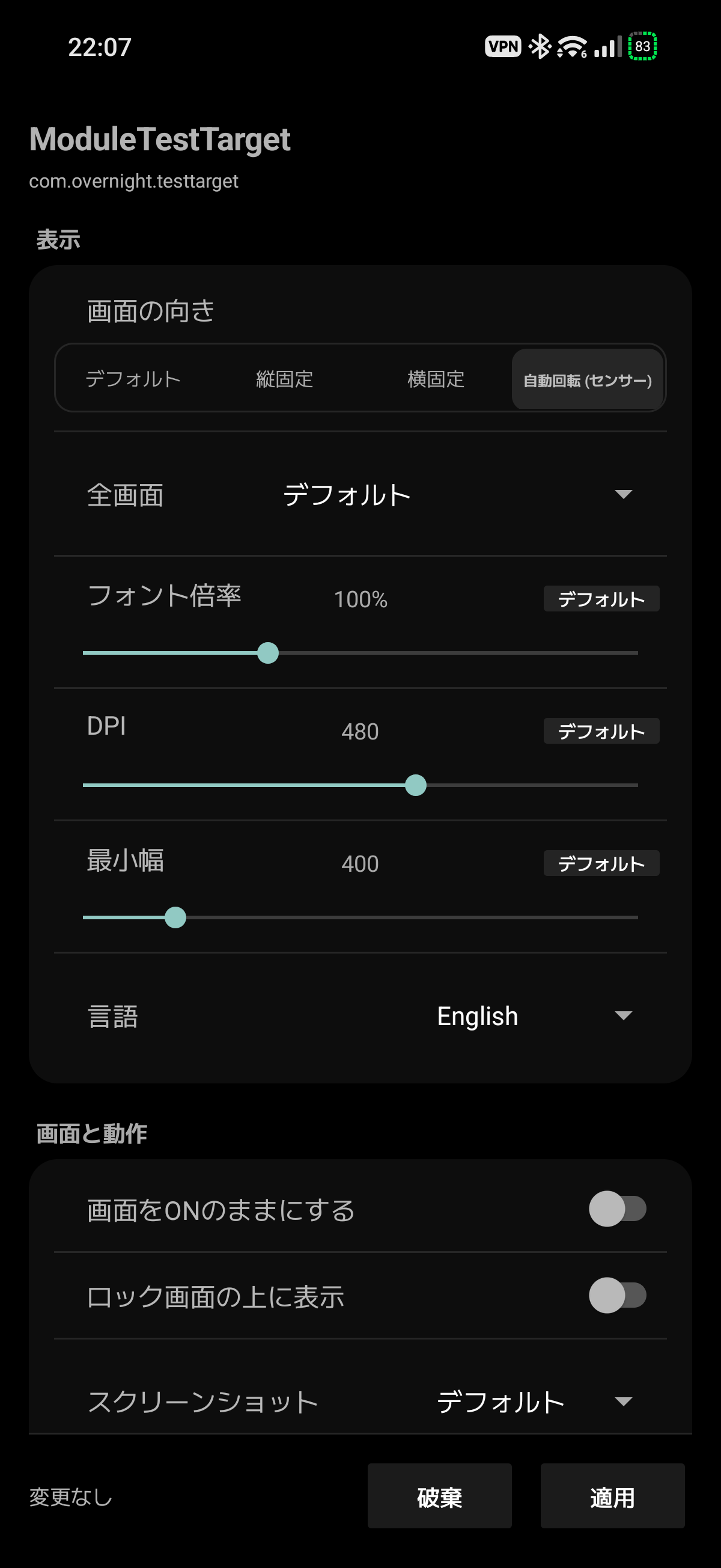
アプリ別設定画面 (左: 日本語 / 右: 英語)
- パッケージ名を変更 (お知らせ参照): com.overnight.asrish → io.github.otouotouotou.asrish。 設定は書き出し / 読み込みで移行できる
- 通知の設定を追加 (アプリ別、設定画面に「通知」グループ): 継続通知 (デフォルト / 継続にする / 継続にしない)、通知を 繰り返す、通知をミュート。NotificationManager.notify を 横取りして Notification オブジェクトを書き換える方式で、 設定は投稿ごとに読むため対象アプリの再起動は不要。 ミュートは Android 11 以降の前提に合わせ、通知チャンネルの 登録時にも音・バイブを消す (登録済みのチャンネルは音を 変更できない仕様のため、新規に作られるチャンネルから有効)
- クリップボードの読み取りをブロックを追加 アプリがクリップボードを読むと空白を返す。ただしその アプリ自身がコピーした内容は、内容の指紋照合で判別して 読めるようにしている (アプリ内のコピー&貼り付けを 壊さないため)。対象は前面にいる間の読み取り
- レイアウト方向をLTRに固定を追加 (アプリ別、スイッチ): 言語が RTL (アラビア語など) のアプリで、言語はそのままにレイアウトの 向きだけをLTRに固定する。公開APIの範囲 (Configuration のレイアウト方向の上書き) で実装
- メイン画面の整理: 説明文を削除し、書き出し / 読み込みの上に 「設定ファイル」の見出しを追加
- 設定ファイルの書き出し / 読み込みを追加: メイン画面の 「書き出し」「読み込み」から、設定一式をJSONファイルに 保存 / 復元できる (Storage Access Framework を使用)。 パッケージ名変更時の移行用 (お知らせ参照)。読み込みは 全置き換えで、確認ダイアログ付き
- 設定画面の説明文を修正
- アプリ別設定画面を刷新: 項目をグループ (表示 / 画面と動作 / その他) ごとのカードにまとめ、変更は「適用」ボタンを押すまで 保存されない方式に変更した (未適用の項目には ● が付く。 「破棄」で適用済みの状態に戻せる)
- 操作部品も見直した: 画面の向きはセグメント、フォント倍率 / DPI / 最小幅はスライダー (数値は画面幅の中央に表示)、 全画面 / 言語 / スクリーンショットはドロップダウン。 スライダー項目には項目別の「デフォルト」ボタンを付けた
- フォント倍率は 85%〜130% を 5% 刻みで選べるようになった (120% / 125% を追加)。DPIと最小幅は10刻みになった
- ロック画面の上に表示を追加 (アプリ別、スイッチ): 公開 API の Activity.setShowWhenLocked で、対象アプリをロック画面の上に 表示する
- Android 11未満では、全画面の設定行をグレーアウトして選べない ようにした (全画面は Android 11以降が必要なため)
- 設定 UI を 10 言語対応に: 日本語 / 英語に加えて、中国語 (简体・繁體)、 韓国語、スペイン語、フランス語、ドイツ語、ロシア語、アラビア語の 文字列リソースを追加。言語機能で選べる言語と、設定 UI の対応言語が 同じになった (翻訳は機械生成ベース。おかしいところがあれば Issue などで教えてください)
- 最近使ったアプリから除外を追加 (アプリ別、スイッチ): 公開 API の ActivityManager.AppTask.setExcludeFromRecentsで、対象アプリの タスクを履歴 (最近使ったアプリ) に表示しないようにする
- 最小幅を追加 (アプリ別): デフォルト / 320〜800。対象アプリの ResourcesのConfiguration.smallestScreenWidthDpを書き換える 標準API方式で、swdp 修飾子のリソース選択に効く (実際の 画面サイズやDPIは変わらない)。フォント倍率・DPI・言語と 1 回の更新でまとめて適用する
- 言語 (ロケール) を追加 (アプリ別): システム言語とは別に、 アプリごとに表示言語を切り替える。同じConfiguration書き換えで localesを差し替え、プロセスのデフォルトロケールも合わせる。 対象アプリにその言語のリソースが含まれていない場合は表示は 変わらない (プレイストアの分割 APK 配信では言語リソースが別分割に なることがある)
- GitHub 公開準備: LICENSE(Apache-2.0)を追加、READMEに機能一覧・ 動作環境・使い方と英語セクションを追加、モジュール説明文を 現在の機能に合わせて更新。機能の変更はなし
- ミュートを追加 (アプリ別、スイッチ): 対象アプリの MediaPlayer / AudioTrack / SoundPool の音量指定を 0 に 差し替え、再生開始時にも音量 0 を先に設定するToneGeneratorは コンストラクタの音量引数を 0 に差し替える。いずれも公開APIの 範囲で実装。ネイティブ再生 (AAudio/OpenSL等、ゲームや ブラウザ内蔵エンジンなど) はJava層を通らないため対象外
- DPI を追加 (アプリ別): デフォルト / 240〜640 (40刻み)。 対象アプリのResourcesのConfiguration.densityDpiと DisplayMetricsのdensityを書き換える標準API方式。 フォント倍率と1回の更新でまとめて適用し、scaledDensityも 整合させる (両方設定したときに片方が上書きされるのを防ぐ)
- アプリ別設定画面のレイアウトを変更: 設定名を左詰め、操作項目 (スピナー / スイッチ) を右詰めにして同じ行に表示。行の間に 区切り線を追加。スクリーンショットの選択肢は行に収まる短い 表記 (デフォルト / 許可する / 禁止する) に変更
- システム言語に追従 (日本語 / 英語): UI文字列をリソース化し、 values (日本語) と values-en (英語) を用意。LSPosedの モジュール説明文も英語版を追加
- フォント倍率を追加 (アプリ別): デフォルト / 85% / 90% / 95% / 100% / 105% / 110% / 115% / 130%。対象アプリのResources Configuration.fontScaleを書き換える標準API方式で、 Application.attach直後とActivity.onCreate直前 (レイアウト 展開前) に適用し、onResumeでも現在値と違う場合だけ再適用する
- スクリーンショット制御を復活 (アプリ別): デフォルト / 許可する (FLAG_SECUREを外す) / 禁止する (FLAG_SECUREを付ける)。 v0.2.0で動かなかった原因はフックではなく設定の受け渡し (ContentProvider)が対象アプリから読めなかったことで、 v0.3.0のRemote Preferences移行で解消したため再実装した。 「許可する」は Window.setFlags / addFlags / setAttributes の 横取りで対象アプリ自身が立てる FLAG_SECUREを無効化する
現在の機能範囲で公開し、不具合報告を見ながら対応を検討します。 機能追加の予定は未定です (候補: 常駐)。
日本語 | English
An LSPosed module to change various settings per app. This is the first step of a project to re-implement features "in the style of a certain well-known module" from scratch — one working feature at a time, within a self-chosen scope.
For registration in the LSPosed Modules Repo, v0.10.7 changes the
package name from com.overnight.asrish to
io.github.otouotouotou.asrish. A different package name means a
different app, so settings will not carry over automatically.
To migrate from the old version, use the settings export / import added in v0.10.5:
- In the old version (com.overnight.asrish), export your settings
- Install this version
- Enable the module in LSPosed and add your target apps to its scope
- Open Asrish and use "Import" to load the exported file
- Uninstall the old version
- Reboot
- The feature set originates from App Settings by rovo89 and its Apache License 2.0 fork, App Settings Reborn by BlueCat300. This project is a fresh implementation of those features for Android 11 and later, and contains none of their code
- Dependencies: libxposed API (Apache License 2.0) as compileOnly, libxposed service (Apache License 2.0) as implementation
| Feature | Options |
|---|---|
| Orientation | Default / Portrait / Landscape / Auto-rotate (sensor) |
| Fullscreen | Default / Force fullscreen / Immersive (hide bars) / Prevent fullscreen |
| Font scale | Default / 85%–130% |
| DPI | Default / 240–640 |
| Smallest width | Default / 320–800 |
| Language | Default / Japanese / English / Chinese (Simplified, Traditional) / Korean / Spanish / French / German / Russian / Arabic |
| Force layout direction to LTR | On / Off (keeps the language, fixes the layout direction to LTR for RTL languages) |
| Screenshot | Default / Allow (removes FLAG_SECURE) / Block |
| Keep screen on | On / Off |
| Show on lock screen | On / Off |
| Mute | On / Off (MediaPlayer / AudioTrack / SoundPool / ToneGenerator; native playback is out of scope) |
| Exclude from recents | On / Off |
| Ongoing notifications | Default / Force ongoing / Prevent ongoing |
| Insistent notifications | On / Off (repeats the sound / vibration until noticed) |
| Mute notifications | On / Off |
| Block clipboard reads | On / Off (content the app copied itself stays readable) |
All features are implemented using only public Android APIs. Nothing hooks OS internals, so the module is designed to keep working across OS updates.
- Android 11 or later
- LSPosed (with Modern Xposed API 102 support)
- All features verified by the author on Xiaomi 17 Ultra HyperOS3 (Android 16),Oneplus7 OOS11(Android 11)
- Install the APK from Releases
- Enable the module in LSPosed and add the apps you want to configure to the scope (then reboot)
- Open Asrish, pick an app from the list, configure it, and tap "Apply"
- Applied settings take effect the next time the target app is launched (or its screen is shown again)
Some apps handle things like fonts and locale on their own, so Asrish's settings may not take effect on them. To tell whether the cause is the app or your device, try ModuleTestTarget, a small test app: scope it in LSPosed and apply the same settings — if they work there, the cause is the target app; if they don't, it's likely your device / environment.
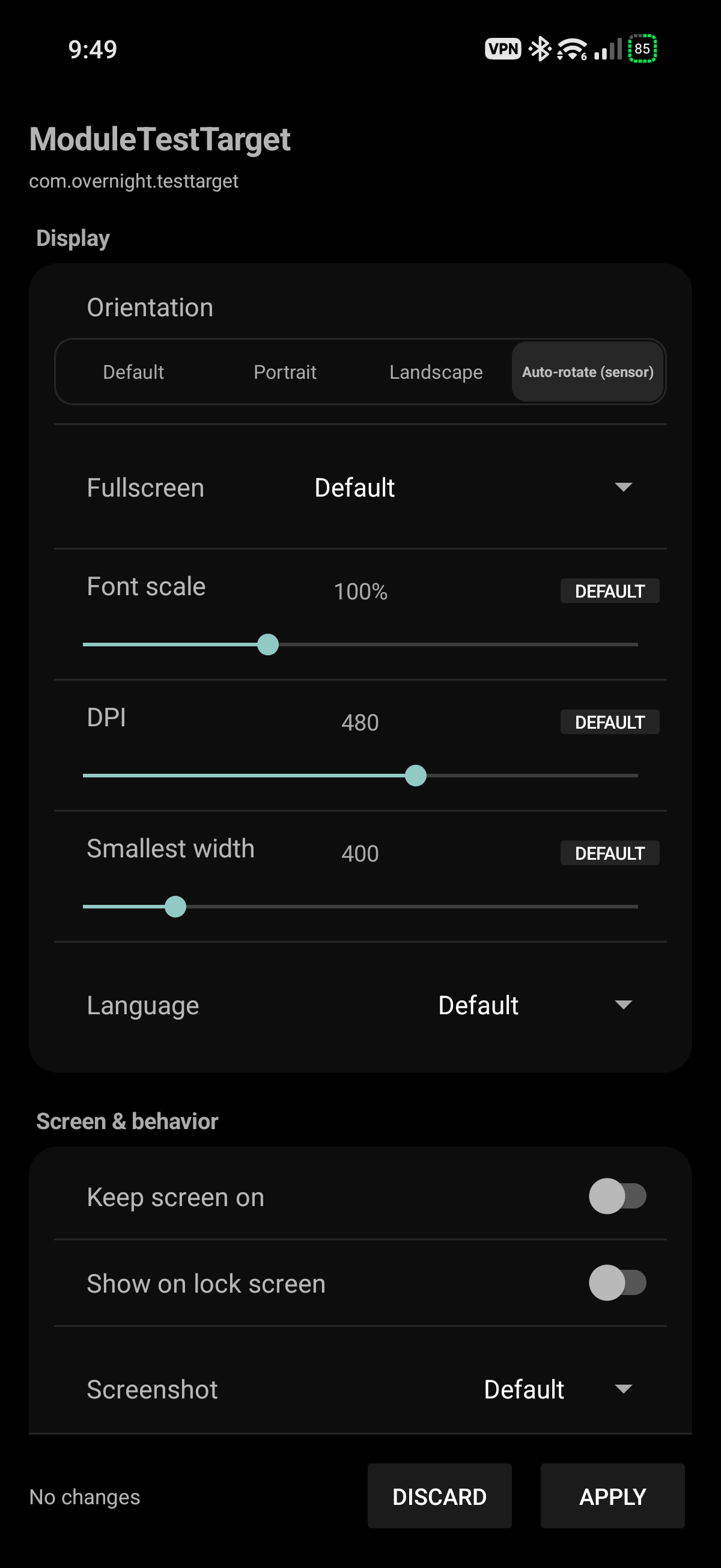
The per-app settings screen (left: Japanese / right: English)
- Package name changed (see the notice above): com.overnight.asrish → io.github.otouotouotou.asrish. Settings can be migrated with export / import
- Added notification settings (per-app, a new "Notifications" group on the settings screen): ongoing notifications (Default / Force ongoing / Prevent ongoing), insistent notifications, and mute notifications. Implemented by intercepting NotificationManager.notify and rewriting the Notification object; settings are read on every post, so the target app does not need a restart. For Android 11 and later, mute also removes the sound and vibration when a notification channel is created (a registered channel's sound cannot be changed afterwards, so this takes effect for newly created channels)
- Added "Block clipboard reads" (per-app, an Asrish-original feature): an app with this ON sees an empty clipboard. Content the app copied itself stays readable, matched by a fingerprint of the clip, so copy & paste inside the app keeps working. Covers reads while the app is in the foreground
- Added "Force layout direction to LTR" (per-app switch): for apps in an RTL language (such as Arabic), this keeps the language as-is and fixes only the layout direction to LTR. Implemented with public APIs only (overriding the layout direction in the app's Configuration)
- Tidied the main screen: removed the description text and added a "Settings file" heading above Export / Import
- Added settings export / import: from "Export" / "Import" on the main screen, all settings can be saved to and restored from a JSON file (via the Storage Access Framework). Intended for the package name change migration (see the notice above). Import replaces everything and asks for confirmation first
- Fixed the description text on the settings screen
- Redesigned the per-app settings screen: items are now grouped into cards (Display / Screen & behavior / Other), and changes are only saved when you tap "Apply" (changed items are marked with ●, and "Discard" reverts them)
- The controls were reworked too: orientation is a segmented control, font scale / DPI / smallest width are sliders (the value is shown at the center of the screen width), and fullscreen / language / screenshot are dropdowns. Slider items have a per-item "Default" button
- Font scale can now be set in 5% steps from 85% to 130% (120% and 125% added). DPI and smallest width now step by 10
- Added show on lock screen (per-app, switch): shows the target app over the lock screen, using the public Activity.setShowWhenLocked API
- On Android versions below 11, the fullscreen settings row is greyed out and cannot be selected (fullscreen requires Android 11 or later)
- The settings UI is now available in 10 languages: added string resources for Chinese (Simplified and Traditional), Korean, Spanish, French, German, Russian and Arabic, on top of Japanese and English - the same set of languages the Language feature offers. The translations are machine-generated; please report anything that reads oddly
- Added exclude from recents (per-app, switch): uses the public ActivityManager.AppTask.setExcludeFromRecents API to keep the target app's tasks out of the recents screen
- Added smallest width (per-app): Default / 320–800. Rewrites Configuration.smallestScreenWidthDp of the target app's Resources using standard APIs, which affects swdp resource selection (the actual screen size and DPI do not change). Applied together with font scale, DPI and language in a single update
- Added language (locale) (per-app): switches the display language per app, independently of the system language. Rewrites the Configuration locales with the same mechanism and also sets the process default locale. If the target app does not contain resources for that language, the display does not change (with Play split APK delivery, language resources may be in a separate split)
- GitHub release preparation: added the LICENSE (Apache-2.0), added the feature list, requirements, usage and an English section to the README, and updated the module description to match the current features. No functional changes
- Added mute (per-app, switch): replaces the volume arguments of the target app's MediaPlayer / AudioTrack / SoundPool with 0, and sets the volume to 0 before playback starts. For ToneGenerator, the constructor's volume argument is replaced with 0. All within public APIs. Native playback (AAudio / OpenSL etc., such as games and built-in browser engines) does not pass through the Java layer and is out of scope
- Added DPI (per-app): Default / 240–640 (in steps of 40). Rewrites Configuration.densityDpi and the DisplayMetrics density of the target app's Resources using standard APIs. Applied together with font scale in a single update, keeping scaledDensity consistent (so the two settings do not overwrite each other)
- Changed the per-app settings screen layout: setting names are left-aligned and controls (spinners / switches) right-aligned on the same row, with dividers between rows. The screenshot options were shortened to fit the row (Default / Allow / Block)
- The UI follows the system language (Japanese / English): all UI strings were moved to resources, with values (Japanese) and values-en (English). The LSPosed module description also gained an English version
- Added font scale (per-app): Default / 85% / 90% / 95% / 100% / 105% / 110% / 115% / 130%. Rewrites Configuration.fontScale of the target app's Resources using standard APIs, applied right after Application.attach and just before Activity.onCreate (before layout inflation), and re-applied onResume only when the value differs
- Restored screenshot control (per-app): Default / Allow (removes FLAG_SECURE) / Block (sets FLAG_SECURE). The reason it did not work in v0.2.0 was not the hook but the config transport (ContentProvider) being unreadable from target apps; the move to Remote Preferences in v0.3.0 fixed that, so the feature was re-implemented. "Allow" works by intercepting Window.setFlags / addFlags / setAttributes to neutralize the FLAG_SECURE that the target app sets itself
The module is published with the current feature set; further work will be considered based on bug reports. No feature additions are currently planned (candidate: resident in memory).