
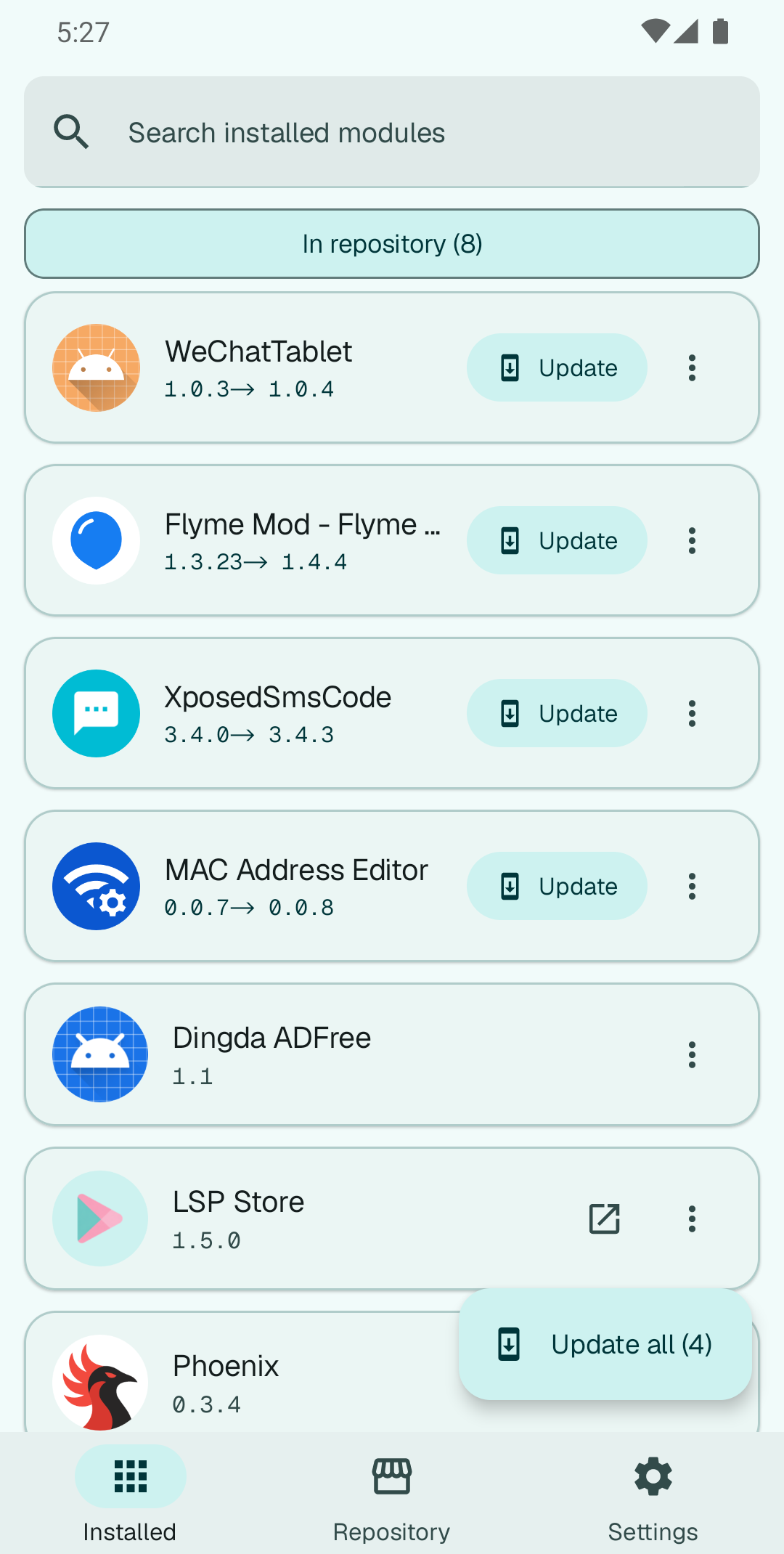
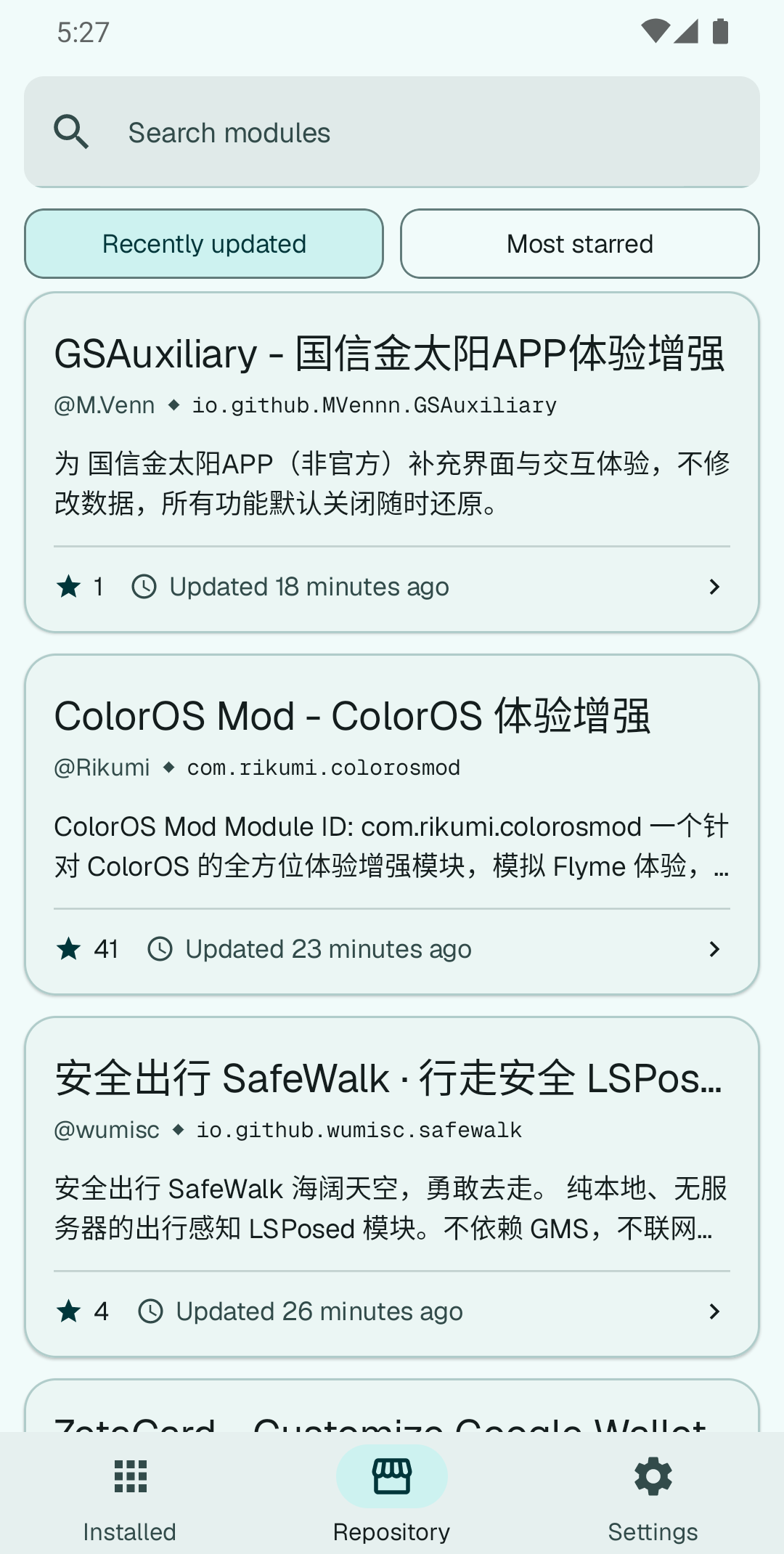
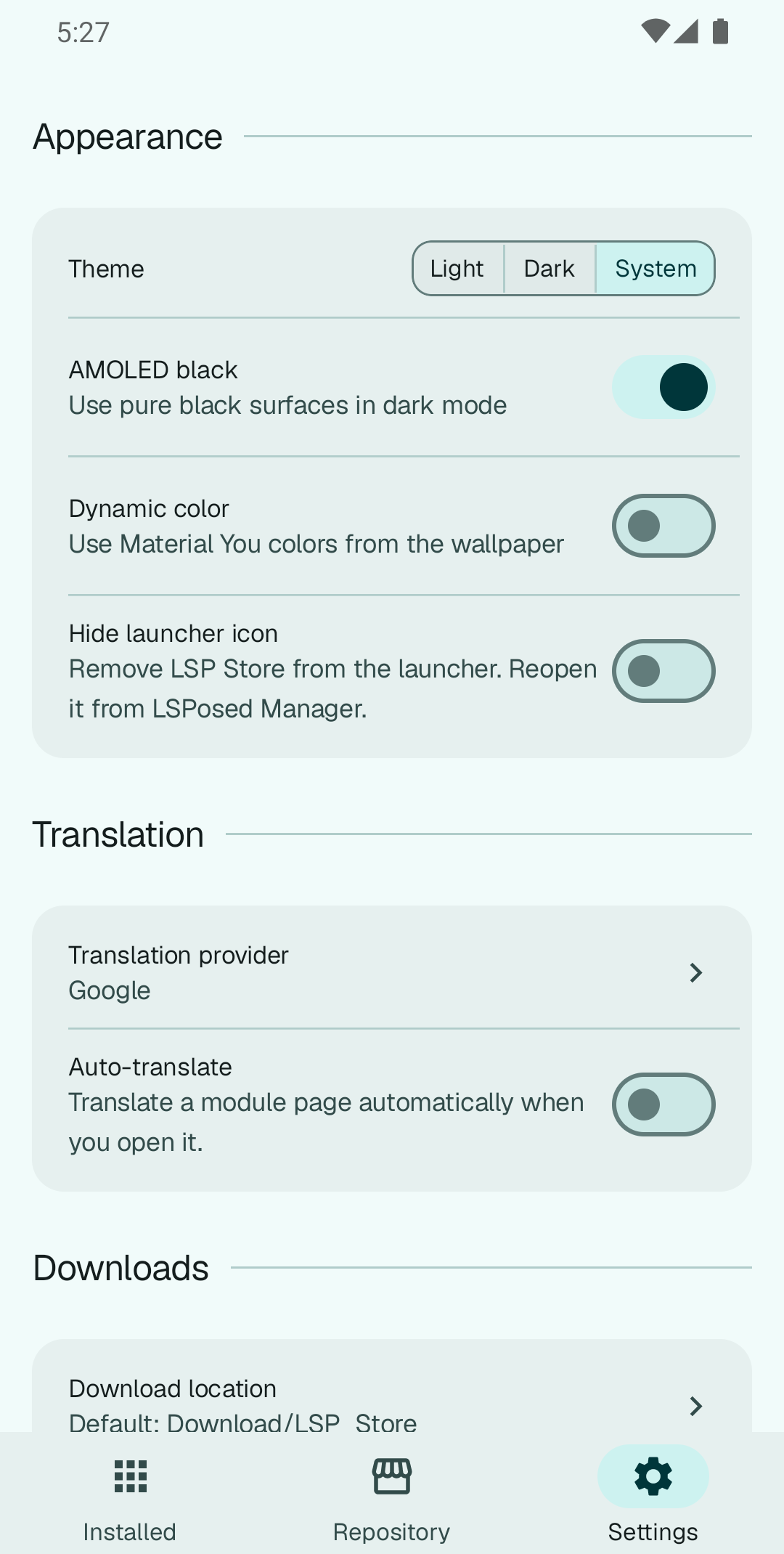
LSP Store 图标

LSP Store

LSPosed 模块的更新与浏览工具

中文 | English

最新版本 Android 10+ 14 种语言 Apache 2.0


页面浏览

已安装 仓库 设置


下载

GitHub Releases


功能

  • 更新模块
  • 浏览模块

致谢

  • Komi Store — 灵感来源与原型参考,界面设计、布局与交互方式均借鉴于此
  • LSPosed — 模块框架,以及商店中所有模块所依赖的公共仓库
  • 域见 ScopeView — 同类项目,他山之石,可以攻玉
  • LINUX DO 社区 — 学AI,上L站

Releases

1.7.1

Stable

11/14/2026, 3:41:54 AM

增加:

  • 无。

减少:

  • 清理前端残留与重复实现,整理首页、已安装、设置和详情页面的共享逻辑。

修复:

  • 优化仓库首页、搜索结果和作者页的长按忽略:按住 0.4 秒后开始缩小变淡,0.5 秒时震动并显示“松手忽略 · 移出取消”,在卡片内松手才忽略。
  • 移出卡片、多指或触摸中断会取消本次忽略;取消后等待全部手指抬起,避免误忽略、列表误滚动或误刷新。重新按压会重新计算等待时间,关闭系统动画也不会提前忽略。
  • 忽略后的卡片淡出与列表补位更连贯,最后一项淡出结束后再显示空状态。

Added:

  • None.

Reduced:

  • Removed unused and duplicated frontend code and organized shared logic across the repository, installed, settings and detail pages.

Fixed:

  • Refined hold-to-ignore on the repository, search results and author pages: the card starts shrinking and fading after 0.4 seconds, then vibrates and shows “Release to ignore · Move out to cancel” at 0.5 seconds. Releasing inside the card commits the action.
  • Moving outside the card, adding another finger or interrupting touch cancels the action. Touch remains captured until every finger is lifted to prevent accidental ignores, scrolling or refreshes. A new press restarts the grace period, and disabling system animations does not shorten the hold.
  • Ignored cards fade out as nearby cards move into place, including the last card before the empty state appears.

Assets

2

1.7.0

Stable

11/12/2026, 1:31:18 PM

增加:

  • 仓库模块支持按关键词隐藏:标题、包名或简介命中即从浏览列表消失,已安装模块和更新检查不受影响;忽略列表会显示每个关键词当前匹配的模块数。
  • 后台检查间隔支持 1–168 小时的自定义值:长按预设间隔即可输入小时数,自定义值会显示在当前设置里。

减少:

  • 已安装列表和详情页减少重复扫描与阻塞加载:复用未变化应用的扫描结果,只查询相关包名;应用图标与长 README 改为后台加载,不再阻塞页面。
  • 下载和索引减少重复工作:下载进度与通知更新限频,旧任务的回调不会覆盖新任务;重叠的索引刷新会合并,缓存改为原子写入,清理缓存不会写回旧数据。

修复:

  • 自动更新的完成汇总改用静默通知,不再播放提示音;简体与繁体中文界面的“静默安装”说明更新为“通过root权限静默安装和更新APK”。

Added:

  • Repository modules can be hidden by keyword: a match in the title, package name or summary removes the module from browsing lists, while installed modules and update checks are unaffected. The ignore list shows each keyword's current match count.
  • Background checks now accept any custom interval from 1 to 168 hours. Long-press a preset to enter an hour value; the current custom interval is shown in the settings row.

Reduced:

  • The installed list and detail pages do less repeated work: unchanged app scans are reused, only relevant packages are queried, and app icons and long READMEs load in the background instead of blocking the page.
  • Downloads and index refreshes avoid duplicate work: progress and notification updates are throttled, stale task callbacks cannot overwrite a newer task, overlapping index refreshes are coalesced, and caches are written atomically so clearing them cannot resurrect old data.

Fixed:

  • Auto-update summaries now use a silent notification channel. The Simplified and Traditional Chinese description for Silent install now states that installation and updates run through root permissions.

Assets

2

1.6.0

Stable

11/12/2026, 5:42:41 AM

增加:

  • 详情安装、单项更新、全部更新和后台自动更新共用任务状态,同一模块不会重复下载或安装;外部安装器接手后保留“待确认”,批量交接完成显示“批量更新请求已处理”。
  • 明确选择的 APK 偏好与安装成功记录分开保存:点击默认 APK 不再固定偏好,失败保留手选,恢复自动选择保留安装记录。各入口共用推荐和探测缓存,推荐 APK 排在资源列表首位。

减少:

  • 选择 APK 后不再增加兼容性拦截、警告或二次确认。

修复:

  • 记住实际安装 APK 的来源版本,修复 release 4571 内 APK 4559 等变体安装后反复提示更新的问题;后续新版本、重新发布和外部替换仍能正确检测。
  • 详情自动选择随刷新跟随最新版本,手选历史版本保持不变;资源移除时显示不可用,不用旧版本冒充最新。安装按钮按所选 APK 显示安装、更新、重新安装或降级安装。
  • 改包名后跟踪实际安装副本;安装失败或取消后重试会重新下载;已安装列表在应用较多时刷新更稳定。

Added:

  • Detail installs, single updates, update all and background updates now share task state, preventing duplicate downloads and installs. External hand-offs remain pending confirmation; a batch with hand-offs reports that its requests have been processed.
  • Explicit APK preferences and successful installation records are stored separately. Installing the default no longer pins a preference; failures keep manual choices, and restoring automatic selection keeps installation history. All entry points share recommendations and probe caches, with the recommended APK first in the asset list.

Reduced:

  • Selecting an APK no longer adds compatibility blocks, warnings or extra confirmations.

Fixed:

  • The store remembers the release that supplied the installed APK, fixing repeated update prompts for variants such as APK 4559 from release 4571. Later releases, republished releases and replacements installed outside the store still trigger the appropriate update checks.
  • Automatic version selection follows refreshed releases while manually selected history stays selected. Removed resources are shown as unavailable, and older releases never stand in for the latest. The install button describes the selected APK as an install, update, reinstall or downgrade.
  • Renamed packages are tracked by the actual installed copy; failed or cancelled installs download afresh on retry, and the installed list refreshes more reliably on devices with many apps.

Assets

2

1.5.5

Stable

11/11/2026, 3:43:00 PM

增加:

  • 仓库首页与作者页的模块卡片可以三秒长按直接忽略,不用再进详情页找菜单,也不弹确认框;
    普通点击和滚动不会误触发。

修复:

  • 多 APK 的模块不再需要手动选变体:已安装的模块跟已安装的那份走(包名、ABI、libxposed 代际、minSdk),
    未安装的模块跟设备走(ABI、LSPosed API、厂商 OS 版本、minSdk);设备也分不出来时选「原版构建 → 下载量最高 → 文件名」。
  • 「全部更新」不再跳过变体分不出来的模块,详情页与已安装页也不再弹「请选择一个变体」的对话框。
  • 详情页资源列表会把默认包标成「推荐」,标签顺序调整为 ABI → API → minSdk。
  • 详情页的默认 APK 现在跟随探测结果和已安装副本更新;手动选过的 APK 在仍然可用时保持优先,
    失效后自动回退到当前默认包,不会再出现「显示一个包、安装另一个包」。
  • 详情页、已安装页的变体选择器、单条更新、「全部更新」和后台更新检查统一按同一个「预期包名」
    判断:已安装模块用实际安装的包名,未安装模块才用仓库包名;链接或改名的模块不再出现
    选择时可用、安装前却被拒绝。
  • 预发布开关统一按仓库包名读取,并兼容旧数据里按已安装包名保存的记录;关闭时会同时清理
    旧记录,更新列表、详情页和批量更新不再得出不同结论。

Added:

  • Holding a module card in the repository or an author page for three seconds ignores that module, with no
    detour through the detail page's menu and no confirmation; taps and scrolling never trigger it.

Fixed:

  • Modules that ship several APKs no longer ask you to choose: an installed module follows the build already on
    your device (package, ABI, libxposed generation, minSdk), a new install follows your device (ABI, LSPosed API,
    vendor OS version, minSdk). When the device cannot tell the builds apart, the plain build wins, then the most
    installed one, then the file name.
  • "Update all" no longer skips modules whose variants it cannot tell apart, and the detail/installed pages no
    longer show the "choose a variant" dialog.
  • The detail page's resource list marks the default APK as recommended and orders its tags ABI → API → minSdk.
  • The detail page's default APK now follows probe results and the installed copy; a manual pick still wins while
    it remains usable and falls back to the current default when it does not, so the page no longer shows one APK
    while installing another.
  • The detail page, the installed page's variant picker, single updates, "update all" and background checks now
    share one expected package: the installed package for an installed module, the repository package only for a
    first install. Linked or renamed modules no longer look usable while choosing and get rejected before installing.
  • Pre-release tracking now reads the repository package and still accepts older data keyed by the installed
    package; turning it off clears the old entry too, so the update list, detail page and batch updates agree.

Assets

2

1.5.4

Stable

11/11/2026, 2:04:27 PM

修复:

  • 安装包自己声明的 minSdk 高于设备时不再拦截安装:详情页不再把该 APK 灰掉、也不再禁用安装按钮,只在资源行留一句「需要 Android 15+(你的是 11)」,装不装由系统安装器判断。
  • 顺带修掉一处误报:Android 11 起系统不再描述 minSdk 高于自己的安装包,以前这种包会被当成「不是 Xposed 模块」直接拒装;现在改读安装包内的清单,仍按真实包名与 Xposed 声明判断。
  • minSdk 提示里的两个数字改成同一套口径,不再出现「需要 Android 35+(你的是 14)」这种 API 级别和系统版本混着说的情况。

Fixed:

  • A minSdk above the device no longer blocks the install: the detail page stops greying the APK out and stops disabling the install button - it only leaves a "Requires Android 15+ (you have 11)" line on the asset row, and the system installer makes the call.
  • One false verdict went with it: since Android 11 the platform refuses to describe an archive whose minSdk is above itself, which made such APKs look like "not an Xposed module" and get rejected outright. The manifest inside the archive is read instead, so the real package name and Xposed declaration still decide.
  • The two numbers in that minSdk hint now use the same unit; no more "Requires Android 35+ (you have 14)" mixing API levels with system versions.

Assets

2

1.5.3

Stable

11/11/2026, 12:29:39 PM

修复:

  • 文件名里的 minsdk 标记不再决定能否安装:以前作者把文件名写错(或版本号只是习惯)就会让模块在详情页禁用安装、并从更新列表消失;现在只显示一行提示,真正的判断交给安装包自己的声明。
  • 原生库 ABI 不匹配不再直接拒绝安装:安装本身不会因此失败,模块也可能根本不用 native 部分,所以改为提示,装不上时仍会按一次失败处理。
  • 文件名像「配套应用」(client/provider/bridge/demo 等)的 APK,在读过安装包、确认它就是本模块后可以正常安装,不再永久灰掉。
  • 连续三次安装失败不再让模块永久退出更新列表:失败只是提示和重新挑选变体,模块仍会出现在更新里,可以在详情页重试。
  • 更新检查遇到不知道发布时间的旧「不适用」结论时改为重新判断,而不是继续隐藏。

Fixed:

  • A minsdk marker in the file name no longer decides whether a build can be installed: a mislabelled name used to disable the install button and hide the module from updates - it is now a hint, and the APK's own manifest decides.
  • A native-library ABI mismatch no longer refuses the install outright: installing never fails on it and the module may not use its native part at all, so it is a warning (a real failure still counts as one attempt).
  • An APK whose name looks like a companion app (client/provider/bridge/demo, ...) becomes installable once its archive shows it is the module itself.
  • Three failed installs no longer remove a module from the update list for good: failures only trigger re-probing, the module stays listed and can be retried from its page.
  • A stored "not applicable" verdict with no publish time is re-checked instead of hiding the module again.

Assets

2

1.5.2

Stable

11/11/2026, 12:09:59 PM

修复:

  • 旧版本因 libxposed API 号不再安装后记下的「不适用」结论不会再永久生效:升级后自动清除,模块重新出现在更新列表,详情页的安装按钮也不再被禁用。
  • 「不适用」结论只覆盖它被判断出来的那个版本:作者发布新版本后会重新检查,系统升级后此前因 minSdk 不兼容的模块也会重新判断。
  • 详情页的安装按钮只看当前版本的判断结果,不再被历史结论锁死。

Fixed:

  • A "not applicable" verdict recorded by the old libxposed API-number block no longer sticks forever: the upgrade clears it, so the module returns to the update list and its install button is enabled again.
  • A verdict now only covers the release it was computed for: a newly published version is re-checked, as is a module that was previously rejected for its minSdk after an OS upgrade.
  • The module page's install button follows the decision for the release on screen instead of a historical verdict.

Assets

2

1.5.1

Stable

11/11/2026, 9:54:15 AM

修复:

  • 关联到仓库模块、或安装包名与仓库包名不一致的模块,在「全部更新」里不再停在「等待安装」:安装阶段按仓库包名更新该行,成功与失败都会正确显示,轮到安装之前也仍可取消。
  • 正在下载时到 设置 > 存储 清除已下载 APK,安装流程不再卡住:等待以取消结束,并释放它占用的下载位。
  • 模块详情页也能识别「版本号相同但重新发布」的更新了,与「已安装」页的判断保持一致。
  • 从更新通知进入「已安装」页后,旋转屏幕或重建界面不再把用户强制弹回该页。

Fixed:

  • Modules linked to a repository entry, or installed under a package name that differs from the repository one, no longer stick at "waiting to install" during Update all: the install stage updates the row under the repository package, reports success and failure correctly, and can still be cancelled before the hand-off.
  • Clearing downloaded APKs in Settings > Storage while a transfer is running no longer wedges the install chain: the wait ends as a cancellation and releases its download slot.
  • The module page now recognises a same-versionCode re-upload as an update, matching the Installed tab.
  • After opening Installed from an update notification, rotating the screen or recreating the UI no longer forces the user back to that page.

Assets

2

1.5.0

Stable

11/8/2026, 6:52:53 AM

增加:

  • 设置 > 资料库新增备份与恢复:可将收藏、最近浏览、忽略的模块与更新、跳过版本、预发布选择、手动链接、变体状态和搜索历史导出为 JSON,并在导入时选择合并或替换;设置和翻译 API 密钥不会写入备份(#59)。
  • 设置 > 下载新增下载位置:默认仍是 Download/LSP_Store,可通过系统文件夹选择器改到 SD 卡或其他文档提供方,选择会跨重启保留;恢复默认会释放旧授权(#57)。
  • Root 模式下卸载已安装模块改为静默卸载:应用内确认后通过 su 直接移除,su 被拒绝或不可用时回退到系统卸载页;非 Root 模式仍走系统确认页(#58)。
  • 设置 > 关于整合原「应用信息与诊断」的全部内容;设置中的「Root 权限」更名为「安装」,「Root 静默安装」更名为「静默安装」(#63)。

减少:

  • 设置 > 资料库移除「导入已安装模块」入口;「已安装」页的导入入口保留(#61)。

修复:

  • 提示条显示期间切换页面再返回时不再重复出现;提示在离开页面时即被消费(#64)。
  • 已安装页在没有浮动操作按钮时不再在列表底部留出多余空白;有更新时仍会为按钮预留空间(#64)。
  • Root 模式下的卸载确认按钮改为红底白字的破坏性按钮,与 Komi 最新设计一致(#64)。

Added:

  • Settings > Library gains Backup & restore: favourites, recently viewed, ignored modules and updates, skipped versions, pre-release choices, manual links, variant states and search history can be exported to JSON and imported with Merge or Replace; settings and translation API keys are never included (#59).
  • Settings > Downloads gains Download location: it stays on Download/LSP_Store by default and can be moved to an SD card or any document provider through the system folder picker; the choice survives restarts, and resetting it releases the old grant (#57).
  • Root mode now uninstalls installed modules silently: after an in-app confirmation it removes the package through su, falling back to the system uninstall page when su is denied or unavailable; non-root uninstalls keep the system confirmation page (#58).
  • Settings > About now includes all of the former App info & diagnostics page; Settings' Root permission is renamed to Install and Root silent install to Silent install (#63).

Reduced:

  • Settings > Library no longer offers Import installed modules; the entry on the Installed page stays (#61).

Fixed:

  • A snackbar no longer replays when returning to a page that was left while it was visible; pending messages are consumed on exit (#64).
  • The Installed list no longer ends in unused space when no floating action button is present; room is still reserved while updates are available (#64).
  • The root-mode uninstall confirmation now uses the red destructive button style from the latest Komi design (#64).

Assets

2

1.4.0

Stable

11/7/2026, 1:48:31 PM

增加:

  • 设置 > 外观新增「隐藏启动器图标」:默认关闭。开启后 LSP Store 从启动器消失,可从 LSPosed Manager > 模块 > LSP Store 重新打开,通知等后台功能不受影响。
  • 可以忽略仓库中的模块:首页货架与搜索、作者页、收藏和最近浏览都不再显示该模块,但保持安装并仍可在「已安装」页管理;在 设置 > 忽略的仓库模块 里恢复。模块详情页的更多菜单新增「忽略模块 / 取消忽略」。

减少:

  • 模块详情页的更多菜单去掉「刷新」(下拉刷新即可)和「忽略此版本」(已安装模块的更多菜单仍然提供)。

修复:

  • 翻译 README 时,翻译服务调整内联标记(链接、代码片段)的位置不再导致整篇翻译失败并退回原文;丢失、重复或未知的标记仍会被拒绝,避免标记错乱。

Added:

  • Settings > Appearance gains "Hide launcher icon": off by default. When on, LSP Store leaves the launcher and can be reopened from LSPosed Manager > Modules > LSP Store; notifications and background features keep working.
  • Repository modules can be ignored: they no longer appear on Home shelves and search, author pages, favourites or recently viewed, while staying installed and manageable from the Installed tab. Restore them in Settings > Ignored repository modules. The module detail overflow menu gains Ignore module / Unignore module.

Reduced:

  • The module detail overflow menu drops Refresh (pull-to-refresh already covers it) and Ignore this version (still available from an installed module's overflow menu).

Fixed:

  • Translating a README no longer fails and falls back to the original text when the translation service reorders inline markup (links, code spans); lost, duplicated or unknown tokens are still rejected so markup cannot break.

Assets

2

1.3.0

Stable

11/6/2026, 11:31:35 AM

增加:

  • 定期后台检查更新:默认关闭,可在设置里选择每 1 / 2 / 3 / 5 / 7 天检查一次,并可限定只在非计费网络(如 Wi-Fi)下运行。发现新版本后发一条通知,点通知直接打开「已安装」页。
  • Root 用户可让后台检查静默安装更新(需同时开启「Root 静默安装」和「自动安装更新」);批量更新沿用现有管线,本应用自身仍然最后安装,替换自身进程不会打断其他模块。

减少:

  • 无。

修复:

  • 无。

Added:

  • Periodic background update checks: off by default, with 1 / 2 / 3 / 5 / 7 day intervals and an optional unmetered-network-only switch. New versions are announced in a notification that opens the Installed tab.
  • Root users can let the background check install updates silently (requires both "Root silent install" and "Install updates automatically"); the batch reuses the existing pipeline and still installs LSP Store itself last, so replacing its own process cannot cut the run short.

Reduced:

  • None.

Fixed:

  • None.

Assets

2

1.2.0

Stable

11/5/2026, 2:01:41 PM

增加:

  • 「全部更新」把 LSP Store 自身排到最后安装:其余模块全部交给安装器后才更新本应用,替换自身 APK 时的进程重启不会再打断整批更新。

减少:

  • 无。

修复:

  • 更新模块时不再因为 module.prop 里声明了更高的 libxposed API 而拒绝安装:按加载器的实际策略(targetApiVersion + assets/xposed_init)判断,声明值只参与排序并显示为警告。
  • 识别 Vector 的 manager 包名(org.matrix.vector.manager),并修正版本号到 libxposed API 的映射:1.10/1.11 是 API 100,Vector 2.0 / 2.1 / 2.2 分别是 100 / 101 / 102。

Added:

  • "Update all" now installs LSP Store itself last: every other module reaches the installer first, so the process restart that replaces the store's own APK can no longer cut the batch short.

Reduced:

  • None.

Fixed:

  • Modules are no longer refused because module.prop declares a newer libxposed API: the loader's actual policy (targetApiVersion + assets/xposed_init) decides, and the declared value only affects ordering and shows as a warning.
  • Vector's manager package (org.matrix.vector.manager) is recognized, and the version-to-libxposed-API mapping is corrected: 1.10/1.11 are API 100, while Vector 2.0 / 2.1 / 2.2 are 100 / 101 / 102.

Assets

2

1.1.9

Stable

11/4/2026, 9:52:02 AM

增加:

  • 自动翻译先判断内容语言:简介、说明和更新内容已经是应用语言时不再翻译,只把真正需要翻译的部分发给翻译服务。
  • 详情页顶栏的翻译按钮改为开关样式:翻译中与已翻译时保持高亮,读屏会读出选中状态。

减少:

  • 无。

修复:

  • 切换底部标签后,之前在某个分区打开的模块详情、作者或库页面不会再跟着回来,标签总是回到列表页。
  • 手动点「翻译」后,即使页面内容已经是当前语言(或中英混排)也会按请求翻译;翻译全部失败时按钮退回原文状态,不再显示成已翻译。

Added:

  • Auto-translate checks the content language first: a summary, description or release notes already in your language are left alone, and only the parts that need it go to the provider.
  • The detail top-bar translate action is a toggle that stays highlighted while the page is translated, and TalkBack announces the selected state.

Reduced:

  • None.

Fixed:

  • Switching bottom tabs no longer brings back the module detail, author or library page that was open before; a tab always lands on its list.
  • A manual "Translate" tap now translates even when the page is already in your language (or mixes languages). If every request fails, the button returns to the original view instead of claiming a translation.

Assets

2

1.1.8

Stable

11/3/2026, 1:01:01 PM

修复:

  • 单个模块更新时不再禁用整个已安装页面的按钮:其他模块随时可以更新,取消系统安装器后也不需要等待 180 秒或重启应用。
  • 被系统安装器取消的安装会自动对账,模块重新回到更新列表;下拉刷新也会立即触发一次对账。
  • 下载完成的 APK 会保存一份到公共 Download/LSP_Store,可在文件管理器中直接找到;设置里的「清除已下载的 APK」会同时删除私有缓存和这份副本。

减少:

  • 最低支持版本提升到 Android 10(API 29)。

Fixed:

  • Updating a single module no longer disables the whole Installed page: every other module stays actionable, and dismissing the system installer no longer requires a 180-second wait or an app restart.
  • Installer hand-offs that were cancelled are reconciled automatically, so the module returns to the update list; pull-to-refresh also runs a reconciliation immediately.
  • Finished APKs are saved to the public Download/LSP_Store folder, where a file manager can find them. "Clear downloaded APKs" removes both the private cache and this copy.

Reduced:

  • The minimum supported version is now Android 10 (API 29).

Assets

2

1.1.7

Stable

11/1/2026, 9:34:29 AM

修复:

  • 已安装列表现在能识别使用新版 libxposed 声明方式的模块(例如 Wren):这类模块不在 manifest 里声明自己,而是在 APK 内携带 META-INF/xposed/ 标记,之前会被当成普通应用过滤掉。
  • 识别时会同时检查 base APK 和 split APK,以分包方式安装的模块也不会漏掉;已安装模块数量随之修正。

Fixed:

  • The Installed list now recognises modules that use the modern libxposed declaration (for example Wren). They declare nothing in the manifest and instead ship META-INF/xposed/ markers inside the APK, so they used to be filtered out as plain apps.
  • The scan now checks split APKs as well as the base APK, so modules installed as app bundles are not missed; the installed module count follows.

Assets

2

1.1.6

Stable

11/1/2026, 1:50:49 AM

减少:

  • 下拉刷新需要的滑动距离缩短约 40%,刷新指示器的移动幅度也相应变短;仓库、搜索结果、已安装和模块详情页一致。

Reduced:

  • Pull-to-refresh now needs about 40% less drag, and the refresh indicator travels a correspondingly shorter distance. Applies to the repository, search results, installed and module detail screens.

Assets

2

1.1.5

Stable

10/31/2026, 12:21:02 PM

增加:

  • 首次引导新增「读取应用列表」授权。部分国产系统(HyperOS、ColorOS 等)在 Android 的包可见性之外还单独管控应用列表,允许后才能识别已安装的 LSPosed 模块。

减少:

  • 首次引导不再要求先授予「安装未知应用」权限才能完成;仍可在引导中提前授权,第一次安装时也会照常引导开启。

Added:

  • Onboarding now offers an "Installed apps" permission. Some Chinese ROMs (HyperOS, ColorOS and others) gate the installed-app list separately from Android's package visibility; allowing it lets LSP Store find your installed LSPosed modules.

Removed:

  • Onboarding no longer blocks completion on the install-unknown-apps permission. You can still grant it there, and the first install keeps prompting for it as before.

Assets

2

1.1.4

Stable

10/31/2026, 11:42:49 AM

增加:

  • 平板横屏新增常驻的左侧导航栏:仓库 / 已安装 / 设置三个入口垂直居中、间距一致,进入模块详情时不再收起。
  • AMOLED 纯黑默认开启,仍可在设置中关闭。

减少:

  • 无。

修复:

  • 平板竖屏恢复底部导航栏,与手机布局一致。
  • 设置页在宽屏下,左右空白区域现在也能滑动。
  • 已安装页、仓库页的列表末端和悬浮按钮不再被系统导航栏遮挡。
  • 首次引导要求在授予「安装未知应用」权限后才能完成;欢迎页描述改为项目简介。

Added:

  • A persistent navigation rail on the left in tablet landscape. Repository, Installed and Settings sit centered vertically with equal gaps, and the rail stays put on module pages.
  • AMOLED pure black is now enabled by default; it can still be turned off in Settings.

Removed:

  • None.

Fixed:

  • Tablets in portrait use the bottom navigation bar again, matching the phone layout.
  • Settings now scrolls when dragging in the empty margins beside its centered column.
  • The end of the list and the floating button on Installed and Repository no longer sit under the system navigation bar.
  • Onboarding now requires the install-unknown-apps permission before it can be completed, and its welcome page shows the project tagline.

Assets

2

1.1.3

Stable

10/31/2026, 2:48:24 AM

简介翻译的请求方式与 Komi 对齐,长文本不再受 URL 长度限制。

增加:

  • 无。

减少:

  • 无。

修复:

  • 简介翻译改用表单提交,与 Komi 的请求方式一致;长文本不再受 URL 长度限制。

The summary translation request now matches Komi, so long text is no longer limited by URL length.

Added:

  • None.

Removed:

  • None.

Fixed:

  • Summary translation posts a form like Komi does, so long text is no longer limited by URL length.

Assets

2

1.1.2

Stable

10/31/2026, 2:08:04 AM

设置页更顺手:分区按使用频率重排,翻译默认使用 Google,下拉刷新只在列表区域出现。

增加:

  • 无。

减少:

  • 设置 → 翻译 的「已禁用」选项:翻译服务现在默认使用 Google,模块页是否翻译仍由「自动翻译」开关控制。

修复:

  • 已安装页和仓库页的下拉刷新指示器不再压在搜索框和胶囊按钮上方,现在出现在胶囊下方;只有列表区域能触发下拉刷新。
  • 设置页分区顺序调整为「外观 → 翻译 → 下载 → Root → 资料库 → 存储 → 高级」。

A tidier Settings screen: sections follow the order you actually use, translation defaults to Google, and pull-to-refresh stays in the list area.

Added:

  • None.

Removed:

  • The "Disabled" translation provider option: Google is now the default, and the auto-translate switch still decides whether a module page is translated.

Fixed:

  • The pull-to-refresh indicator no longer covers the search field and capsule buttons on the Installed and Repository pages; it appears below the capsules, and only the list area starts a refresh.
  • Settings sections now follow the order Appearance → Translation → Downloads → Root → Library → Storage → Advanced.

Assets

2

1.1.1

Stable

10/30/2026, 3:02:21 PM

设置页更简洁:翻译设置改完就生效,重复的说明文字已经移除。

增加:

  • 无。

减少:

  • 设置 → 下载 中「同时下载数」下方的说明文字。
  • 设置 → 翻译 中的「保存」按钮:选择服务商、输入密钥或切换自动翻译后立即生效并保存。

修复:

  • 无。

A cleaner Settings screen: translation changes apply as you edit, and the duplicate label is gone.

Added:

  • None.

Removed:

  • The explanatory text under "Concurrent downloads" in Settings → Downloads.
  • The Save button in Settings → Translation: choosing a provider, typing a key or toggling auto-translate now applies and saves immediately.

Fixed:

  • None.

Assets

2

1.1.0

Stable

10/30/2026, 12:30:27 PM

下载支持断点续传,更新过程也能逐条看到进度。

增加:

  • 每条更新行显示自己的下载百分比、等待安装和安装状态,下载中可以单独取消;「全部更新」运行中也可以随时停止。
  • 设置 → 下载 可以设同时下载的数量(1–5,默认 3),批量更新和模块页安装共用这个上限。
  • 设置 → 翻译 新增「自动翻译」开关:打开模块详情时自动翻译描述,目标语言跟随应用语言。
  • 平板和其他宽屏窗口改用侧边导航栏,手机仍保持底部导航栏。

减少:

  • 无。

修复:

  • Wi-Fi 断开、切换网络或应用进程被杀后,下载会从已经下载的部分继续,不再从头重下或直接失败。
  • 重新输入搜索词时,结果列表从顶部开始显示,不再停在上一组结果的滚动位置。
  • 设置页顶栏多余的空白副标题。

Downloads survive a dropped connection, and each update shows its own progress.

Added:

  • Every update row shows its own download percentage, waiting/installing state, and can be cancelled on its own; "Update all" can be stopped while it runs.
  • Settings → Downloads sets how many APKs download at once (1–5, 3 by default); batch updates and module-page installs share the limit.
  • Settings → Translation gained an "Auto-translate" switch: a module's description is translated when its page opens, into the app language.
  • Tablets and other wide windows use a navigation rail; phones keep the bottom bar.

Removed:

  • None.

Fixed:

  • When Wi-Fi drops, the network switches or the app process is killed, the download resumes from the bytes already on disk instead of starting over or failing.
  • A new search query starts the results at the top instead of keeping the previous scroll offset.
  • The empty subtitle in the Settings top bar.

Assets

2

1.0.6

Stable

10/25/2026, 9:52:05 AM

从模块详情页返回时,列表不再跳回顶部,而是停在离开时的位置。

增加:

  • 无。

减少:

  • 无。

修复:

  • 「仓库」列表从模块详情页返回后停在原处,不用再往下滑找回刚才那个模块。
  • 「仓库」页选中的分段(最近更新 / 最热门)也一起保留,不再跳回第一个。
  • 「已安装」列表同样保留滚动位置。

Coming back from a module page keeps the list where you left it instead of jumping to the top.

Added:

  • None.

Removed:

  • None.

Fixed:

  • The repository list keeps its position when a module page is closed, so finding the module again no longer means scrolling down by hand.
  • The selected repository shelf (recently updated / most starred) survives the trip too, instead of snapping back to the first one.
  • The installed list keeps its position as well.

Assets

2

1.0.5

Stable

10/24/2026, 11:54:30 PM

已安装列表改为按名称排序,详情页表格里的图片也能正常显示了。

增加:

  • 设置 → 关于里的 GitHub 源码卡片右侧加了箭头,看起来更像一个可以点的入口。

减少:

  • 无。

修复:

  • 「已安装」里的「已是最新」和「未关联」分组改为按应用名称排序,不再跟着系统的包扫描顺序变化。
  • 模块详情页「关于此应用」中,README 表格里的图片不再显示成 OBJ 方块;截图会按单元格宽度显示,徽章仍保持小尺寸。
  • 模块仓库同步现在会带上 README 的三张截图,LSP Store 自己详情页的截图不再 404。

Installed rows sort by name, and screenshots inside README tables render again.

Added:

  • The source card in Settings → About now has a chevron, so it reads as a link.

Removed:

  • None.

Fixed:

  • The "up to date" and "unknown" groups on Installed sort by app name instead of PackageManager's scan order.
  • Images inside README tables no longer render as OBJ boxes; screenshots fill their cell and badges keep their small size.
  • The module-repository sync now copies the three README screenshots, so LSP Store's own detail page no longer gets 404s.

Assets

2

1.0.4

Stable

10/24/2026, 3:58:53 PM

模块的「更新于」现在显示真正的发版时间,不再被 star 顶起来。

  • 仓库/首页卡片和详情页的时间改用最新一个 release(正式版、预发布或快照)的发布
    时间,和 GitHub、LSPosed 仓库里看到的一致。
  • 有人点 star、改 README 或改元数据时,GitHub 会把仓库的 updated_at 一起刷新;
    以前这个时间被当作「更新于」,所以会出现「1 小时前更新」但实际两天没发版的情况。
  • 「最近更新」排序同样按发版时间;从未发过版的模块不再显示更新时间,并排在已发版
    模块之后。

Module pages now show the real release time instead of a star bump.

  • The time on repository/home cards and the detail header comes from the newest
    release (stable, pre-release or snapshot), matching what GitHub and the LSPosed
    repository show.
  • A star, a README edit or a metadata push refreshes GitHub's repo-level
    updated_at; it used to be displayed as "updated", so a module that had not
    released in days could claim it was updated an hour ago.
  • "Recently updated" sorts by release time too. Modules that never published a
    release show no time and sort after the ones that did.

Assets

2

1.0.3

Stable

10/24/2026, 3:49:09 PM

关于页换成 GitHub 源码入口。

  • 设置 → 关于 里删掉了"与 LSPosed 项目无隶属关系"的说明卡:这个模块本来就通过模块
    索引分发,那句话对用户没有用处。
  • 同一位置换成一张指向源码的卡片,点一下直达
    https://github.com/tophtab/lsp-store 。
  • 卡片里顺带写了:如果这个项目帮到了你,请在 GitHub 点个 Star——这对我意义重大。
  • 关于页和诊断页现在显示这次构建所用的提交号(例如 1.0.3 · 2f19c4a),反馈问题时能
    直接说清是哪个构建。
  • 版本号、签名密钥和覆盖安装的关系与以前完全一致。

The About screen now points at the source instead of disclaiming LSPosed.

  • Removed the "not affiliated with the LSPosed project" card from Settings → About.
    The module is distributed through the module index anyway, so the sentence was
    noise for users.
  • That slot now holds a card linking to the source:
    https://github.com/tophtab/lsp-store .
  • It also asks for a star if the project has been useful - that means a lot.
  • About and Diagnostics show the commit the build came from (for example
    1.0.3 · 2f19c4a), so a bug report can name the exact build.
  • Version numbers, the signing key and the update chain are unchanged.

Assets

2

1.0.2

Stable

10/24/2026, 2:49:33 PM

刷新后列表回到顶部。

  • 下拉刷新、重复点当前底部标签、以及冷启动后的自动刷新,完成后都会回到列表顶部,
    不再停留在原来的滚动位置。
  • 刷新失败时保持当前位置并继续显示缓存内容,不会无谓地跳动。

A finished refresh now returns the list to the top.

  • Pull-to-refresh, re-tapping the current bottom tab, and the automatic refresh after
    a cold start all finish at the top, instead of leaving the old scroll position.
  • A failed refresh keeps both the position and the cached content, so nothing jumps
    for no reason.

Assets

2

1.0.0

Stable

10/24/2026, 1:24:52 AM

首个公开版本。

  • 浏览、搜索并安装 LSPosed 官方仓库中的模块,已安装模块可单个或批量更新。
  • 模块详情页包含 readme、Hook 作用域、更新日志与历史版本;可逐模块跟随预发布。
  • 下载支持暂停、断点续传与前台服务;可交给设备上任意 APK 安装器,root 下可静默安装。
  • 14 种语言、浅色 / 深色 / AMOLED 主题与 Material You 取色。
  • 从本版本起,应用随官方模块索引分发,也可在 LSPosed Manager 中直接安装与更新;
    应用本身不 Hook 任何目标,无需激活。

First public release.

  • Browse, search and install modules from the official LSPosed repository; update
    installed modules one by one or all at once.
  • Module pages show the rendered readme, hook scope, changelog and release history;
    pre-release tracking can be enabled per module.
  • Downloads support pause, resume and a foreground service, and can be handed to any
    APK installer on the device; silent install with root.
  • 14 languages, light / dark / AMOLED themes and Material You colors.
  • Starting with this release the app is distributed through the official module
    index and can be installed or updated from LSPosed Manager. It hooks nothing and
    needs no activation.

Assets

2